


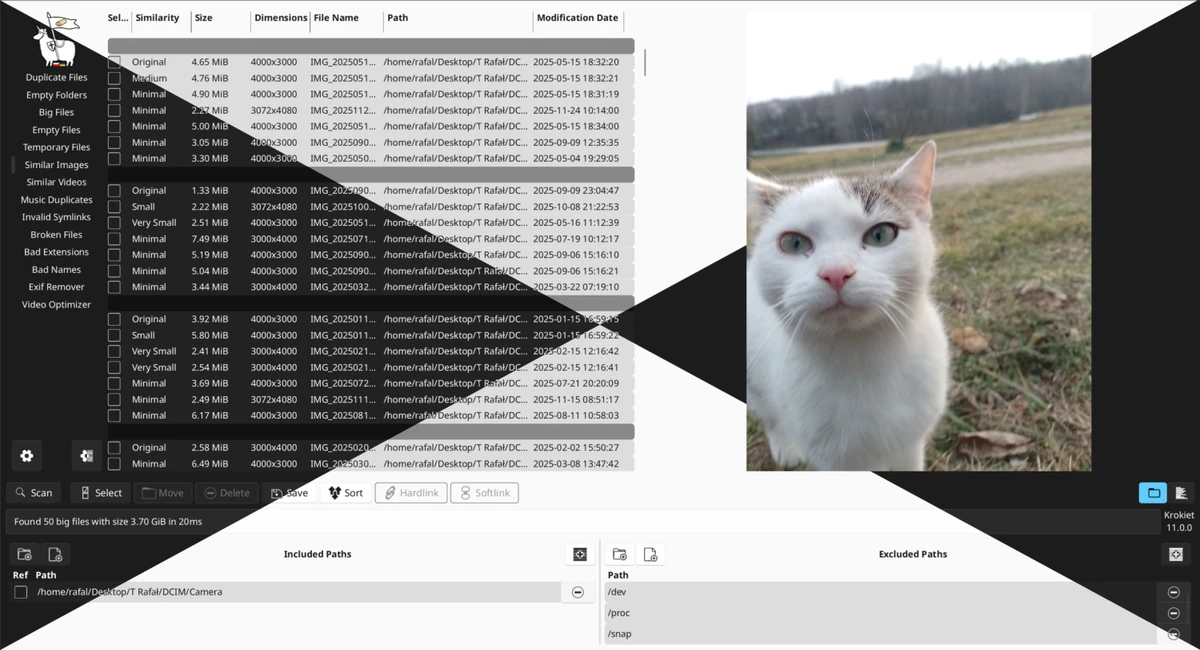

Czkawka is a free and open-source file management and system cleanup tool designed to help users quickly identify and remove unnecessary files from their storage. Written in Rust, it focuses on performance, safety, and efficiency, leveraging multithreading and optimized algorithms to deliver extremely fast scan results. Unlike many similar utilities, Czkawka operates completely offline, ensuring user privacy by not collecting data or requiring internet access. It provides both a graphical interface and a command-line version, making it suitable for both casual users and advanced automation workflows.
Features of Czkawka
- Free and open-source with no ads
- Fully offline operation (no internet access required)
- Privacy-focused (no telemetry or user tracking)
- Extremely fast scanning using Rust and multithreading
- Cache support for faster repeat scans
- Cross-platform support (Windows, Linux, macOS, FreeBSD, ARM, RISC-V, Android)
File Cleanup & Analysis Tools
- Find duplicate files (by name, size, or hash)
- Detect empty folders
- Identify large files in a selected location
- Find empty files across drives
- Locate temporary files
- Detect similar images (different resolutions or edits)
- Identify similar videos
- Find duplicate or similar music files (based on tags or content)
- Detect invalid symbolic links
- Identify broken or corrupted files
- Detect mismatched file extensions (bad extensions)
- List files with potentially unsafe or unusual names
- Remove EXIF metadata from images and files
- Optimize and compress videos
- Detect and clean unnecessary or malformed file names
Advanced Features
- CLI version for automation and scripting
- GUI version using GTK 4 or Slint frameworks
- Core library for integration into other applications
- Lightweight Android version available
- Multilingual support
User Experience
Czkawka provides a highly efficient and straightforward experience focused on file cleanup and system optimization. Upon launching the application, users can select specific scan types such as duplicates, large files, or empty folders, making it easy to target storage issues without unnecessary complexity. One of its standout qualities is speed. Thanks to its Rust-based architecture and multithreaded processing, scans complete quickly even on large drives. The caching system further improves performance by accelerating repeated scans, which is especially useful for users who regularly maintain large file collections.
The interface is functional rather than decorative, prioritizing clarity and performance over visual design. Users can switch between a GUI for simplicity or a CLI for automation, making the tool flexible for different skill levels. Privacy is another major strength. Czkawka runs entirely offline and does not collect any user data, making it a trustworthy option for users concerned about telemetry or cloud-based scanning tools.
Overall, it is particularly effective for users who need a powerful cleanup utility that can quickly identify redundant or unnecessary files without compromising privacy.
Who Should Use Czkawka?
- Users with large file collections or full drives
- People looking to remove duplicate files safely
- Photographers and media collectors managing large libraries
- Privacy-conscious users who want offline tools
- Advanced users who prefer CLI automation
- Anyone needing a fast disk cleanup utility
Conclusion
Czkawka stands out as a powerful, privacy-focused file cleanup solution that goes far beyond simple duplicate detection. With support for identifying similar images, large files, broken links, and more, it offers a comprehensive toolkit for maintaining clean and efficient storage.


