


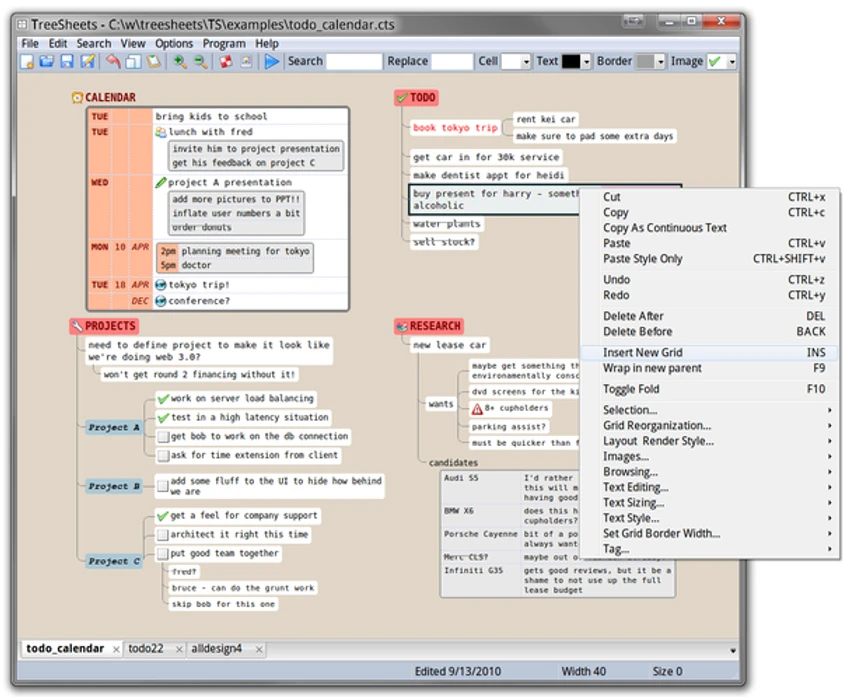

TreeSheets is a unique open-source productivity tool that blends the functionality of a spreadsheet, outliner, note-taking application, mind-mapping tool, and lightweight database into a single interface. Rather than forcing users into a traditional row-and-column spreadsheet or a linear outline structure, TreeSheets organizes information using a hierarchical grid system that allows data to be nested, grouped, and explored in multiple dimensions. Designed for users who work with complex information, project plans, research notes, to-do lists, and personal data collections, TreeSheets aims to reduce the need for multiple specialized applications while maintaining a remarkably small system footprint.
Features of TreeSheets
- Hierarchical spreadsheet structure
- Nested data organization
- Spreadsheet-like grid interface
- Outlining capabilities
- Mind-mapping style information organization
- Personal Information Manager (PIM) functionality
- Project planning tools
- To-do list management
- Brainstorming and idea organization
- Contact management capabilities
- Simple inventory tracking
- Presentation planning support
- Integrated text editing
- Cross-referenced information structures
- Compact data visualization
- Export to XML format
- Export to CSV format
- Export to HTML format
- Export to plain text
- Export to image formats
- Import existing project data
- Lightweight resource usage
- Multiple document support
User Experience
TreeSheets offers a very different experience compared to traditional productivity software. At first glance, the interface may resemble a spreadsheet, but it quickly becomes apparent that the software is designed around hierarchy rather than flat rows and columns. When organizing projects, ideas, or research, the ability to nest information within cells creates a natural structure that feels more flexible than a conventional spreadsheet and more organized than many mind-mapping applications. Users can progressively break down tasks, notes, and concepts into smaller sections without losing context.
For project planning and task management, TreeSheets excels at keeping related information together in a compact format. Large amounts of data can be stored within a single document while remaining easy to navigate thanks to the expandable hierarchical layout. Brainstorming sessions also benefit from the software's structure. Ideas can be organized organically without the visual clutter that often accompanies large mind maps. At the same time, the grid-based presentation maintains a level of order that traditional note-taking tools may lack.
One of the most impressive aspects of TreeSheets is its efficiency. Even with multiple documents open, the software remains lightweight and responsive, making it suitable for older hardware as well as modern systems. While the interface may require some adjustment for users accustomed to traditional spreadsheets or note-taking applications, the learning curve is rewarded with a highly flexible organizational system.
Conclusion
TreeSheets stands out as one of the most versatile information organization tools available. By blending spreadsheet functionality, outlining, note-taking, and hierarchical planning into a single lightweight package, it offers a refreshing alternative to traditional productivity software.


