FileLegit Windows Utilities System Tools MiTeC Certificate Information
MiTeC Certificate Information logo

MiTeC Certificate Information 1.5.0

  • User Rating:
    ★★★★★
    ★★★★★
    0.0 ★ 0Votes
  • Requirements:
    Windows
  • Version: 1.5.0
  • Latest updated: 1 week ago
  • License: Freeware  
  • Publisher: MiTeC
  • Size: 1 MB
× app stores

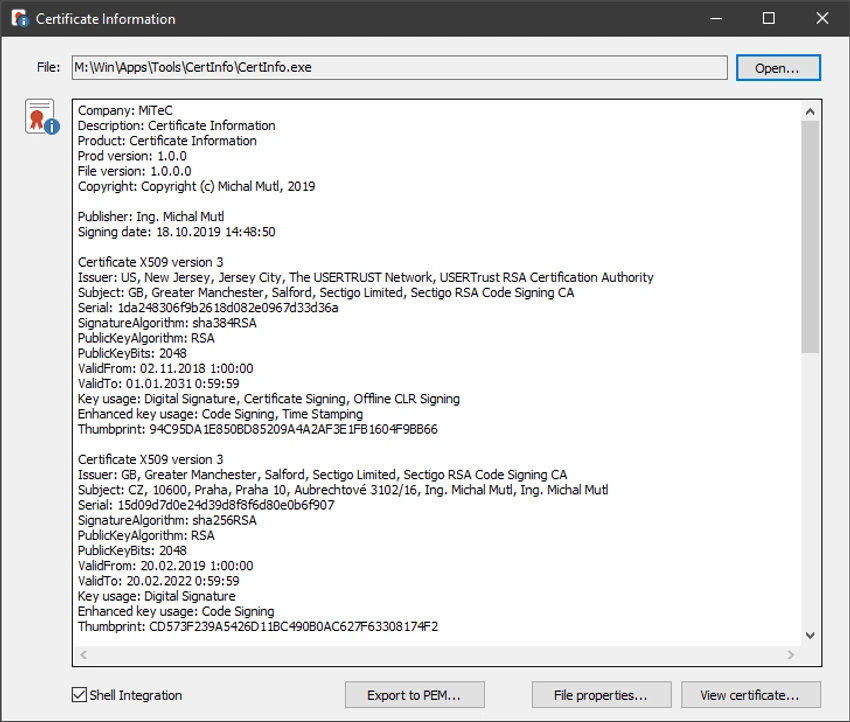
MiTeC Certificate Information is a free Windows utility that allows users to inspect digital certificates and view certificate-related properties from supported files. Designed as a lightweight system tool, it helps users examine certificate information associated with executable files, installers, and standalone certificate files, making it easier to verify file authenticity and review certificate details.

The application supports a wide variety of file types, including Portable Executable (PE) files such as EXE, DLL, SYS, OCX, CPL, SCR, and DRV files, as well as Microsoft Installer (MSI) packages and common certificate formats including PEM, CRT, CER, DER, P7B, P7C, PFX, and P12. This broad compatibility makes it useful for developers, IT professionals, and users who need to inspect digital signatures or certificate properties across different file types.

In addition to displaying certificate information, MiTeC Certificate Information can export the selected certificate to the PEM format, providing a convenient way to reuse or analyze certificate data with other tools. Its straightforward interface focuses on presenting essential information clearly without unnecessary complexity, making certificate inspection both quick and accessible.

Features of MiTeC Certificate Information

  • View digital certificate properties
  • Inspect certificate information from supported files
  • Export displayed certificates to PEM format
  • Support for Portable Executable (PE) files
  • Compatible with Microsoft Installer (MSI) files
  • Open common certificate formats including PEM, CRT, CER, DER, P7B, P7C, PFX, and P12
  • Lightweight and free to use
  • Simple interface focused on certificate inspection

Interface and Usability

MiTeC Certificate Information features a clean and uncomplicated interface designed around a single purpose: viewing certificate information. Users simply open a supported file, and the application displays the available certificate details in an organized layout. The straightforward design allows users to access certificate properties without navigating through complex menus or configuration options.

The export function is equally simple, allowing the displayed certificate to be saved in PEM format when needed. Because the software focuses solely on certificate inspection, the workflow remains fast and efficient, making it suitable for occasional users as well as IT professionals who frequently examine digital signatures.

Who Should Use MiTeC Certificate Information?

  • IT administrators inspecting digital certificates
  • Software developers verifying signed files
  • Security professionals reviewing certificate information
  • Users who want to examine executable or installer certificates
  • Anyone who needs to export certificates in PEM format
  • Windows users looking for a lightweight certificate viewer

Conclusion

MiTeC Certificate Information is a focused utility for viewing digital certificate details and inspecting supported files on Windows. Its wide file format compatibility, lightweight design, and ability to export certificates in PEM format make it a practical choice for users who need a simple certificate inspection tool without unnecessary features.

Pros & Cons

✓

Pros

  • Completely free to use
  • Supports numerous executable and certificate file formats
  • Displays certificate properties clearly
  • Exports certificates to PEM format
  • Lightweight and easy to use
  • No complicated setup required
✕

Cons

  • Limited to certificate inspection and export
  • Does not provide certificate management or editing features

Frequently Asked Questions

What is MiTeC Certificate Information used for?

MiTeC Certificate Information is used to view digital certificate properties and inspect certificate information stored in supported executable, installer, and certificate files.

Which file types are supported?

The software supports Portable Executable files such as EXE, DLL, SYS, OCX, CPL, SCR, and DRV, Microsoft Installer (MSI) files, and certificate formats including PEM, CRT, CER, DER, P7B, P7C, PFX, and P12.

Can MiTeC Certificate Information export certificates?

Yes. The application allows users to export the displayed certificate in PEM format for use with other software or certificate-related tasks.

Is MiTeC Certificate Information free?

Yes. The software is available as a free utility for viewing certificate information.

Does MiTeC Certificate Information modify files?

Based on the available information, the software is designed to inspect and display certificate properties and export certificates to PEM format. It is not described as a tool for modifying or editing files.

Who can benefit from using MiTeC Certificate Information?

The software is useful for IT administrators, developers, security professionals, and Windows users who need to inspect digital certificates or verify certificate information contained in supported file types.

Recommended apps [Freeware]:
  • GOM Player 2.3.120 Build 5390 GOM Player logo a free Windows media player supporting many formats, subtitles, VR videos, and damaged file playback
  • VSDC Free Video Editor 11.2.3.729 VSDC Free Video Editor logo a non-linear video editing tool for creating videos with effects, transitions, and multi-format support on Windows
  • TinyWall 3.5.1 TinyWall logo a lightweight Windows firewall manager offering simple controls, blocking rules, and zero ads
  • Xreveal 2.9.6 Xreveal logo a lightweight disc decryption tool that removes supported Blu-ray, UHD, DVD, and CD protections for compatible media
  • SciTE (SCIntilla) 5.6.4 SciTE (SCIntilla) logo A lightweight text editor with syntax highlighting, search tools, and programming support for developers working with multiple languages.
  • Comet Browser 2026 Comet Browser logo Browse faster with an AI-powered browser that automates tasks, summarizes content, and provides intelligent online assistance.
Recommended apps [Shareware]:
  • SkyDemon 4.3.1 SkyDemon logo Plan flights with real-time aeronautical data, dynamic charts, NOTAMs, METAR, TAF, and intelligent route planning using SkyDemon
  • VX Search 18.2.34 VX Search logo a powerful rule-based file search tool with advanced filtering, reporting, and network search capabilities.
  • EaseUS Data Recovery Wizard 20.5.0 EaseUS Data Recovery Wizard logo Recover deleted or lost files with EaseUS Data Recovery Wizard using quick and deep scans for hard drives
  • Artweaver Plus 8.1.6.4131 Artweaver Plus logo a digital painting tool with realistic brushes, layers, and teamwork features for artists
  • Adobe Animate 2024 Adobe Animate logo Create interactive animations, characters, web content, games, and multimedia projects with professional drawing and publishing tools.
  • Actual Installer 10.8 Actual Installer logo Create reliable Windows installers quickly with a form-based setup tool supporting shortcuts, registry edits, prerequisites, and uninstall options.