PTE AV Studio logo

PTE AV Studio 12.0 Build 2

  • User Rating:
    ★★★★★
    ★★★★★
    0.0 ★ 0Votes
  • Requirements:
    Windows
  • Version: 12.0 Build 2
  • Latest updated: 3 weeks ago
  • License: Free Trial  
  • Publisher: WN Soft
  • Size: 73 MB
× app stores

PTE AV Studio is a professional slideshow creation tool designed for photographers, enthusiasts, and creative users who want to turn photos, videos, and music into polished presentations. The software provides advanced editing capabilities, including keyframe animations, timeline-based audio editing, slide styles, transitions, and visual effects. Users can combine images and video clips, apply pan, zoom, rotate, and 3D transformations, and synchronize slides with multiple audio tracks. PTE AV Studio also supports creating executable slideshow files for PC and Mac, as well as exporting projects for HD, 4K video, and mobile devices. With tools for image adjustments, color management, text captions, and customizable animation templates, the software offers detailed control over slideshow production.

Features of PTE AV Studio

  • Professional slideshow creation: Create photo slideshows using images, video clips, music, animations, and transitions.
  • Keyframe animations: Animate objects with control over movement, size, position, and visual effects.
  • Pan, zoom, rotate, and 3D effects: Apply advanced transformations to images and videos.
  • Timeline editing: Synchronize slides with multiple audio tracks using timeline-based editing.
  • Audio editor: Adjust audio clips with fade effects, duration controls, start points, and cross-fading.
  • Slide styles and transitions: Use more than 125 customizable animation templates, themes, and transition effects.
  • Image and video editing: Crop media, apply blur effects, masking, frames, shadows, and color adjustments.
  • Color management: Support color profiles and Adobe RGB monitors for accurate previews.
  • Text captions: Add animated text captions and create text macros using EXIF metadata.
  • Executable slideshow output: Create standalone slideshow files for PC and Mac.
  • High-quality video output: Export projects for HD, 4K video, and mobile devices.

Interface and Usability

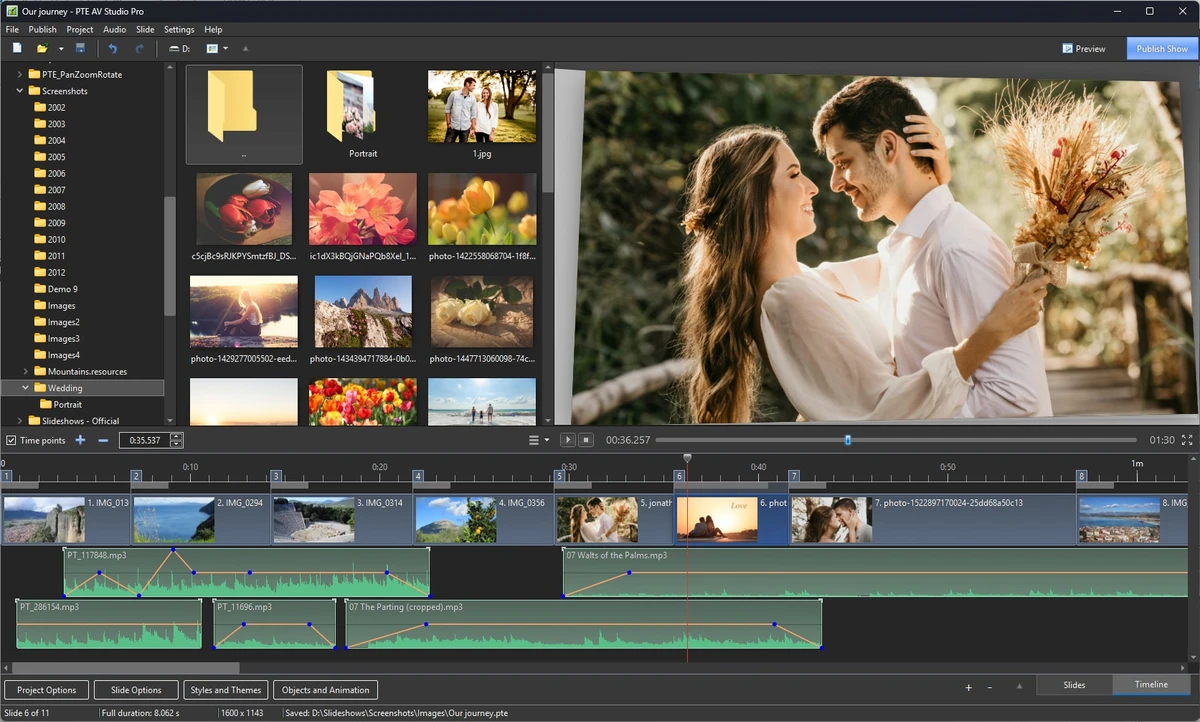
PTE AV Studio provides a timeline-based workflow that gives users detailed control over slideshow creation. The interface is built around managing visual elements, audio tracks, animations, and transitions in a structured way.

The timeline view makes it easier to synchronize images with music, while keyframe controls allow users to create custom movements and effects. The large collection of slide styles and templates can help speed up the creation process, while advanced users can fine-tune individual objects, colors, and animations. The software is designed for users who want more creative control than a basic slideshow maker provides, offering tools suitable for detailed photo and video presentations.

Who Should Use PTE AV Studio?

PTE AV Studio is suitable for photographers, slideshow creators, content producers, and users who want to create professional-looking visual presentations. It can be useful for creating photo stories, event presentations, animated portfolios, and multimedia projects.

Users who need advanced control over animation timing, audio synchronization, and visual effects may find PTE AV Studio a suitable choice compared with simpler slideshow tools.

Conclusion

PTE AV Studio is a feature-rich slideshow creation application that gives photographers and creative users extensive control over animations, audio synchronization, and visual presentation. With professional tools such as keyframes, timeline editing, customizable slide styles, and high-quality output options, it provides everything needed to create engaging photo and video presentations.

Pros & Cons

✓

Pros

  • Powerful slideshow creation features
  • Supports images, videos, and multiple audio tracks
  • Includes advanced keyframe animation tools
  • Offers more than 125 slide styles and transitions
  • Supports HD and 4K video output
  • Provides detailed image, color, and audio editing controls
✕

Cons

  • Designed mainly for slideshow production rather than general video editing
  • May require time to learn advanced animation features
  • Supports only 64-bit Windows systems

Frequently Asked Questions

What is PTE AV Studio?

PTE AV Studio is a professional slideshow creation software that allows users to combine photos, videos, music, animations, and transitions into multimedia presentations.

Can PTE AV Studio create 4K videos?

Yes. PTE AV Studio supports output for HD and 4K video, as well as formats suitable for mobile devices.

Does PTE AV Studio support video clips?

Yes. Users can combine images and video clips together within the same slideshow project.

What are keyframe animations in PTE AV Studio?

Keyframe animations allow users to define starting and ending positions, sizes, and other parameters for objects. The software then creates movement between those points using effects such as pan, zoom, and rotation.

Can PTE AV Studio edit audio files?

Yes. The software includes audio editing features that allow users to adjust volume, fade effects, start times, duration, and cross-fading.

Which operating systems does PTE AV Studio support?

According to the available system requirements, PTE AV Studio supports Windows 11, Windows 10, Windows 8, and Windows 7. It requires a 64-bit system.

Recommended apps [Freeware]:
  • Automatic Email Processor 4.2.0 Automatic Email Processor logo Automatically save, archive, print, and process Outlook emails and attachments with customizable rules.
  • LAV Filters 0.82 LAV Filters logo a free DirectShow codec package that enables broad audio and video format support on Windows
  • Viber for Windows 28.3.1 Viber for Windows logo make free calls, send messages, and sync chats across devices via WiFi or 3G
  • PDF Shaper 15.6 PDF Shaper logo Windows PDF utility for splitting, merging, converting, encrypting, and editing PDF documents with powerful tools
  • Bitvise 9.65 Bitvise logo Secure SSH client for Windows with SFTP, terminal emulation, port forwarding, and advanced remote administration features.
  • Qalculate! 5.12.0 Qalculate! logo Advanced calculator with symbolic math, unit conversion, currency tools, plotting, and natural expression input for everyday and scientific use.
Recommended apps [Shareware]:
  • Audio Transcoder 2.12.24 Audio Transcoder logo all-in-one audio converter and CD ripper supporting MP3, FLAC, AAC, WMA, and more
  • My Music Collection 3.4.16.178 My Music Collection logo organize CDs, vinyl, and MP3s with cataloging, tracking, and export features on Windows
  • LumaBooth 8.2.1.0 LumaBooth logo professional photo booth software for photos, GIFs, videos, 360 booths, and event customization
  • JP Software TCC 36.50.70 JP Software TCC logo advanced Windows CMD replacement shell with scripting, debugging, and enhanced command-line features
  • CyberLink PhotoDirector 2026 v17.6.1826.0 CyberLink PhotoDirector logo Edit, retouch, and enhance photos with CyberLink PhotoDirector, featuring AI tools, layer editing, and professional effects
  • PRTG - Free Network Monitor 26.2.120.1477 PRTG - Free Network Monitor logo Monitor network performance, track traffic usage, and detect system issues with a free network monitoring solution for businesses.