PopChar logo

PopChar 10.1 Build 3360

  • User Rating:
    ★★★★★
    ★★★★★
    0.0 ★ 0Votes
  • Requirements:
    Windows
  • Version: 10.1 Build 3360
  • Latest updated: 3 weeks ago
  • License: Free Trial  
  • Publisher: Ergonis Software
  • Size: 7 MB
× app stores

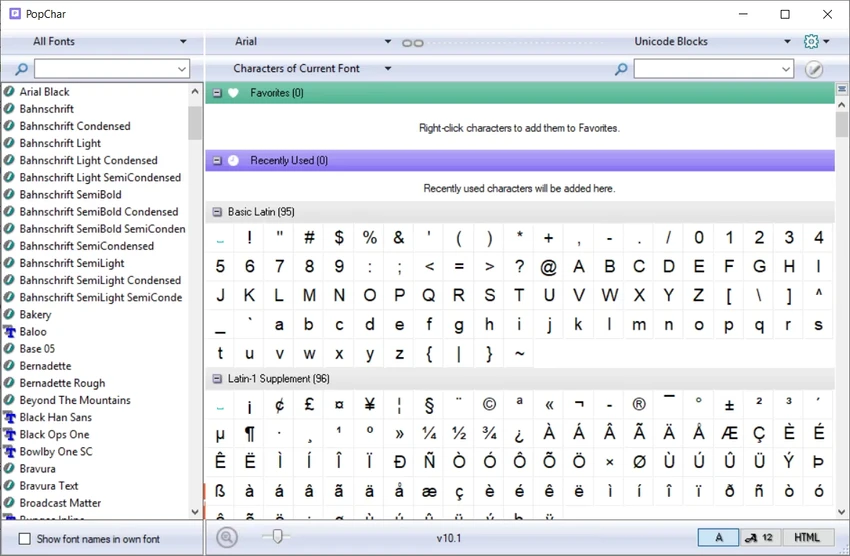
PopChar is a Windows utility designed to simplify the insertion of special characters, symbols, and Unicode glyphs into documents. Instead of memorizing complex keyboard shortcuts or searching through character maps, users can access a visual interface that displays all characters available in installed fonts. PopChar integrates directly into the workflow of supported applications, allowing characters to be inserted instantly into documents, text editors, or design tools. This makes it particularly useful for writers, designers, developers, and anyone who frequently works with typography or symbols beyond the standard keyboard layout.

The tool supports both modern Unicode-based applications and older software that relies on limited ASCII character sets, ensuring broad compatibility across different environments.

Features of PopChar

  • Inserts special characters directly into documents with a single click.
  • Visual character table for easy browsing and selection.
  • Full Unicode support for modern fonts.
  • Search characters by name or Unicode number.
  • Works across different fonts and character sets.
  • Displays recently used characters for quick access.
  • Shows keyboard shortcuts for selected characters.
  • Automatically detects active font in supported applications.
  • Optimized font menu showing recently used fonts.
  • Supports insertion of HTML symbols.
  • Hotkey activation for quick access.
  • Can start automatically with Windows login.

Interface and Usability

PopChar provides a simple and intuitive interface centered around quick character selection. From my perspective, the workflow is designed to minimize interruption—users can open the character panel, select a symbol, and insert it directly into their document without switching context.

The search functionality is especially useful when working with large Unicode fonts that contain thousands of symbols. Instead of scrolling through long lists, users can quickly locate characters by name or code. The recent characters panel also improves efficiency by allowing frequent symbols to be reused instantly.

Who Should Use PopChar?

  • Writers and editors using special typography symbols.
  • Graphic and web designers.
  • Developers working with HTML or Unicode characters.
  • Translators and multilingual content creators.
  • Students and researchers using mathematical or linguistic symbols.
  • Anyone frequently needing characters not available on the keyboard.

System Requirements

  • Windows 8 / 8.1
  • Windows 10
  • Windows 11

Conclusion

PopChar is a practical and time-saving utility for anyone who frequently works with special characters or Unicode symbols. By replacing complex keyboard shortcuts with a visual selection tool, it streamlines text input and improves productivity across writing, design, and development workflows.

Pros & Cons

✓

Pros

  • Fast and easy insertion of special characters
  • Full Unicode support
  • Works across many applications
  • Powerful search by name or code
  • Recent characters for quick reuse
  • Hotkey support for faster workflow
  • Lightweight and unobtrusive
✕

Cons

  • Primarily focused on text and typography tasks
  • Advanced features may be unnecessary for casual users

Frequently Asked Questions

What is PopChar used for?

PopChar is used to insert special characters, symbols, and Unicode glyphs into documents quickly and easily.

Does PopChar support Unicode?

Yes. PopChar fully supports Unicode and allows users to browse and search large character sets in modern fonts.

Can PopChar be used in any application?

It works with most applications that support text input, including modern Unicode-based programs and older ASCII-based software.

Does PopChar help find characters by name?

Yes. Users can search for characters by name or Unicode number to quickly locate symbols.

Can I use PopChar for HTML symbols?

Yes. PopChar supports insertion of HTML symbols, making it useful for web development tasks.

Does PopChar remember frequently used characters?

Yes. It includes a recent characters feature that provides quick access to commonly used symbols.

Recommended apps [Freeware]:
  • Digital Clock 5.2.2 Digital Clock logo customizable desktop clock app with skins, alarms, opacity control, and system tray support
  • Ventoy 1.1.16 + LiveCD Ventoy logo create bootable USB drives and boot directly from ISO files without extraction or reformatting
  • Quick Clipboard Editor 3.4.1.0 Quick Clipboard Editor logo edit, format, and manage clipboard text with powerful tools for productivity and automation
  • NETworkManager 2026.7.7.0 NETworkManager logo Manage network connections, diagnose issues, scan devices, and access essential troubleshooting tools with this open-source utility.
  • Display Hot Keys 3.0.0 Display Hot Keys logo Switch monitor settings instantly with customizable hotkeys for resolution, refresh rate, scaling, DPI, and multi-display configurations.
  • DXVA Checker 4.8.0 DXVA Checker logo Check DXVA support, decoder compatibility, GPU usage, and hardware video acceleration capabilities for Windows media playback.
Recommended apps [Shareware]:
  • VovSoft AI Requester 5.2 VovSoft AI Requester logo a program that can connect to OpenAI API and OpenAI-compatible APIs with ease
  • Malwarebytes 5.24.0.4031 Malwarebytes logo cybersecurity tool that detects and removes malware, ransomware, spyware, and phishing threats with real-time protection on Windows
  • iNMR 7.1.9 iNMR logo Analyze and process NMR spectroscopy data with iNMR, featuring 1D–3D processing, scripting, simulations, and broad format support
  • GiliSoft AI Toolkit 10.9 GiliSoft AI Toolkit logo combines chatbot, OCR, TTS, ASR, and image tools to streamline AI-powered workflow automation.
  • WinCam 4.0 WinCam logo Record screens, applications, audio, and tutorials with a lightweight Windows recorder featuring real-time capture and editing tools.
  • Gammadyne Mailer 74.0 Gammadyne Mailer logo Automate email campaigns, manage mailing lists, track engagement, and process messages with advanced marketing tools.