Cutting Optimization Pro logo

Cutting Optimization Pro 5.18.27.3

  • User Rating:
    ★★★★★
    ★★★★★
    0.0 ★ 0Votes
  • Requirements:
    Windows
  • Version: 5.18.27.3
  • Latest updated: 3 weeks ago
  • License: Free Trial  
  • Publisher: Optimal Programs SRL
  • Size: 2 MB
× app stores

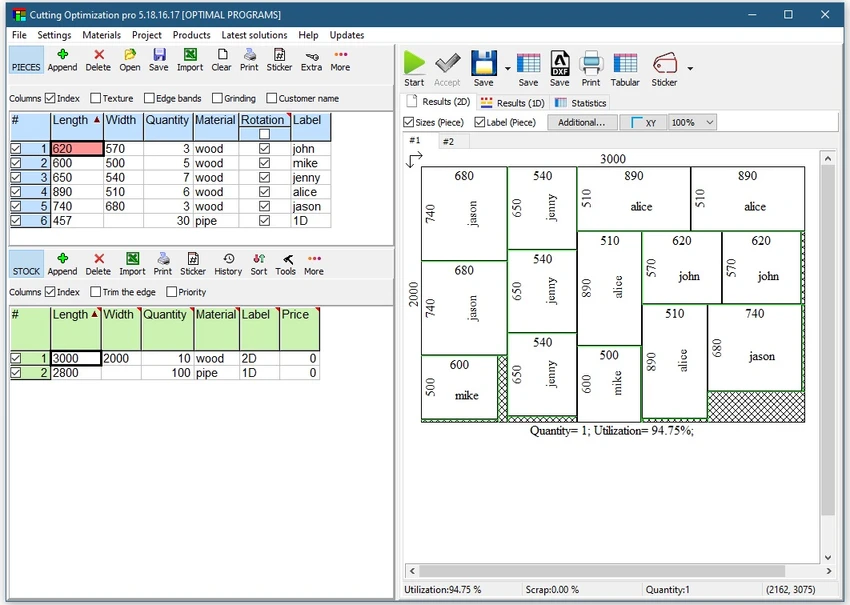
Cutting Optimization Pro is a specialized software tool designed to generate optimal cutting layouts for both 1D and 2D materials. It is widely used in manufacturing, woodworking, metal fabrication, and other industrial fields where material efficiency and waste reduction are important. The software supports a variety of materials including wood, glass, plastic, metal sheets, pipes, and structural profiles. It is particularly useful for designing cutting plans for furniture components such as tables, desks, cupboards, lockers, and shelves.

Features of Cutting Optimization Pro

  • Optimizes cutting layouts for 1D and 2D materials.
  • Supports rectangular sheets such as wood, glass, metal, and plastic.
  • Handles linear materials like pipes, tubes, bars, and profiles.
  • Reduces material waste through efficient layout calculation.
  • Suitable for industrial and manufacturing applications.
  • Supports complex product definitions (furniture and structures).
  • Simple interface for defining cutting parameters.
  • Lightweight software with minimal system requirements.
  • Fast optimization for small and medium projects.
  • Compatible with Windows 7, 8, 10, and 11 (64-bit recommended).

User Experience

Cutting Optimization Pro focuses on functionality rather than visual design. The interface is straightforward and centered around defining material dimensions, quantities, and cutting constraints. Users input their required parts, and the software generates optimized cutting plans to minimize waste. For industrial users, this tool provides practical value by helping reduce material costs and improve production efficiency. The ability to handle both sheet materials and linear materials makes it versatile for different types of manufacturing workflows.

While it does not include modern UI enhancements or advanced visualization features, it performs its core task efficiently. The results are presented in a structured format that is easy to interpret and apply in real-world cutting processes. Because of its technical nature, it is more suitable for engineers, workshop operators, and production planners rather than casual users.

Who Should Use Cutting Optimization Pro?

  • Woodworking and furniture manufacturers.
  • Metal fabrication workshops.
  • Industrial production planners.
  • Engineers and technical designers.
  • Anyone needing material optimization for cutting tasks.

Conclusion

Cutting Optimization Pro is a focused and reliable solution for optimizing cutting layouts in industrial environments. It helps reduce material waste and improve efficiency when working with sheets, bars, pipes, and other raw materials.

Pros & Cons

✓

Pros

  • Effective optimization of material usage.
  • Supports both 1D and 2D cutting scenarios.
  • Works with a wide range of industrial materials.
  • Lightweight and fast performance.
  • Useful for manufacturing and workshop planning.
  • Helps reduce material waste and costs.
✕

Cons

  • Outdated and basic user interface.
  • Limited modern features or integrations.
  • Not suitable for casual or non-technical users.
  • No clear update changelog provided.

Frequently Asked Questions

What is Cutting Optimization Pro used for?

It is used to calculate optimal cutting layouts for materials like wood, metal, glass, plastic, and pipes to reduce waste.

Does it support 1D and 2D cutting?

Yes. It supports both linear (1D) and sheet-based (2D) cutting optimization.

Who should use this software?

It is designed for manufacturers, workshops, engineers, and production planners.

Is Cutting Optimization Pro easy to use?

It has a simple interface but is more suited for technical and industrial users.

What materials does it support?

It supports wood, metal, glass, plastic sheets, pipes, tubes, and similar industrial materials.

Recommended apps [Freeware]:
  • Tor Browser 15.0.18 Tor Browser logo anonymous web browsing with privacy protection, IP masking, and access to the Tor network
  • Revo Registry Cleaner 2.2.1 Revo Registry Cleaner logo Clean, monitor, tune, and back up the Windows Registry with Revo Registry Cleaner for improved system maintenance
  • VovSoft VCF Editor 2.6 VovSoft VCF Editor logo offline vCard editor for managing, editing, and exporting contact information securely
  • Fastfetch 2.66.0 Fastfetch logo open-source system information tool that displays hardware and OS details with customizable output
  • Minimal Firewall 2.8.5 Minimal Firewall logo enhances Windows Firewall by blocking unknown connections and giving you full control over app network access
  • Beeper 4.2.972 Beeper logo Bring multiple messaging services together in one app with unified chats, cross-platform support, searchable conversations, and synced notifications.
Recommended apps [Shareware]:
  • Audio Transcoder 2.12.24 Audio Transcoder logo all-in-one audio converter and CD ripper supporting MP3, FLAC, AAC, WMA, and more
  • DBF Converter 7.87 DBF Converter logo convert DBF files to CSV, Excel, SQL and text with fast batch processing and filtering
  • ThunderSoft Watermark Remover 6.3.0 ThunderSoft Watermark Remover logo removes watermarks, logos, and unwanted objects with easy selection and photo editing tools
  • NovaBench 6.1.2 NovaBench logo Benchmark your CPU, GPU, RAM, and storage with NovaBench to measure PC performance and compare results online
  • Adlice Protect 16.7.0.0 Adlice Protect logo Detect and remove stubborn malware with Adlice Protect, an advanced anti-malware tool using signature and heuristic analysis
  • NoteCase Pro 4.9.0 NoteCase Pro logo organize notes, tasks, attachments, and audio across multiple platforms with powerful import and export support