


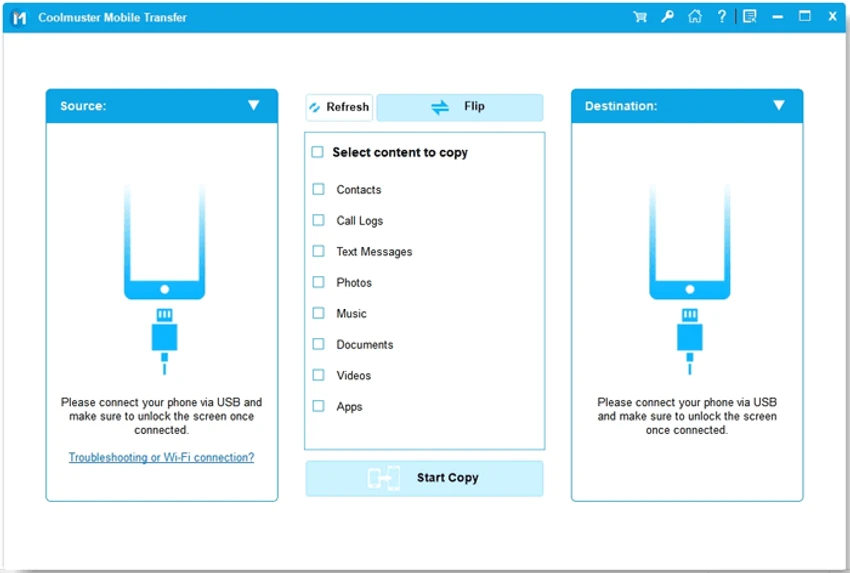

Coolmuster Mobile Transfer is a phone migration tool that helps users move data between Android and iOS devices quickly and safely. Whether you're upgrading to a new smartphone or switching between mobile platforms, the software is designed to simplify the transfer process with a straightforward, three-step workflow.
The application supports a broad range of mobile devices and carriers, allowing users to transfer contacts, messages, photos, videos, documents, and other supported data types. It also includes backup and restore functionality, although these features are described as "Coming Soon" in the provided information. With a read-only transfer process that does not modify your source data without permission, Coolmuster Mobile Transfer aims to provide a secure way to migrate important mobile content.
Features of Coolmuster Mobile Transfer
- Transfer data directly between Android and iOS devices.
- Supports phone-to-phone migration across different manufacturers.
- Compatible with Android phones and tablets.
- Compatible with iPhone, iPad, and iPod.
- Supports major mobile brands, including:
- Samsung
- HTC
- LG
- Sony
- Motorola
- Apple devices
- Supports major mobile carriers such as AT&T, Verizon, Sprint, and T-Mobile.
- Transfer supported data types, including:
- Contacts
- Text messages
- Call logs
- Calendars
- Safari bookmarks
- Photos
- Music
- Videos
- Documents
- Apps
- eBooks
- Three-step transfer process.
- Read-only operation designed to avoid altering source data without permission.
- Backup phone data to a computer (listed as Coming Soon).
- Restore data from backups (listed as Coming Soon).
Interface and Usability
Coolmuster Mobile Transfer is designed around a simple workflow that guides users through connecting both devices, selecting the content to transfer, and starting the migration process. The interface is uncluttered, making it easy to identify the source and destination devices before beginning a transfer. The software emphasizes ease of use by reducing the process to only a few steps. This makes it approachable for users who may be switching phones for the first time. As with most mobile transfer utilities, successful operation depends on proper device detection and USB connectivity.
Who Should Use Coolmuster Mobile Transfer?
- Users upgrading to a new Android or iPhone.
- People switching between Android and iOS platforms.
- Users transferring contacts, messages, photos, and media.
- Families managing data across multiple mobile devices.
- Anyone looking for a simple phone migration tool.
- Users who prefer transferring data through a computer instead of cloud services.
Conclusion
Coolmuster Mobile Transfer offers a convenient way to move data between Android and iOS devices without requiring complicated setup. Its straightforward workflow and support for multiple file types make it a practical choice for users upgrading to a new phone or changing mobile platforms.


