RJ TextEd logo

RJ TextEd 16.65

  • User Rating:
    ★★★★★
    ★★★★★
    0.0 ★ 0Votes
  • Requirements:
    Windows
  • Version: 16.65
  • Latest updated: 2 weeks ago
  • License: Freeware  
  • Publisher: RJ TextEd
  • Size: 38 MB
× app stores

RJ TextEd is a full-featured text and source code editor designed for developers, web designers, and users who need more advanced editing capabilities than a standard text editor. The software provides Unicode support, syntax highlighting, code folding, and a wide range of tools for working with programming languages, HTML, CSS, and general text files.

The application combines code editing features with additional utilities for web development and file management. It includes a CSS editor, a dual-pane file commander, and an integrated FTP client that allows users to manage and upload website files. These features make RJ TextEd suitable for users who need a single workspace for editing code and managing related files.

RJ TextEd supports multiple file formats, including ASCII files, binary files, and plain text documents. It provides tools such as auto-completion, HTML validation, code templates, macro commands, and customizable syntax highlighting to improve the coding workflow. The editor can also handle different text formats used by Windows, Unix/Linux, and Macintosh systems, making it useful for working across different environments.

For web developers, RJ TextEd includes HTML and XHTML editing features with integrated preview options, HTML tag wizards, and validation tools. The software also includes several smaller utilities, such as a color picker, unit converter, character map, and other productivity tools.

A portable version of RJ TextEd is available for users who want to run the application from a USB drive. However, the installed version may be more convenient for users who regularly update the software or maintain custom settings.

Features of RJ TextEd

  • Full-featured text and source code editing environment
  • Unicode support for handling different text formats
  • Syntax highlighting and customizable syntax colors
  • Auto-completion for tags and classes
  • Code folding for easier navigation through large files
  • Column editing mode for advanced text manipulation
  • Support for ASCII, binary, and plain text files
  • Built-in CSS editor
  • FTP client for managing and synchronizing website files
  • Dual-pane file management interface
  • HTML and XHTML editing with validation tools
  • HTML tag wizards for creating web elements
  • Code templates and macro support
  • Conversion between code pages, Unicode, and text formats

Interface and Usability

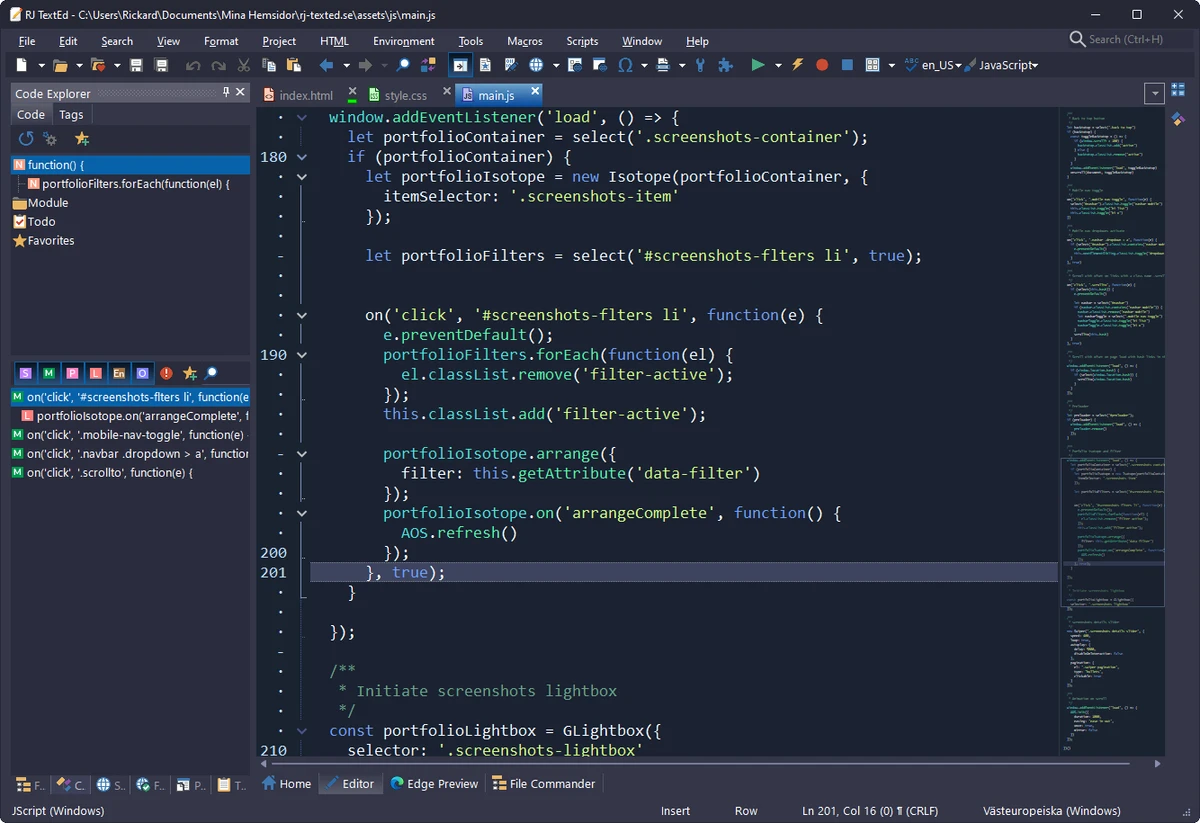
RJ TextEd provides a comprehensive interface designed around productivity and development workflows. The layout combines the main editing area with additional tools such as file explorers, project management options, and text clip management through the sidebar.

The editor includes many features that help speed up coding tasks. Auto-completion assists with tags and classes, while code folding makes it easier to manage larger files by collapsing sections of code. The column editing mode is also useful for users who need more control over text formatting and editing.

The integrated FTP client and file management features provide a convenient way to work with website files without switching between multiple applications. However, because RJ TextEd includes many advanced tools, new users may need some time to explore and understand all available functions.

Who Should Use RJ TextEd?

  • Web developers working with HTML, CSS, and source code
  • Programmers who need syntax highlighting and code assistance
  • Users managing website files through FTP
  • Developers working with different text encoding formats
  • Anyone looking for a feature-rich alternative to basic text editors

Conclusion

RJ TextEd is a versatile code editor that combines advanced text editing features with useful web development tools. With support for Unicode, syntax highlighting, auto-completion, HTML validation, CSS editing, and FTP management, it provides a complete environment for developers and website creators.

Pros & Cons

✓

Pros

  • Supports many programming and text editing features
  • Includes Unicode and multiple text format support
  • Provides built-in CSS and HTML editing tools
  • Includes FTP client and file management features
  • Offers a portable version
  • Provides useful developer utilities
✕

Cons

  • The large number of features may feel overwhelming for beginners
  • May offer more functionality than users need for simple text editing

Frequently Asked Questions

What is RJ TextEd used for?

RJ TextEd is a text and code editor used for editing source code, HTML, CSS, and various text file formats. It includes features designed for programming and web development tasks.

Does RJ TextEd support Unicode?

Yes. RJ TextEd includes Unicode support and can handle UTF-8 files, including formats without a BOM identifier. It can also convert between different code pages, Unicode, and text formats.

Does RJ TextEd include an FTP client?

Yes. RJ TextEd includes an FTP client that helps users manage website files and synchronize local files with remote locations.

Can RJ TextEd edit HTML and CSS files?

Yes. RJ TextEd includes HTML and XHTML editing features, HTML validation tools, tag wizards, and a CSS editor for web development work.

Is there a portable version of RJ TextEd?

Yes. RJ TextEd is available as a portable version that can be copied to a USB drive and used without a traditional installation.

Does RJ TextEd support code completion?

Yes. RJ TextEd includes auto-completion features that work with tags and classes to help users write code more efficiently.

Recommended apps [Freeware]:
  • AOMEI Backupper 8.4.0 AOMEI Backupper logo easy-to-use Windows backup software for system imaging, disk cloning, and file restoration
  • Daum PotPlayer 1.7.22979 Daum PotPlayer logo a free media player for Windows with broad format support, built-in codecs, subtitles, and customization
  • XnConvert 1.112.0.0 XnConvert logo batch image converter supporting 500 formats with 80+ editing actions and cross-platform compatibility
  • qBittorrent 5.2.3 qBittorrent logo Manage torrent downloads efficiently with a free, open-source client featuring search tools, remote control, scheduling, and customization.
  • OpenCode 1.17.20 OpenCode logo Use an open source AI coding assistant that helps write code, fix bugs, understand projects, and work with flexible AI models.
  • Secret Video Downloader 1.1.7 Secret Video Downloader logo Download online videos with a simple interface, built-in browser, and high-quality downloads without complicated settings or login.
Recommended apps [Shareware]:
  • EF File Catalog 26.05 EF File Catalog logo Catalog disks, folders, archives, and media for fast offline browsing, searching, and file organization
  • priPrinter Professional 7.0.1.2625 priPrinter Professional logo virtual printer driver that lets you preview, edit, and optimize print jobs before sending them to a physical printer
  • Xlight FTP Server 3.9.5 Xlight FTP Server logo Windows FTP server supporting SFTP, SSL, Active Directory, and enterprise-grade file transfer management
  • Ref-n-write 7.2 Ref-n-write logo a Microsoft Word add-in that helps improve academic writing with paraphrasing and phrase suggestions
  • Argente Malware Cleaner 3.0.8.4 Argente Malware Cleaner logo Detect and remove malware with flexible scan modes, restore point creation, and an easy-to-use on-demand security scanner.
  • Process Lasso 18.2.2.10 Process Lasso logo Optimize process behavior, manage CPU priorities, monitor system responsiveness, and control background tasks with advanced tools.