


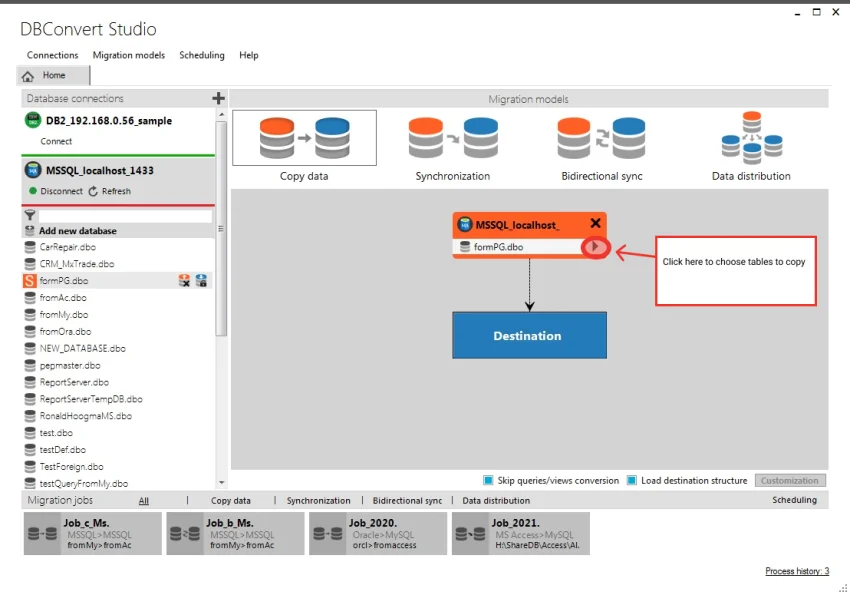

DBConvert Studio is a cross-database migration and synchronization solution designed to help businesses, developers, and database administrators transfer and synchronize data between different database systems. It combines data migration, replication, and synchronization capabilities within a single interface, making complex database management tasks more efficient.
Overview
DBConvert Studio is built for organizations and professionals who need to move data between various database platforms while maintaining consistency and integrity. The software supports a broad range of popular database systems, including Microsoft SQL Server, MySQL, Oracle, PostgreSQL, SQLite, Firebird, IBM DB2, and cloud-based services such as Azure SQL, Amazon RDS, and Heroku Postgres.
The application offers several migration and synchronization scenarios, including one-way migration, master-to-slave replication, bidirectional synchronization, and data distribution across multiple database nodes. With customizable mapping, filtering, scheduling, and validation tools, DBConvert Studio provides flexibility for both simple and complex migration projects.
Features of DBConvert Studio
- Cross-Database Migration: Transfer database structures and data between different database platforms.
- Database Synchronization: Keep source and target databases synchronized with multiple sync modes.
- Master-to-Slave Migration: Replicate data from a primary database to secondary databases.
- Bidirectional Synchronization: Synchronize changes between two database systems.
- Data Distribution: Send data from one source database to multiple destination databases.
- Custom Data Mapping: Modify and map data types during migration.
- Database Object Renaming: Rename tables, fields, schemas, and other objects during transfer.
- Data Filtering: Transfer only selected records using customizable filters.
- Built-In Scheduler: Automate migrations and synchronization tasks on recurring schedules.
- Error Checking: Validate destination settings before migration begins.
- Selective Object Transfer: Migrate tables, fields, indexes, views, primary keys, and schemas individually.
Supported Databases
DBConvert Studio supports migration and synchronization between:
- Microsoft SQL Server
- MySQL
- Oracle
- PostgreSQL
- Microsoft Access
- Microsoft FoxPro
- SQLite
- Firebird
- Microsoft Excel
- IBM DB2
- Microsoft Azure SQL
- Amazon RDS
- Heroku Postgres
User Experience
DBConvert Studio provides a modernized user experience built on mature migration and synchronization technologies. Setting up source and destination connections is straightforward, whether databases are hosted locally or on remote Windows, Linux, macOS, or BSD servers. The migration workflow is highly configurable, allowing users to customize object selection, field mappings, and filtering rules without requiring manual scripting. The built-in scheduler is particularly useful for organizations that need recurring synchronization jobs to run automatically.
While beginners may need some time to understand database migration concepts, the interface helps simplify complex tasks through guided configuration and pre-migration validation checks.
Who Should Use DBConvert Studio?
DBConvert Studio is ideal for:
- Database administrators
- Software developers
- Data engineers
- IT consultants
- Organizations migrating between database platforms
- Businesses requiring ongoing database synchronization
It is particularly valuable for teams managing data across multiple database technologies or cloud environments.
Conclusion
DBConvert Studio delivers a robust solution for database migration, replication, and synchronization. Its support for numerous database platforms, flexible synchronization modes, and advanced customization options make it suitable for both one-time migrations and ongoing data integration projects. If your workflow involves moving or synchronizing data between different database systems, DBConvert Studio offers a reliable and efficient platform that can significantly reduce manual effort while maintaining data consistency.


