


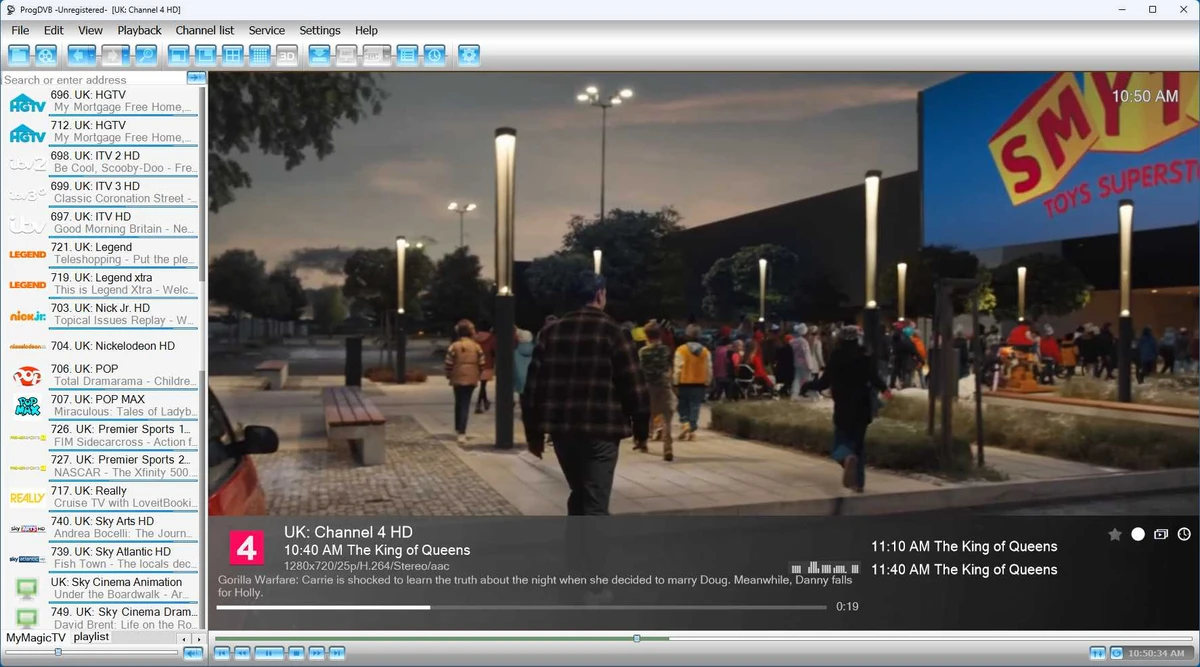

Watching live television on a PC has become increasingly convenient, and ProgDVB brings together a wide range of broadcast technologies in a single application. Designed as a universal multimedia program, it allows users to watch digital TV, stream IPTV, and listen to online radio from one interface. Whether you're accessing satellite broadcasts, cable TV, terrestrial television, or Internet TV, ProgDVB supports numerous standards while offering features such as recording, picture-in-picture viewing, channel previews, and electronic program guides. Its flexibility makes it suitable for users who want an all-in-one television solution on Windows.
Overview
ProgDVB is a multimedia application that enables users to watch digital television and listen to radio broadcasts from multiple sources. It supports traditional broadcast standards alongside Internet TV and IPTV, allowing access to thousands of television and radio channels through local networks or the internet. The software includes features designed to enhance the viewing experience, including Picture-in-Picture (PiP), recording, channel previews, remote control support, and scheduling. It can also display content across multiple monitors, making it suitable for both casual viewing and more advanced media setups.
Features of ProgDVB
- Watch digital television on Windows
- Listen to Internet radio stations
- Supports Internet TV with thousands of listed channels, including YouTube
- Compatible with IPTV services
- Supports DVB-S, DVB-S2, DVB-C, DVB-T, ATSC, and ISDB-T
- Picture-in-Picture (PiP) with up to eight channels simultaneously
- View television across multiple monitors or a connected TV
- Record broadcasts in multiple formats, including TS
- Compatible with multiple tuner cards operating simultaneously
- Built-in channel mosaic preview
- Electronic Program Guide (EPG) support with multiple guide formats
- Support for remote controls with customizable key bindings
- Built-in scheduler compatible with Microsoft scheduling
- Original video renderer
- Supports 3D television
- Multilingual user interface
User Experience
ProgDVB offers a feature-rich environment for watching live television and streaming media from numerous broadcast sources. During use, switching between supported TV standards and IPTV streams feels straightforward, making it possible to manage different content sources from a single application. One of the most useful features is Picture-in-Picture mode, which allows up to eight channels to be displayed simultaneously. This is especially convenient for following multiple live broadcasts, such as sporting events or news coverage, without constantly changing channels.
The Mosaic channel preview is another practical addition, allowing users to quickly browse available channels before selecting one to watch. Combined with Electronic Program Guide support, finding upcoming programs becomes much more convenient.
Recording functionality also adds flexibility by allowing broadcasts to be saved in several popular formats, including TS, while the scheduling feature makes it easy to automate recordings. Support for multiple tuner cards and numerous broadcasting standards makes ProgDVB suitable for users with more advanced TV hardware setups, while multilingual support helps make the software accessible to a wider audience.
Who Should Use ProgDVB?
- Users who watch live television on Windows PCs
- IPTV users
- Satellite TV enthusiasts
- Cable and terrestrial TV viewers
- Home entertainment users
- Users with DVB tuner hardware
- Anyone looking for a multimedia application that combines live TV and Internet radio
Conclusion
ProgDVB delivers a comprehensive solution for watching digital television and listening to online radio on Windows. Its support for multiple broadcast standards, IPTV, Internet TV, recording capabilities, and Picture-in-Picture viewing makes it a versatile choice for users who want more than a basic media player. Features such as channel previews, Electronic Program Guide integration, multi-monitor support, and recording enhance the overall viewing experience, while compatibility with various tuner cards allows the software to adapt to different hardware configurations.


