


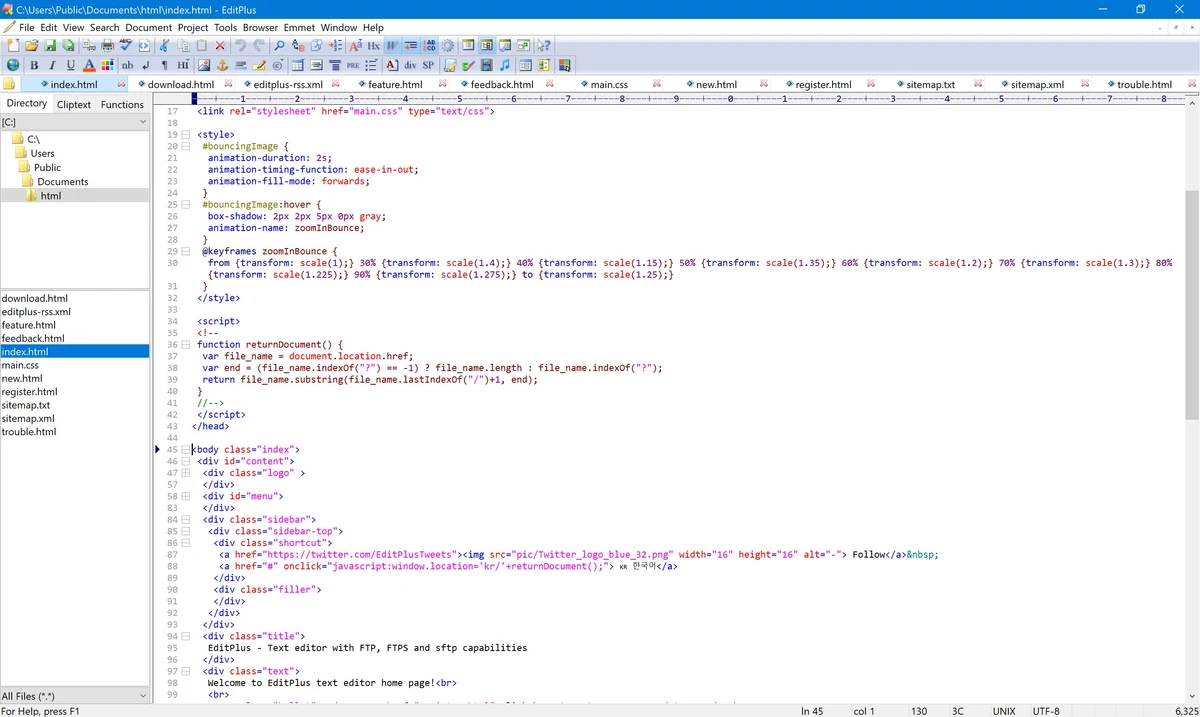

EditPlus is a lightweight yet powerful text editor designed for Windows users who need more functionality than a standard Notepad replacement. Combining text editing, HTML development, and programming features, the software provides tools for web developers, programmers, and advanced users working with source code and structured text files. With customizable syntax highlighting, code editing assistance, FTP support, macro recording, and integration with external tools, EditPlus offers a flexible environment for writing, editing, and managing code.
Features of EditPlus
Advanced Text Editing
- Multiple document interface
- Tabbed document interface
- Split window editing
- Overlapping window support
- Multiple undo and redo actions
- Rectangular block selection
- Spell checking
- Bracket matching
Programming & Code Editing
- Syntax highlighting
- Code folding
- Auto indentation
- Auto completion
- Compiler integration
- Shell integration
- Custom syntax file support
- User-defined programming language support
Supported Languages
Built-in syntax highlighting support includes:
- HTML
- CSS
- PHP
- ASP
- Perl
- C/C++
- Java
- JavaScript
- VBScript
Search & Editing Tools
- Regex-based search and replace
- Multi-line regular expression support
- Encoding conversion
- Newline conversion
- Find and replace tools
Web Development Features
- Integrated web browser
- HTML editing support
- FTP support
- SFTP support through SSH
Encoding Support
- ASCII
- UTF-8
- UTF-16 Unicode
- Little-endian and big-endian Unicode
- Other operating system-supported encodings
Line Ending Support
- DOS format (CR/LF)
- Unix format (LF)
- Mac format (CR)
Productivity Features
- Macro recording
- Keystroke recording
- Customizable keyboard shortcuts
- User-defined tools
- External help file support
- Output Window for tool execution results
User Experience
EditPlus delivers a focused editing experience aimed at users who need a capable development editor without the complexity of a full integrated development environment. Its lightweight design makes it quick to launch while still providing many advanced editing features. The syntax highlighting system is one of the software's main strengths. Developers working with web technologies and programming languages can benefit from color-coded code formatting and the ability to create custom syntax definitions for additional languages.
The editor provides useful productivity improvements such as auto completion, bracket matching, code folding, and customizable keyboard shortcuts. These features help reduce repetitive tasks and make navigating larger files easier. For web developers, built-in FTP and SFTP support adds convenience by allowing files to be edited and transferred without relying on separate tools. The integrated browser also helps users preview web-related content directly within the application.
The external tool integration is another useful feature for programmers. Users can configure tools, capture output, and quickly navigate to error locations from compiler or command-line results. Although EditPlus is feature-rich, it maintains a simple interface compared with larger development environments. This makes it suitable for users who prefer a fast editor while still requiring professional coding capabilities.
Who Should Use EditPlus?
- Web developers
- Programmers
- HTML and CSS editors
- Script writers
- System administrators
- Developers who prefer lightweight tools
- Users needing a powerful Notepad alternative
Conclusion & Recommendation
EditPlus provides a balanced combination of speed, flexibility, and programming-focused features. With support for syntax highlighting, FTP/SFTP connections, macros, external tools, and multiple encoding formats, it offers a productive workspace for coding and text editing tasks.


