FanControl logo

FanControl v271

  • User Rating:
    ★★★★★
    ★★★★★
    0.0 ★ 0Votes
  • Requirements:
    Windows
  • Version: v271
  • Latest updated: 3 weeks ago
  • License: Open Source  
  • Publisher: Rem0o
  • Size: 13 MB
× app stores

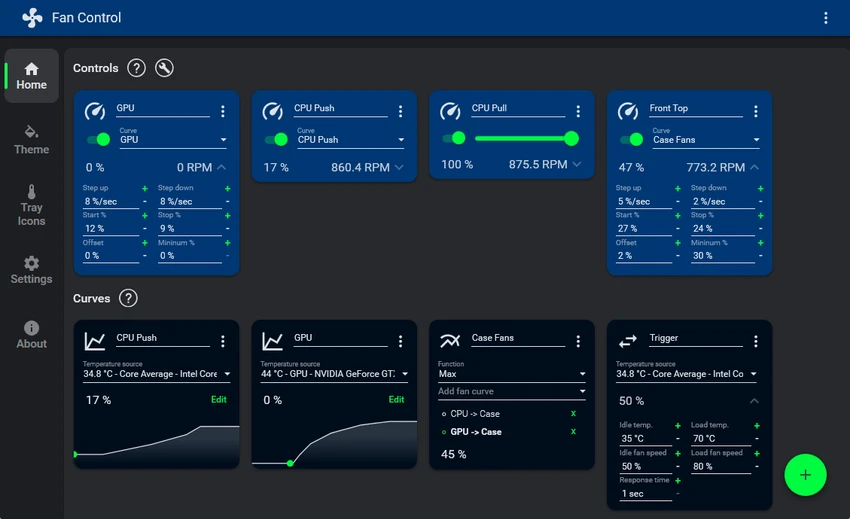
FanControl is a highly customizable Windows application designed to help users monitor and manage their computer’s CPU and GPU fan behavior. The software provides detailed control over cooling performance by allowing users to create custom fan curves, combine different temperature sources, and adjust fan response settings. FanControl supports temperature inputs from CPUs, GPUs, motherboards, hard drives, and custom external sensors through .sensor files. Users can save multiple profiles, fine-tune cooling responses, and run the application quietly in the background with a customizable system tray icon. With its modern dashboard-style interface and extensive customization options, FanControl is designed for users who want more control over their PC cooling system.

Features of FanControl

  • Custom fan control: Create personalized fan curves to adjust cooling behavior based on temperature changes.
  • Multiple temperature sources: Monitor temperatures from CPU, GPU, motherboard, hard drives, and custom sensor files.
  • Profile management: Save, edit, and load multiple fan control profiles for different usage scenarios.
  • Advanced response settings: Adjust fan behavior using steps, activation percentage, stop percentage, response time, and hysteresis settings.
  • Combined sensor and curve control: Mix different temperature sensors and fan curves together for flexible cooling management.
  • Modern dashboard interface: Provides a clean dashboard-style user interface for monitoring and configuration.
  • Background operation: Runs as a background application with a customizable system tray icon.
  • External sensor support: Create custom external temperature sensors using .sensor files.
  • Hardware compatibility improvements: Includes support for newer Nvidia RTX cards through NvAPIWrapper.

Interface and Usability

FanControl provides a modern dashboard-style interface focused on giving users detailed visibility and control over their cooling system. The software allows users to configure fan curves, monitor temperature sources, and create profiles without needing to manually adjust hardware settings.

The customization options are designed for users who want precise control over cooling performance. Features such as combined curves, response adjustments, and multiple sensor inputs provide flexibility for balancing temperature and fan noise. Once configured, FanControl can run in the background and manage fan behavior automatically, making it convenient for users who prefer continuous monitoring without keeping the main interface open.

Who Should Use FanControl?

FanControl is suitable for PC enthusiasts, gamers, system builders, and users who want greater control over their computer’s cooling performance. It can be useful for users who want to customize fan behavior, reduce unnecessary noise, or create specific cooling profiles for different workloads. The software is especially suitable for users with custom-built PCs or systems where detailed fan management is important.

Conclusion

FanControl is a powerful cooling management tool for users who want detailed control over CPU and GPU fan performance. With customizable curves, multiple sensor sources, profile management, and background operation, it provides a flexible way to manage PC temperatures.

Pros & Cons

✓

Pros

  • Provides extensive CPU and GPU fan control options
  • Supports multiple temperature sources
  • Allows custom fan curves and profiles
  • Includes advanced cooling response adjustments
  • Supports external temperature sensors
  • Runs quietly in the background
  • Lightweight application size
✕

Cons

  • Advanced settings may require technical knowledge

Frequently Asked Questions

What is FanControl?

FanControl is a Windows application that allows users to control and customize CPU and GPU fan behavior using temperature sensors, fan curves, and custom profiles.

What temperature sources does FanControl support?

FanControl supports temperature sources from CPUs, GPUs, motherboards, hard drives, and custom external sensors created through .sensor files.

Can FanControl create custom fan curves?

Yes. FanControl allows users to create custom fan curves and adjust how fans respond to changing temperatures.

Does FanControl support multiple fan profiles?

Yes. Users can save, edit, and load multiple profiles for different cooling configurations.

Can FanControl run in the background?

Yes. FanControl can run as a background application and display information through a customizable system tray icon.

Which versions of Windows does FanControl support?

According to the available system requirements, FanControl supports Windows 11, Windows 10, Windows 8, and Windows 7.

Recommended apps [Freeware]:
  • Easy Gamer Utility 1.3.110.0 Easy Gamer Utility logo a Windows tool that optimizes gaming performance, clears cache, and fixes common game issues.
  • TimVer 0.12.0 TimVer logo open-source Windows system information tool that provides detailed OS version, build, compatibility, and system data beyond standard Winver
  • SponsorBlock 6.1.6 SponsorBlock logo browser extension that automatically skips YouTube sponsorships, intros, outros, and other non-essential video segments
  • TinyWall 3.5.1 TinyWall logo a lightweight Windows firewall manager offering simple controls, blocking rules, and zero ads
  • SecretDNS 3.9.2 SecretDNS logo Improve online privacy with encrypted DNS requests and SNI protection while reducing access issues through secure network features.
  • Telegram 7.0.2 Telegram logo Securely chat, share files, join large communities, and stay connected across devices with a feature-rich cloud messaging platform.
Recommended apps [Shareware]:
  • Adobe Illustrator 2026 Adobe Illustrator logo professional vector graphic editor for creating logos, illustrations, and scalable designs.
  • Wondershare Filmora 15.3.20.18660 Wondershare Filmora logo a powerful, user-friendly video editor with effects, transitions, and 4K support.
  • My Music Collection 3.4.16.178 My Music Collection logo organize CDs, vinyl, and MP3s with cataloging, tracking, and export features on Windows
  • reaConverter Pro 8.0.231 reaConverter Pro logo batch image converter and editor supporting 700+ formats with automation and advanced processing tools
  • Elcomsoft Forensic Disk Decryptor 2.21.1036 Elcomsoft Forensic Disk Decryptor logo Access and analyze encrypted BitLocker, FileVault, VeraCrypt, and TrueCrypt disks with forensic-grade decryption tools
  • Revo Uninstaller Pro 5.5.0 Revo Uninstaller Pro logo Remove unwanted programs completely, clean leftover files, and manage Windows applications with an advanced software uninstall utility.