Clonezilla logo

Clonezilla 3.3.3-15

  • User Rating:
    ★★★★★
    ★★★★★
    0.0 ★ 0Votes
  • Requirements:
    Windows
  • Version: 3.3.3-15
  • Latest updated: 1 week ago
  • License: Open Source  
  • Publisher: Clonezilla
  • Size: 535 MB
× app stores

Clonezilla is a free and open-source disk imaging, partition cloning, and system deployment utility designed for backing up and restoring entire operating systems, partitions, and hard drives. Often compared to commercial disk cloning solutions, it provides a reliable way to create complete system images for disaster recovery, hardware migration, or operating system deployment without licensing costs.

The software supports a wide range of file systems across Linux, Windows, macOS, BSD, VMware ESX, and other platforms. Instead of copying every sector on a supported partition, Clonezilla saves and restores only the blocks that are actually in use, helping reduce imaging time and storage requirements. For unsupported file systems, it performs sector-by-sector cloning to preserve the complete contents of the disk.

Clonezilla is available in different editions to accommodate both individual users and enterprise environments. Clonezilla Live is intended for backing up and restoring single computers, while Clonezilla Server Edition (SE) supports large-scale deployments by cloning dozens of computers simultaneously using multicast technology. Additional capabilities such as unattended operation, network-based image storage, MBR and GPT support, BIOS and UEFI compatibility, and remote deployment make Clonezilla a powerful solution for IT professionals as well as advanced home users.

Features of Clonezilla

  • Free and open-source disk imaging and cloning
  • Clone entire disks or individual partitions
  • Bare metal backup and system recovery
  • Save and restore only used disk blocks on supported file systems
  • Support for numerous Linux, Windows, macOS, BSD, Minix, and VMware file systems
  • Support for both MBR and GPT partition tables
  • Compatible with BIOS and UEFI systems
  • Clonezilla Live for single-machine backup and recovery
  • Clonezilla Server Edition for large-scale deployments
  • Simultaneous cloning of multiple computers using multicast
  • Restore one image to multiple local devices
  • Network image storage via SSH, Samba, and NFS
  • LVM2 support
  • Bootloader reinstallation support, including GRUB and Syslinux
  • Unattended operation through command-line options and boot parameters

Interface and Usability

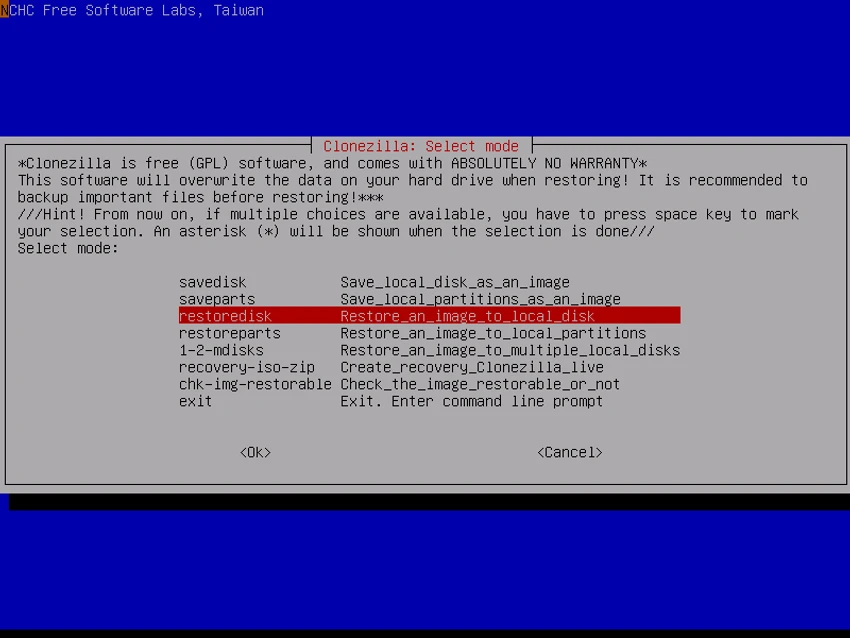
Clonezilla uses a text-based interface that prioritizes functionality over visual design. While it may initially appear less approachable than many commercial backup applications, the guided menus help users navigate common tasks such as creating disk images, restoring backups, and cloning drives.

The software provides step-by-step prompts throughout the imaging and recovery process, reducing the likelihood of accidental configuration errors. Advanced users and system administrators can further automate deployment through unattended mode, command-line options, and customizable boot parameters. Although beginners may need some time to become familiar with the interface, Clonezilla offers extensive flexibility for both individual backups and enterprise-scale deployments.

Who Should Use Clonezilla?

  • IT administrators deploying multiple computers
  • Users creating full system backups
  • Professionals migrating operating systems to new drives
  • Organizations managing large computer labs
  • Advanced users performing disk cloning and recovery
  • Anyone looking for a free, open-source imaging solution

Conclusion

Clonezilla is one of the most capable open-source disk imaging and cloning solutions available. Its support for numerous operating systems, efficient block-level imaging, and enterprise deployment features make it suitable for everything from personal system backups to large-scale network deployments. While its interface is more technical than many commercial alternatives, it compensates with flexibility, performance, and a comprehensive feature set.

Pros & Cons

✓

Pros

  • Completely free and open source
  • Supports a wide range of operating systems and file systems
  • Efficient cloning by copying only used disk blocks
  • Powerful backup and recovery capabilities
  • Supports both BIOS and UEFI systems
  • Network-based backup and deployment options
  • Enterprise-ready multicast cloning
  • Flexible unattended deployment features
✕

Cons

  • Text-based interface may be challenging for beginners
  • Advanced features require some technical knowledge

Frequently Asked Questions

What is Clonezilla used for?

Clonezilla is used to create disk images, clone hard drives or partitions, perform full system backups, restore operating systems, and deploy identical system images to multiple computers.

Is Clonezilla free?

Yes. Clonezilla is completely free and open source, allowing users to download, use, and modify the software under its open-source license.

Can Clonezilla clone an entire hard drive?

Yes. Clonezilla can clone complete hard drives as well as individual partitions, making it useful for system migration, backup, and hardware upgrades.

Does Clonezilla support Windows and Linux?

Yes. Clonezilla supports numerous file systems used by Windows, Linux, macOS, BSD, VMware ESX, and several other operating systems.

Can Clonezilla deploy the same image to multiple computers?

Yes. Clonezilla Server Edition supports multicast deployment, allowing administrators to restore the same system image to many computers simultaneously on a network.

Is Clonezilla suitable for beginners?

Clonezilla can be used by beginners for basic backup and restore tasks, but its text-based interface and advanced configuration options make it better suited to users who are comfortable working with system utilities or following detailed instructions.

Recommended apps [Freeware]:
  • EarthView 7.17.0 EarthView logo dynamic wallpapers and screensavers with day, night, and weather effects
  • XRecode 3 v1.184 XRecode logo a powerful audio converter supporting many formats, CD ripping, and audio extraction from video files
  • Tixati 3.43 Tixati logo a fast, ad-free BitTorrent client offering advanced peer control, bandwidth management, and detailed swarm analysis
  • OcenAudio 3.20.0 OcenAudio logo a fast and easy-to-use audio editor with real-time effects, spectrogram analysis, and VST plugin support
  • Dropbox 260.4.2926 Dropbox logo cloud storage service for syncing files, backup, and sharing documents across Windows, mobile, and web devices
  • Mullvad Browser 15.0.18 Mullvad Browser logo Browse with enhanced privacy using a Firefox-based browser that minimizes tracking, removes telemetry, and supports VPN connections.
Recommended apps [Shareware]:
  • EditPlus 6.1.0939 EditPlus logo powerful Windows text editor with syntax highlighting, coding tools, FTP support, and web editing features
  • DBF Recovery 4.74 DBF Recovery logo repairs corrupted DBF database files from dBASE, FoxPro, and Visual FoxPro formats with automatic recovery tools
  • Pepakura Designer 6.2.6 Pepakura Designer logo converts 3D models into printable papercraft patterns with layout editing and export tools
  • WiFi Explorer Pro 1.2.3.0 WiFi Explorer Pro logo Analyze, troubleshoot, and optimize Wi-Fi networks with WiFi Explorer Pro for Windows, supporting Wi-Fi 6, 6E, and 7
  • Rapid CSS 2025 v18.7.0.277 Rapid CSS logo Fast CSS editor with code completion, browser preview, validation tools, and FTP support for modern web development.
  • Vovsoft Speech to Subtitle Converter 2.0 Vovsoft Speech to Subtitle Converter logo Convert audio and video files into synchronized subtitles with support for over 50 languages and popular SRT and VTT formats.