Tor Browser logo

Tor Browser 15.0.17

  • User Rating:
    ★★★★★
    ★★★★★
    0.0 0Votes
  • Requirements:
    Windows
  • Version: 15.0.17
  • Latest updated: 1 day ago
  • License: Freeware  
  • Publisher: Tor
  • Size: 110 MB
× app stores

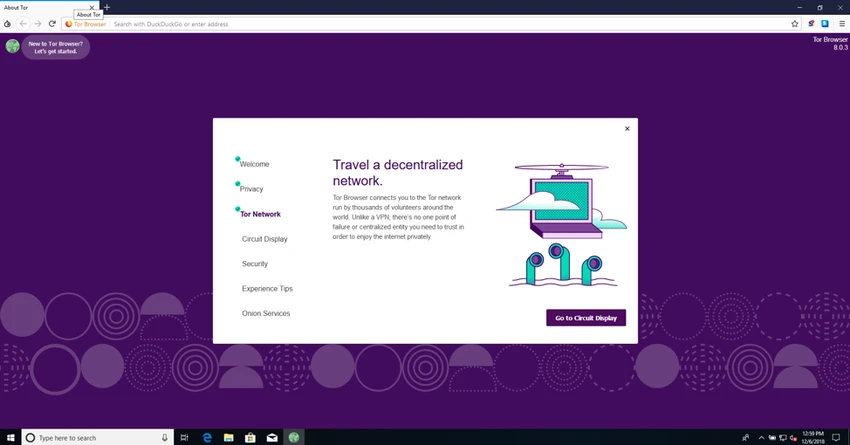
Tor Browser is a free privacy-focused web browser designed to help users browse the internet with increased anonymity and security. Based on a modified version of Mozilla Firefox, it is preconfigured to connect through the Tor network, allowing users to browse without manually configuring additional privacy software. By routing internet traffic through a distributed network of volunteer-operated relays, Tor Browser helps hide a user's IP address and reduce online tracking. It is designed for people who want greater control over their digital privacy and protection for sensitive browsing activities.

Features of Tor Browser

  • Free anonymous web browser
  • Built-in connection to the Tor network
  • Automatically changes the visible IP address
  • Helps protect personal information while browsing
  • Based on Mozilla Firefox technology
  • Preconfigured privacy settings
  • No additional configuration required to use Tor connectivity
  • Portable version support
  • Open-source project
  • Designed to reduce online tracking
  • Allows users to customize browser settings
  • Protects browsing activity through encrypted Tor routing

User Experience

Tor Browser provides a straightforward way to access privacy-focused browsing without requiring users to manually configure proxy settings or install additional tools. After launching the application, users can connect to the Tor network and begin browsing through an environment designed around anonymity.

The browser interface feels familiar because it is based on Mozilla Firefox, making navigation comfortable for users who have experience with modern web browsers. Standard browsing features are available while privacy-focused settings are integrated into the application. The main difference users notice is the connection behavior. Because traffic is routed through multiple Tor relays operated by volunteers around the world, browsing speed may be slower compared with traditional browsers. However, this trade-off helps provide additional privacy by making it more difficult to associate browsing activity with a user's real IP address.

Tor Browser is especially useful for accessing the internet while minimizing tracking and reducing exposure of personal information. It does not require complicated setup, which makes privacy-focused browsing more accessible to everyday users The portable nature of Tor Browser is another practical advantage. Users can carry the application and use it on compatible systems without needing a traditional installation process. Overall, Tor Browser delivers a focused browsing experience built around privacy, anonymity, and user control rather than maximum speed or convenience features.

Conclusion

Tor Browser provides a simple and effective way to improve online privacy by connecting users to the Tor network automatically. With anonymous routing, IP address protection, and a familiar Firefox-based interface, it offers a strong privacy-focused alternative to traditional web browsers.

Pros & Cons

Pros

  • Strong focus on online privacy and anonymity
  • Free and open-source browser
  • Uses the Tor network automatically
  • Hides the user's public IP address
  • Based on Mozilla Firefox
  • Requires minimal setup
  • Portable version available
  • Helps reduce online tracking
  • Suitable for sensitive browsing activities

Cons

  • Browsing speeds may be slower due to Tor routing
  • Some websites may restrict or limit Tor connections
  • Not designed primarily for maximum performance browsing
  • Privacy features may require users to understand their limitations

Frequently Asked Questions

What is Tor Browser?

Tor Browser is a free privacy-focused web browser that connects users to the Tor network to provide anonymous browsing and improved online privacy.

How does Tor Browser protect privacy?

Tor Browser routes internet traffic through multiple volunteer-operated relays, making it more difficult to identify a user's original IP address.

Is Tor Browser free?

Yes. Tor Browser is free and based on an open-source project.

Does Tor Browser require additional software?

No. The browser includes built-in Tor network support and is designed to work without installing separate privacy software.

Is Tor Browser based on Firefox?

Yes. Tor Browser is built using a modified version of Mozilla Firefox.

Why is Tor Browser slower than normal browsers?

Internet traffic passes through multiple Tor relays to improve anonymity, which can reduce browsing speed compared with direct connections.

Can Tor Browser be used as a portable application?

Yes. The provided information indicates that Tor Browser supports portable use, allowing it to be carried and run from compatible storage devices.

Recommended apps [Freeware]:
  • CalendarTask 3.30.290.9088 CalendarTask logo lightweight desktop calendar with note-taking, cloud sync, reminders, and desktop scheduling tools
  • MSI Center 2.0.71.0 MSI Center logo a system utility for MSI devices that manages performance, gaming modes, monitoring, RGB, and hardware optimization tools
  • PhotoPad Photo Editor 15.16 PhotoPad Photo Editor logo photo retouching, effects, collages, panoramas, and non-destructive editing for Windows
  • Adobe Acrobat Reader DC 2026.001.21691 Adobe Acrobat Reader DC logo trusted PDF viewer for reading, printing, and annotating PDFs with strong security and cloud sync support
  • Dropbox 258.4.3749 Dropbox logo cloud storage service for syncing files, backup, and sharing documents across Windows, mobile, and web devices
  • Czkawka 12.0.0 Czkawka logo open-source file cleanup tool that finds duplicates, empty folders, similar images, and large files across your system
Recommended apps [Shareware]:
  • Mountain Duck 5.3.0.29446 Mountain Duck logo mounts cloud storage and servers as local drives with smart sync, offline access, and seamless file integration
  • ThunderSoft Watermark Remover 6.3.0 ThunderSoft Watermark Remover logo removes watermarks, logos, and unwanted objects with easy selection and photo editing tools
  • ezAccounting 3.16.18 ezAccounting logo Manage accounting, payroll, invoicing, and tax forms locally with ezAccounting, an affordable desktop solution for small businesses
  • Pdf995 26.1 Pdf995 logo Create high-quality PDF files from any application with Pdf995 Printer Driver using a lightweight virtual printer
  • XnView MP 1.11.5 XnView MP logo a powerful image viewer, editor, and batch converter supporting 500+ image formats on Windows
  • ReclaiMe Build 6447 ReclaiMe logo easy-to-use Windows data recovery tool for hard drives, USB drives, RAID arrays, and memory cards