


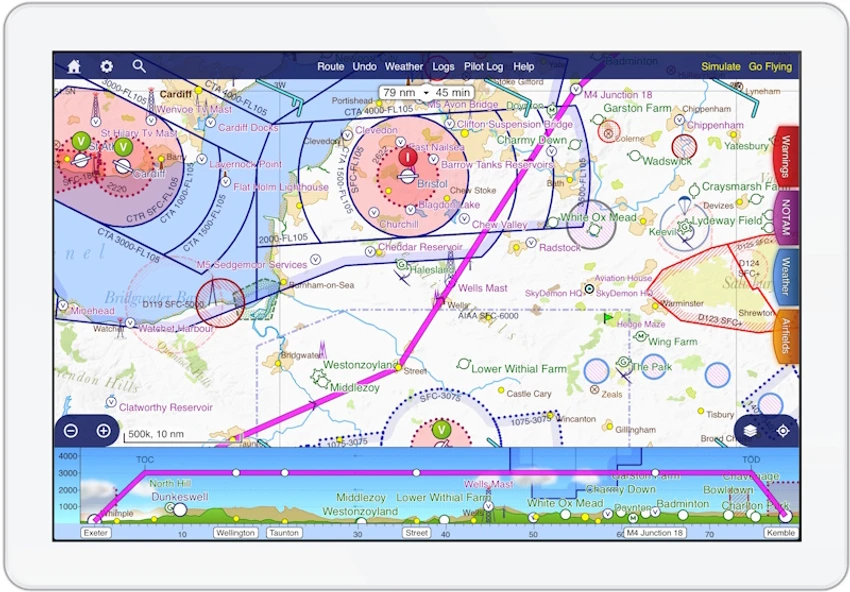

SkyDemon is a professional-grade aviation flight planning and navigation software designed to assist pilots in preparing, briefing, and analyzing flights using real-time aeronautical data. It combines dynamic vector charts with live aviation information such as NOTAMs, METAR, TAF, wind forecasts, and airfield documentation. The software is built to simplify complex flight planning tasks, making it easier for pilots to visualize routes, assess risks, and generate accurate flight logs. It is widely used in general aviation environments across Europe, Africa, New Zealand, and the United States.
Features of SkyDemon
- Dynamic vector aeronautical charts with customizable layers
- Real-time flight planning using interactive map-based route creation
- Live briefing data including NOTAMs, METAR, TAF, and wind forecasts
- Airspace awareness with automatic hazard detection
- Pilot log generation with headings, altitudes, and frequencies
- Minimum safe altitude calculations
- Airfield data, frequencies, and navigation aids included
- Real-time airspace warnings during route planning
- Configurable alerts for restricted or dangerous zones
- Ability to drag and adjust flight routes dynamically
- Comprehensive coverage of Europe, Southern Africa, New Zealand, and the USA
- Integrated weather and aviation briefing tools
- Compatible with Windows 10 and Windows 11
User Experience
After reviewing SkyDemon, the software stands out as a highly specialized tool designed specifically for pilots and aviation enthusiasts. The interface focuses on clarity and situational awareness, prioritizing map-based interaction and real-time aviation data. Planning a route is intuitive. Users can simply click on waypoints to create a flight path, and the system automatically calculates distance, time, headings, and safe altitudes. This removes much of the manual workload typically associated with traditional flight planning methods.
The dynamic vector charts are one of SkyDemon’s strongest features. Unlike static maps, the charts adjust based on the planned route, hiding irrelevant airspace and highlighting only the most important information. This reduces visual clutter and improves decision-making during planning. Real-time briefing data is deeply integrated into the workflow. Pilots can view NOTAMs, weather forecasts, and airfield information directly within the planning interface, ensuring they have all critical data before departure.
The system also provides continuous warnings during planning, alerting users to controlled airspace entry, temporary restrictions, and unsafe altitude decisions. This enhances situational awareness and contributes to safer flight planning. The ability to generate pilot logs automatically is another practical feature. These logs include essential flight information such as headings, navigation aids, frequencies, and altitude guidance, which helps streamline pre-flight preparation.
Who Should Use SkyDemon?
- Private and general aviation pilots
- Flight instructors and aviation schools
- Student pilots learning navigation planning
- Recreational pilots planning cross-country flights
- Aviation professionals needing real-time briefing data
Conclusion
SkyDemon delivers a complete digital flight planning environment that replaces traditional paper-based navigation and fragmented briefing sources. With its dynamic charts, real-time aviation data, and intelligent route analysis, it provides a clear advantage for pilots who prioritize safety, accuracy, and efficiency.


