


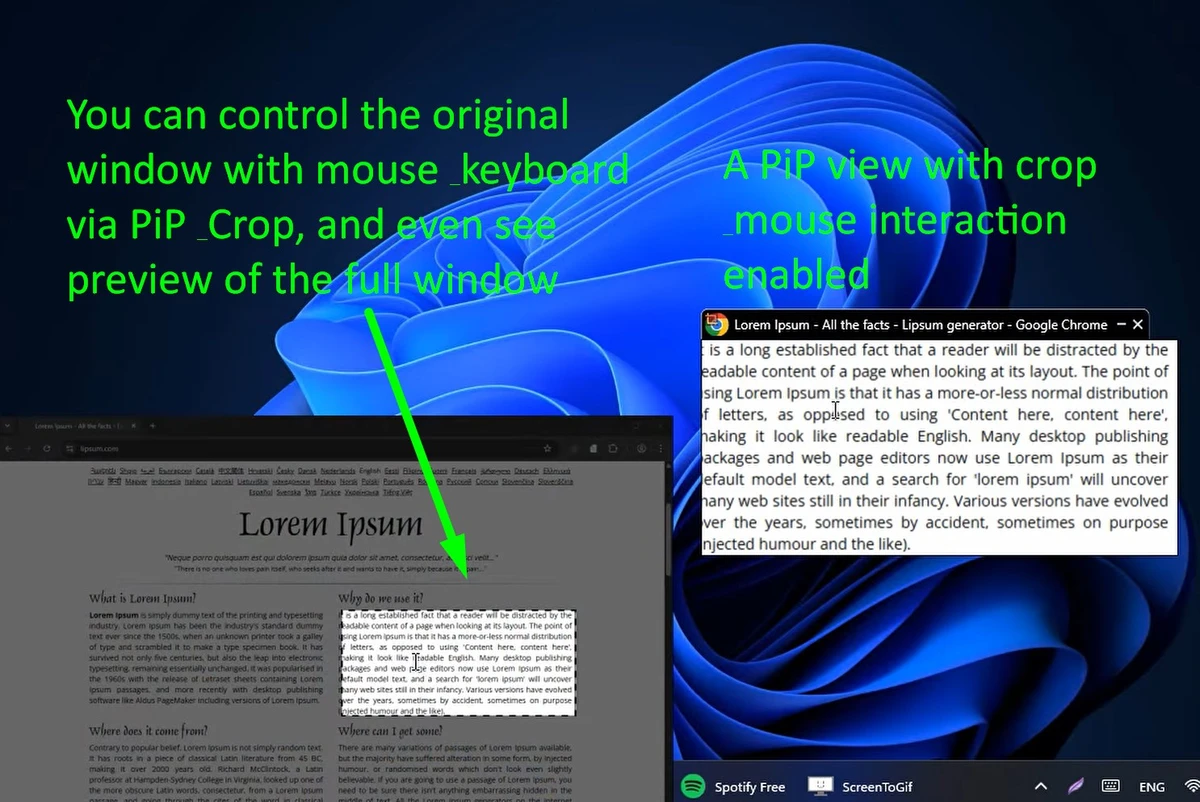

WindowTop is a desktop productivity tool that gives you greater control over application windows in Windows. It combines practical window management features such as Always on Top, transparency, dark mode, Picture-in-Picture (PiP), and window cropping into a single application designed to improve multitasking. The software is available with both free and paid functionality. The free version includes essential window management tools, while the paid edition unlocks advanced productivity features like Anchors, Glass mode, PiP enhancements, configuration profiles, and smart cropping.
Features of WindowTop
Free Features
- Keep any window always on top with a keyboard shortcut (ALT+Z).
- Highlight topmost windows with a visible red border.
- Adjust window transparency (ALT+A).
- Click through transparent windows.
- Apply Dark Mode to supported windows.
- Shrink windows (limited functionality in the free version).
- Simple toolbar for quick access to window controls.
Paid Features
- Picture-in-Picture (PiP) mode for any window.
- Crop windows directly without entering PiP mode first.
- PiP with selectable cropped regions.
- Click forwarding to interact with PiP windows.
- Automatic PiP movement to avoid covering text or images.
- Save custom window configurations.
- Set default transparency levels.
- Include or exclude specific applications.
- Anchors for faster window switching.
- Glass mode with advanced transparency effects.
- Custom PiP window sizes.
- Smart Region Detection for faster and more precise cropping.
- Continue using PiP and cropped views even when the original window is minimized.
Additional Highlights
- Supports multiple interface languages.
- Automatic installation of the appropriate ARM64 or x64 version.
- Native ARM64 support.
- Improved Glass mode compatible with DirectX 11 graphics hardware.
- General stability, memory usage, and performance improvements.
User Experience
WindowTop immediately makes multitasking more flexible by adding controls that Windows doesn't offer by default. Keeping frequently used applications on top of other windows is effortless, and adjusting transparency or enabling Dark Mode can make it easier to work with multiple applications simultaneously.
One feature I found particularly useful is Picture-in-Picture mode. It allows a window to remain visible while I continue working in other applications. Combined with cropping and click forwarding, it becomes practical for monitoring videos, reference documents, or other content without constantly switching windows. The Anchors feature offers an alternative to the traditional Alt+Tab workflow by making it easier to jump directly to selected windows. For users who regularly work with many open applications, this can noticeably improve navigation.
Glass mode also stands out. The latest version improves transparency performance and no longer depends on a specific graphics card vendor, allowing it to work on a broader range of DirectX 11-compatible hardware. Although beginners can start using the free features immediately, the software offers enough advanced options to satisfy power users who want fine-grained control over their desktop environment.
What's New
- Native ARM64 support for Windows on ARM devices.
- Automatic installation of the correct ARM64 or x64 build.
- Redesigned Glass mode that works on nearly any DirectX 11-compatible GPU, including AMD, Intel, and NVIDIA graphics.
- Improved transparency quality with cleaner text and fewer visual artifacts.
- Better default transparency settings for Glass mode.
- Reduced memory usage when closing windows or opening complex interfaces.
- General performance and stability improvements.
Who Should Use WindowTop?
WindowTop is an excellent choice for professionals, programmers, students, content creators, and anyone who regularly works with multiple applications at once. Users who need to keep reference material visible, monitor videos while working, or organize crowded desktops will benefit from its multitasking tools. Power users will gain the most value from the paid edition, while casual users can still improve their workflow using the free features.
Conclusion
WindowTop is a feature-rich utility that helps you organize your desktop more efficiently by adding practical window controls that Windows doesn't provide out of the box. From always-on-top windows and transparency to advanced Picture-in-Picture and smart cropping, it offers tools for both casual users and productivity enthusiasts.


