


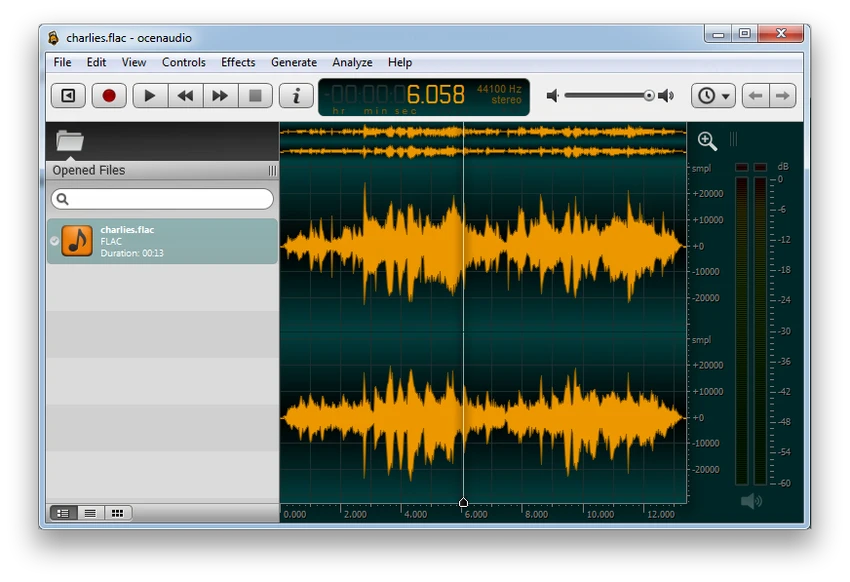

Ocenaudio is a lightweight yet powerful audio editing software designed for users who want to edit and analyze audio files without complexity. It offers a clean interface combined with advanced tools such as real-time effects preview, VST plugin support, and spectral analysis. During my experience with it, I found it to be especially well-balanced for both casual editing tasks and more detailed audio work.
Key Features of Ocenaudio
- Cross-platform support (Windows, macOS, Linux)
- Real-time preview of audio effects
- Support for VST (Virtual Studio Technology) plugins
- Spectrogram view for frequency analysis
- Waveform visualization for detailed editing
- Multi-selection editing for non-continuous audio regions
- Efficient handling of large audio files
- Background processing for tasks like opening and saving files
- Audio effects such as EQ, gain, filtering, and normalization
- Interactive spectrogram settings (real-time adjustments)
- Built on Ocen Framework for performance and consistency
User Experience
After using Ocenaudio, I found its biggest strength to be its simplicity combined with real-time feedback. Unlike many audio editors that require trial-and-error adjustments, Ocenaudio lets you hear effect changes instantly, which makes editing much more intuitive. The interface is clean and responsive, even when working with multiple audio files. Tasks such as applying effects or navigating through long recordings run smoothly in the background, allowing uninterrupted workflow. The multi-selection feature is particularly useful for editing interviews, podcasts, or any audio with non-continuous segments. It allows you to apply effects only to selected parts, which improves precision without requiring complex workflows.
The spectrogram view adds another layer of analysis, making it easier to understand frequency content in audio signals. Real-time updates to spectrogram settings also enhance usability for advanced users who need detailed control. Overall, Ocenaudio feels fast, practical, and well-designed for users who want powerful audio tools without the learning curve of professional digital audio workstations.
Who Should Use Ocenaudio?
- Podcasters and content creators
- Students learning audio editing
- Musicians needing quick audio adjustments
- Users analyzing audio signals
- Professionals needing lightweight editing tools
- Anyone wanting a simple but capable audio editor
Conclusion
Ocenaudio is a fast, reliable, and user-friendly audio editor that excels in simplicity and real-time processing. While it does not replace full professional digital audio workstations, it offers more than enough power for everyday audio editing, analysis, and enhancement. If you want a lightweight yet capable audio tool, Ocenaudio is an excellent choice.


