Hasleo Backup Suite logo

Hasleo Backup Suite 5.8.2.2

  • User Rating:
    ★★★★★
    ★★★★★
    0.0 0Votes
  • Requirements:
    Windows
  • Version: 5.8.2.2
  • Latest updated: 3 days ago
  • License: Freeware  
  • Publisher: Hasleo Software
  • Size: 40 MB
× app stores

Hasleo Backup Suite is a comprehensive Windows backup, restore, and disk cloning solution designed for both personal and server environments. It helps users protect their operating system, disks, partitions, and personal data by creating reliable backups that can be restored in case of system failure or data loss. In addition to backup and recovery, the software also includes disk cloning features, making it suitable for system migration or upgrading to a new drive such as an SSD.

Features of Hasleo Backup Suite

  • Backup Windows operating system, disks, and partitions.
  • Restore system and data from previously created backups.
  • Disk and partition cloning capabilities.
  • OS migration to another disk or SSD upgrade support.
  • Create a Windows PE bootable emergency recovery disk.
  • Supports backup customization options such as:
    • Compression levels
    • Password protection
    • Email notifications via SMTP
    • Pre- and post-backup commands
  • Sector-by-sector cloning mode.
  • Partition size adjustment during cloning.
  • Supports disk alignment options (1M, Cylinder, 4K, or none).
  • Emergency recovery via USB or ISO boot media.
  • Additional tools including:
    • MBR rebuild
    • Drive wipe
    • Boot menu management

User Experience

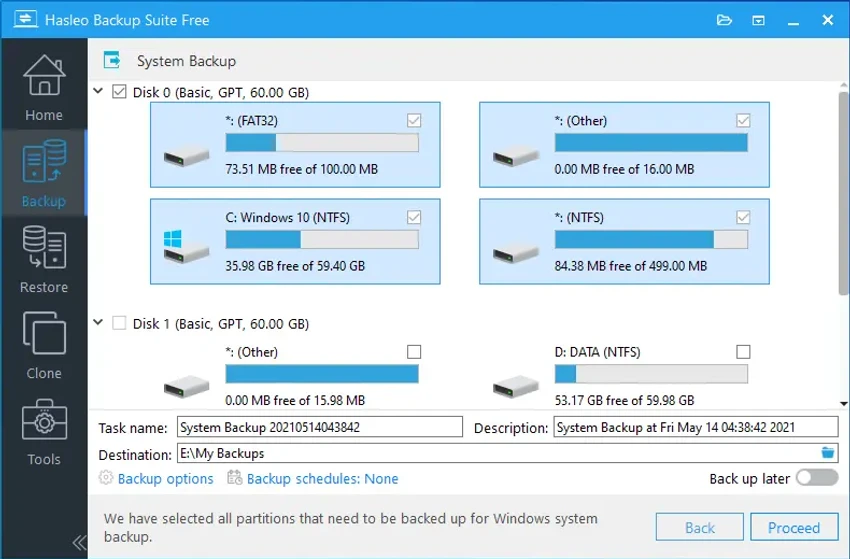
Hasleo Backup Suite presents a clean and straightforward interface that is accessible even to users with limited technical experience. The backup process is guided and easy to follow, allowing users to quickly create system images or disk backups without complex setup. Advanced users will appreciate the detailed configuration options, such as compression settings, encryption, and automated notifications. These features provide greater control over backup strategies. The cloning process is also well-structured, making it easy to migrate an operating system to a new drive or upgrade hardware without reinstalling Windows. The ability to create a bootable recovery environment adds an important layer of safety in case of system failure.

Who Should Use Hasleo Backup Suite?

  • Users who want to protect their Windows system from crashes.
  • IT professionals managing multiple systems or servers.
  • Users upgrading to SSD or migrating to a new drive.
  • Anyone needing reliable disk cloning and system imaging.
  • Users looking for bootable recovery options.

Conclusion

Hasleo Backup Suite is a strong all-in-one backup and recovery solution for Windows. With system imaging, disk cloning, and emergency recovery tools, it provides essential protection against data loss and system failure.

Pros & Cons

Pros

  • Complete backup, restore, and cloning solution.
  • Supports full system and partition imaging.
  • Easy-to-use interface suitable for beginners.
  • Advanced customization options for power users.
  • Bootable emergency recovery media (USB or ISO).
  • Useful disk utilities like MBR repair and drive wiping.
  • Supports OS migration and SSD upgrades.

Cons

  • Advanced features may be overwhelming for new users.
  • No cloud backup information provided in the supplied data.

Frequently Asked Questions

What is Hasleo Backup Suite used for?

It is used for backing up, restoring, and cloning Windows systems, disks, and partitions.

Can I migrate Windows to a new SSD?

Yes. It supports OS migration and disk cloning, making SSD upgrades straightforward.

Does it support system recovery?

Yes. It includes a Windows PE emergency boot environment for system recovery.

Can I customize backup settings?

Yes. It supports compression, encryption, email notifications, and command execution.

Which Windows versions are supported?

It supports Windows Vista, Server 2008, and later versions (32/64-bit).

Recommended apps [Freeware]:
  • FastCopy 5.11.3 FastCopy logo a lightweight Windows tool for ultra-fast file copying, syncing, and error-resilient data transfer
  • VidCoder 12.20 VidCoder logo Convert, encode, and rip DVDs and Blu-rays with VidCoder, a powerful open-source video transcoding tool for Windows
  • Mozilla Firefox 152.0.3 Mozilla Firefox logo Browse the web securely and quickly with Mozilla Firefox, a customizable browser with strong privacy and add-on support
  • QueueExplorer 5.0.84 QueueExplorer logo helps developers and admins manage, test, troubleshoot, and monitor message queues across platforms
  • PointerStick 7.17 PointerStick logo a virtual pointer to Windows desktops, helping presenters highlight mouse movements on large screens
  • Speccy 1.34.084 Speccy logo provides detailed PC hardware information, temperature monitoring, and system reports for Windows users
Recommended apps [Shareware]:
  • Adobe Premiere Pro 2026 Adobe Premiere Pro logo professional 4K video editor with advanced audio, color, and motion graphics tools.
  • Send Anywhere 24.6.0 Send Anywhere logo free cross-platform file-sharing tool that transfers files of any size without registration.
  • Photo Supreme 2026.3.0.9285 Photo Supreme logo Organize, search, and manage thousands of photos with Photo Supreme's powerful cataloging features
  • Your Uninstaller! 7.5.3.1287 Your Uninstaller! logo powerful Windows uninstaller tool with deep scan, leftover removal, and system cleanup utilities for Windows PC
  • CloudMounter 3.7.2137 CloudMounter logo mounts cloud storage and remote servers like local drives for easy file access and management on Windows
  • WavePad 24.38 WavePad logo audio editor for Windows, macOS, and mobile devices, offering effects, restoration tools, and batch processing