


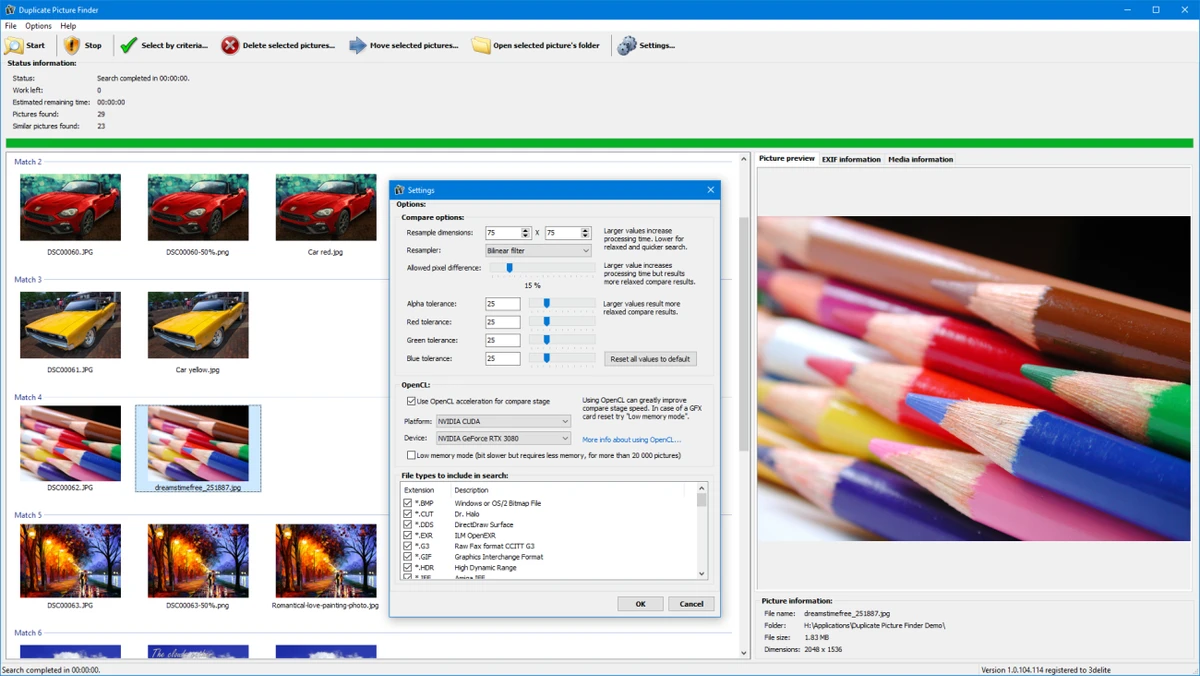

3delite Duplicate Picture Finder is a Windows utility designed to help users locate and manage duplicate images stored on their computers. The software can identify pictures that are exact copies of each other while also offering content-based comparison to detect images that look similar even when they have different resolutions.
The application is useful for users who have accumulated large image collections and want to reduce unnecessary storage usage. Instead of only checking file names or file sizes, Duplicate Picture Finder can analyze image content to find matching pictures that may have been resized, saved in different formats, or otherwise modified.
Once matching images are detected, the software displays them in groups, making it easier to review results before removing unwanted files. Users can preview matching pictures and view EXIF information to help determine which copies should be kept.
The program supports multi-threaded image processing, allowing it to scan and compare pictures more efficiently. Full Unicode support also helps ensure compatibility with image collections containing different languages and character sets. With support for Windows 10 and Windows 11, 3delite Duplicate Picture Finder provides a focused solution for organizing and cleaning up photo libraries.
Features of 3delite Duplicate Picture Finder
- Finds exact duplicate picture files
- Detects images with the same or similar visual content
- Groups matching pictures for easier review
- Provides image previews
- Displays EXIF information for pictures
- Allows selection and deletion of unwanted images
- Uses multi-threaded image processing
- Supports Unicode file names
Interface and Usability
3delite Duplicate Picture Finder is designed around a straightforward workflow: scan images, review matches, and remove unnecessary copies. The grouped display of matching pictures helps users compare results before deleting files.
The preview feature makes it easier to identify duplicates, while EXIF information provides additional details about images when deciding which version to keep. Content-based matching adds flexibility compared with simple duplicate finders that only compare file properties. The multi-threaded processing system helps improve scanning efficiency, especially when working with larger image collections. The software focuses on practical image organization rather than offering unnecessary complexity.
Who Should Use 3delite Duplicate Picture Finder?
- Users managing large photo collections
- Photographers organizing image libraries
- People looking to free up storage space
- Users with multiple copies of the same pictures
- Anyone needing a duplicate image detection tool for Windows
Conclusion
3delite Duplicate Picture Finder provides a focused way to identify and remove duplicate images from a computer. Its ability to compare both exact copies and visually similar pictures makes it more flexible than basic duplicate file scanners.


