FileLegit Windows Multimedia Media Players Media Player Codec Pack
Media Player Codec Pack logo

Media Player Codec Pack 5.1.2.625

  • User Rating:
    ★★★★★
    ★★★★★
    0.0 0Votes
  • Requirements:
    Windows
  • Version: 5.1.2.625
  • Latest updated: 3 days ago
  • License: Freeware  
  • Publisher: Cole Williams
  • Size: 66 MB
× app stores

Media Player Codec Pack is a Windows codec bundle designed to improve audio and video playback compatibility across a wide range of multimedia formats. Instead of relying on limited default system codecs, this package adds essential decoders, filters, and encoders to ensure that most modern media files can be played smoothly on Windows media players. It is especially useful for users who frequently encounter unsupported file formats such as MKV, FLV, FLAC, and other advanced video and audio types.

Features of Media Player Codec Pack

  • Supports playback of most modern video and audio formats.
  • Enables smooth viewing of video clips at various resolutions, including SD content.
  • Includes widely used codecs and filters such as:
    • ffdshow
    • LAV Filters (video and audio)
    • XviD Encoder
    • AC3Filter
    • DivX Audio
    • LAME MP3 encoder
    • Flash FLV support
  • Allows configuration of file associations during installation.
  • Supports playback of formats such as:
    • MKV
    • VOB
    • FLV
    • FLAC
    • OGG
  • Compatible with Windows Media Player and other media applications.
  • Includes source filters and splitters for improved media handling.
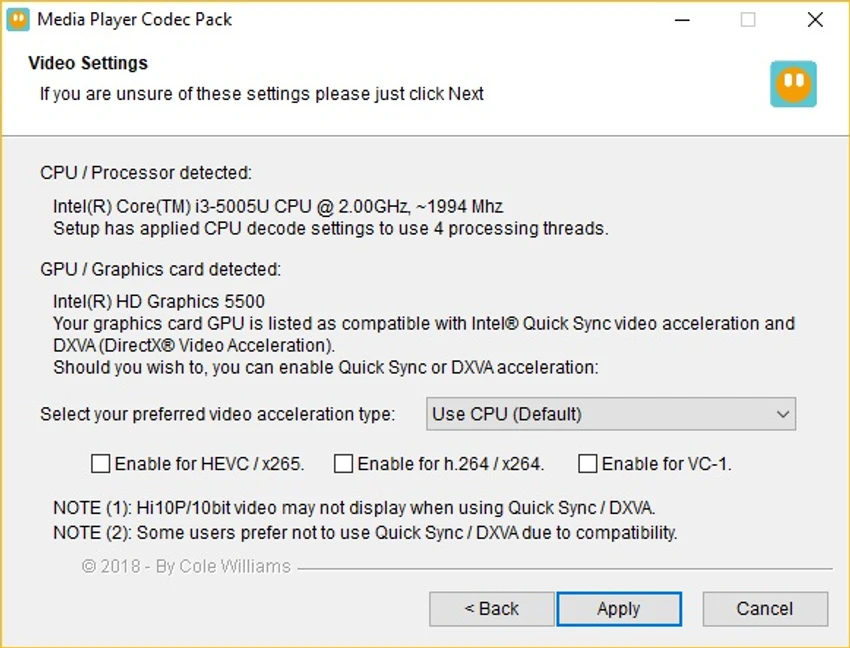
  • Custom installation allows users to select required components.

User Experience

Media Player Codec Pack is designed to work quietly in the background while improving overall media compatibility on Windows systems. After installation, users can immediately notice that previously unsupported files begin playing without requiring additional software. The installation process provides flexibility, allowing users to choose which codecs and components to install. This helps avoid unnecessary system clutter while still ensuring compatibility with desired formats. Once configured, playback becomes seamless across different media types, including high-compression video formats and lossless audio files. It integrates well with standard Windows media players, reducing the need for third-party media applications.

Who Should Use Media Player Codec Pack?

  • Users who cannot play certain video or audio formats on Windows.
  • People using Windows Media Player or similar software.
  • Users who frequently download diverse media file types.
  • Anyone needing improved MKV, FLAC, or FLV support.

Conclusion

Media Player Codec Pack is a simple yet effective solution for enhancing media playback compatibility on Windows. By adding essential codecs and filters, it ensures smoother playback of a wide variety of audio and video formats.

Pros & Cons

Pros

  • Expands support for many video and audio formats.
  • Improves compatibility with Windows media players.
  • Includes widely used codecs and filters.
  • Custom installation options for flexibility.
  • Supports modern file formats like MKV and FLAC.

Cons

  • Does not function as a standalone media player.
  • Requires correct configuration for best results.
  • Advanced users may prefer manual codec management.

Frequently Asked Questions

What is Media Player Codec Pack used for?

It is used to add support for additional audio and video formats on Windows media players.

Does it include a media player?

No. It is a codec pack, not a standalone media player.

What formats does it support?

It supports formats such as MKV, FLV, FLAC, OGG, VOB, and more.

Can it improve Windows Media Player?

Yes. It enhances compatibility and allows Windows Media Player to play more file types.

Is it easy to install?

Yes. It includes a guided installer with selectable components for customization.

Recommended apps [Freeware]:
  • TreeSize 9.8.1.2302 TreeSize logo Windows disk space analyzer to scan, visualize, and clean storage efficiently with reports.
  • OCCT 16.1.11.99 OCCT logo hardware monitoring and stress testing tool for CPU, GPU, memory, and power supply performance analysis.
  • Microsoft PowerToys 0.100.2 Microsoft PowerToys logo adds powerful productivity tools and customization features to Windows 10 and 11
  • WifiInfoView 3.00 WifiInfoView logo scans nearby Wi-Fi networks and displays detailed technical information in real time
  • NanaZip 6.5.1750.0 NanaZip logo a modern file compression and extraction tool based on 7-Zip, offering strong encryption and wide format support
  • AIMP 5.40.2721 AIMP logo a lightweight audio player with high-quality sound, playlist tools, equalizer, and audio conversion features
Recommended apps [Shareware]:
  • Syncovery 12.2.1 Syncovery logo fast backup and file synchronization tool with real-time sync, versioning, and advanced automation features
  • DBF Converter 7.85 DBF Converter logo convert DBF files to CSV, Excel, SQL and text with fast batch processing and filtering
  • UVK Ultra Virus Killer 11.10.26.0 UVK Ultra Virus Killer logo removes malware, manages system processes, repairs Windows issues, and provides advanced system cleanup tools
  • CoolUtils PDF Combine 8.1.0.76/13 CoolUtils PDF Combine logo Windows tool for merging multiple PDF files into one, with bookmarks, encryption, and batch processing
  • EventSentry Light 6.0.1.68 EventSentry Light logo Monitor servers, logs, and network devices, get real-time alerts and centralized system monitoring for IT environments.
  • Adobe Audition 2026 v26.3 Adobe Audition logo professional audio editor for recording, mixing, restoration, podcasting, and sound design