SSD Booster .NET logo

SSD Booster .NET 19.7

  • User Rating:
    ★★★★★
    ★★★★★
    0.0 0Votes
  • Requirements:
    Windows
  • Version: 19.7
  • Latest updated: 1 week ago
  • License: Freeware  
  • Publisher: Omid Soft
  • Size: 3.4 MB
× app stores

SSD Booster .NET is a lightweight Windows utility focused on optimizing system settings for SSD drives. It provides quick access to several performance-related tweaks through a simple toggle-based interface, aiming to help users improve SSD efficiency and reduce unnecessary system overhead.

Overview

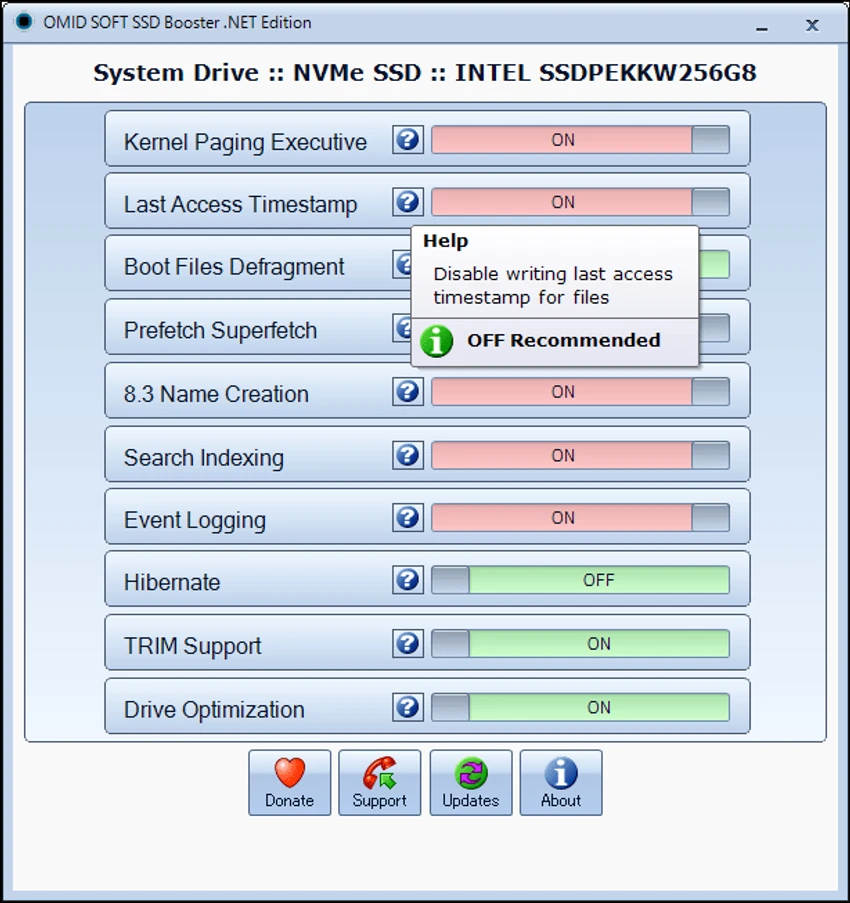
SSD Booster .NET is designed for users who want to adjust Windows settings specifically for SSD usage without manually navigating system configurations. It offers a compact interface where each optimization feature can be enabled or disabled using simple sliders. The tool focuses on common system-level adjustments such as hibernation control, drive optimization behavior, and background logging features. It also includes less obvious system tweaks like Prefetch and Superfetch behavior, which relate to how Windows handles application launch data. Additionally, SSD Booster .NET provides a system information section that allows users to view basic hardware and operating system details.

Features of SSD Booster .NET

  • SSD-focused Windows optimization settings
  • Toggle-based interface for enabling/disabling system features
  • Controls for hibernation and drive optimization
  • Options related to Prefetch and Superfetch behavior
  • System event logging adjustments
  • Support for long file name handling and related system settings
  • Built-in system information panel (hardware and OS overview)
  • Portable utility (no installation required)
  • Lightweight interface with quick access to tweaks

User Experience

SSD Booster .NET is designed to be simple and direct. Instead of navigating deep into Windows settings, users can toggle performance-related options from a single interface. The slider-based system makes it easy to see which optimizations are active. This can be helpful for users who want quick control over SSD-related settings without technical complexity.

However, some features are not self-explanatory, especially for users unfamiliar with Windows internals. While the tool simplifies access, it does not always explain the impact of each change in detail, so caution is needed when enabling or disabling system-level features.

Who Should Use SSD Booster .NET?

SSD Booster .NET is best suited for Windows users who want a quick way to optimize system settings for SSD performance. It may appeal to enthusiasts who like tweaking system behavior or users maintaining older systems with SSD upgrades. It is less suitable for beginners who are unfamiliar with Windows performance settings and their potential impact.

Conclusion

SSD Booster .NET is a straightforward SSD optimization utility that consolidates several system tweaks into a simple interface. It is useful for users who want quick access to performance-related settings without manual system configuration.

Pros & Cons

Pros

  • Simple toggle-based interface
  • Quick access to SSD-related system tweaks
  • Portable and lightweight
  • Includes system information overview
  • Saves time compared to manual Windows configuration

Cons

  • Some features are not clearly explained
  • Limited guidance on system impact of changes
  • Not ideal for beginners
  • No advanced performance benchmarking tools

Frequently Asked Questions

What is SSD Booster .NET used for?

It is used to optimize Windows settings for SSD performance using simple on/off system tweaks.

Does SSD Booster .NET require installation?

No, it is a portable tool and can run directly without installation.

Is SSD Booster .NET safe to use?

Yes, but users should understand each tweak before enabling or disabling it.

Does it improve SSD speed?

It can help optimize system behavior for SSDs, but results depend on system configuration and usage.

Recommended apps [Freeware]:
  • Stretchly 1.21.0 Stretchly logo reminds you to take breaks while working on your computer, promoting better health and productivity.
  • FBackup 9.9.1044 FBackup logo a free Windows backup tool offering automatic backups, cloud support, encryption, and easy file recovery options
  • Exportizer 10.3.4.822 Exportizer logo view, edit, and export databases to Excel, CSV, SQL, and more with advanced conversion tools.
  • Adobe Camera Raw 18.4 Adobe Camera Raw logo Edit, process, and convert RAW photos in Photoshop with Adobe Camera Raw's powerful image workflow tools
  • Tor Browser 15.0.17 Tor Browser logo anonymous web browsing with privacy protection, IP masking, and access to the Tor network
  • Google Chrome 149.0.7827.201 Google Chrome logo fast, secure, and stable web browser with sandboxing, tab isolation, and a minimal interface for modern web applications
Recommended apps [Shareware]:
  • Teorex FolderIco 9.3.0 Teorex FolderIco logo Change folder colors or icons in one click and organize your files visually, so you can find everything instantly
  • EF Mailbox Manager 26.05 EF Mailbox Manager logo Manage multiple POP3 email accounts, remove spam on the server, and download messages securely
  • Pazu StreamGet 3.1.5 Pazu StreamGet logo Download movies and TV shows from major streaming platforms to MP4 or MKV
  • MailWasher Pro 8.0.119 MailWasher Pro logo blocks spam, scams, and unwanted emails before download with advanced filtering tools
  • Duplicate Finder 2026 v418 Duplicate Finder logo remove duplicate photos and videos by scanning files using MD5 hashing for accurate results.
  • DBF Recovery 4.74 DBF Recovery logo repairs corrupted DBF database files from dBASE, FoxPro, and Visual FoxPro formats with automatic recovery tools