


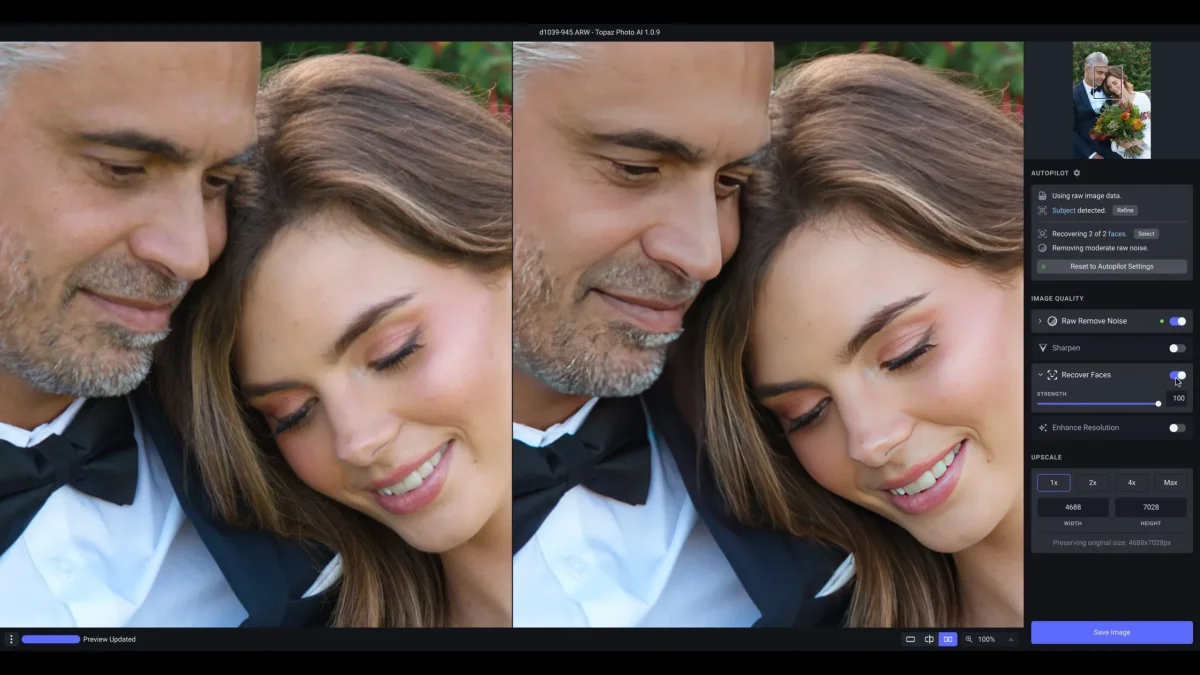

Topaz Photo AI is an AI-powered photo enhancement tool designed to improve image quality through intelligent sharpening and noise reduction. Built for photographers and image enthusiasts, it helps rescue imperfect shots while preserving natural-looking details, allowing users to focus more on creativity and less on technical corrections.
Overview
Topaz Photo AI leverages machine learning technology to enhance photos by addressing common image quality issues such as blur and digital noise. Rather than relying on traditional sharpening methods that can introduce unwanted artifacts, the software analyzes image content and applies targeted improvements designed to maintain a realistic appearance.
The software's primary focus is image enhancement rather than photo manipulation. It helps photographers recover detail from blurry images, reduce noise in high-ISO shots, and produce cleaner, sharper results without extensive manual adjustments.
By automating complex enhancement processes, Topaz Photo AI streamlines post-processing workflows and enables users to achieve high-quality results more efficiently.
Features of Topaz Photo AI
- AI-Powered Sharpening: Improve image sharpness by addressing blur caused by camera shake, motion blur, or focus issues.
- Advanced Noise Reduction: Remove digital noise while preserving important image details.
- Natural-Looking Results: Enhances image quality without excessive halos or sharpening artifacts.
- Content-Aware Processing: AI analyzes image content to distinguish between genuine detail and unwanted noise.
- Automated Enhancement Workflow: Simplifies image correction with intelligent processing.
- High-Quality Detail Recovery: Restores clarity in images that may otherwise be difficult to salvage.
- Photographer-Focused Design: Built specifically to improve photo quality rather than replace creative editing tools.
User Experience
Using Topaz Photo AI feels refreshingly straightforward. The software focuses on solving two of the most common photography challenges: blur and noise. Instead of overwhelming users with dozens of technical controls, it automates much of the enhancement process through AI-driven analysis. The sharpening technology stands out because it targets the underlying causes of blur rather than simply increasing contrast around edges. This often results in more realistic-looking improvements. Likewise, the noise reduction engine effectively cleans up grainy images while maintaining important textures and details.
Photographers who regularly shoot in low-light environments or encounter occasional focus issues will appreciate how quickly the software can improve image quality. While professional users may still rely on dedicated editing software for creative adjustments, Topaz Photo AI serves as a valuable enhancement tool within a broader editing workflow.
Who Should Use Topaz Photo AI?
Topaz Photo AI is ideal for:
- Professional photographers
- Enthusiast photographers
- Wildlife and sports photographers
- Event and wedding photographers
- Content creators
- Users working with low-light photography
- Anyone looking to improve image sharpness and reduce noise
It is especially useful for photographers who want to recover details from images that might otherwise be unusable due to blur or noise.
Conclusion
Topaz Photo AI delivers a focused and effective approach to photo enhancement. By combining advanced AI-powered sharpening and noise reduction technologies, it helps photographers maximize image quality while minimizing manual effort. Rather than replacing creative editing software, Topaz Photo AI complements existing workflows by handling technical image corrections efficiently. If you frequently work with blurry, noisy, or less-than-perfect photos, this software is a compelling addition to your photography toolkit.


