


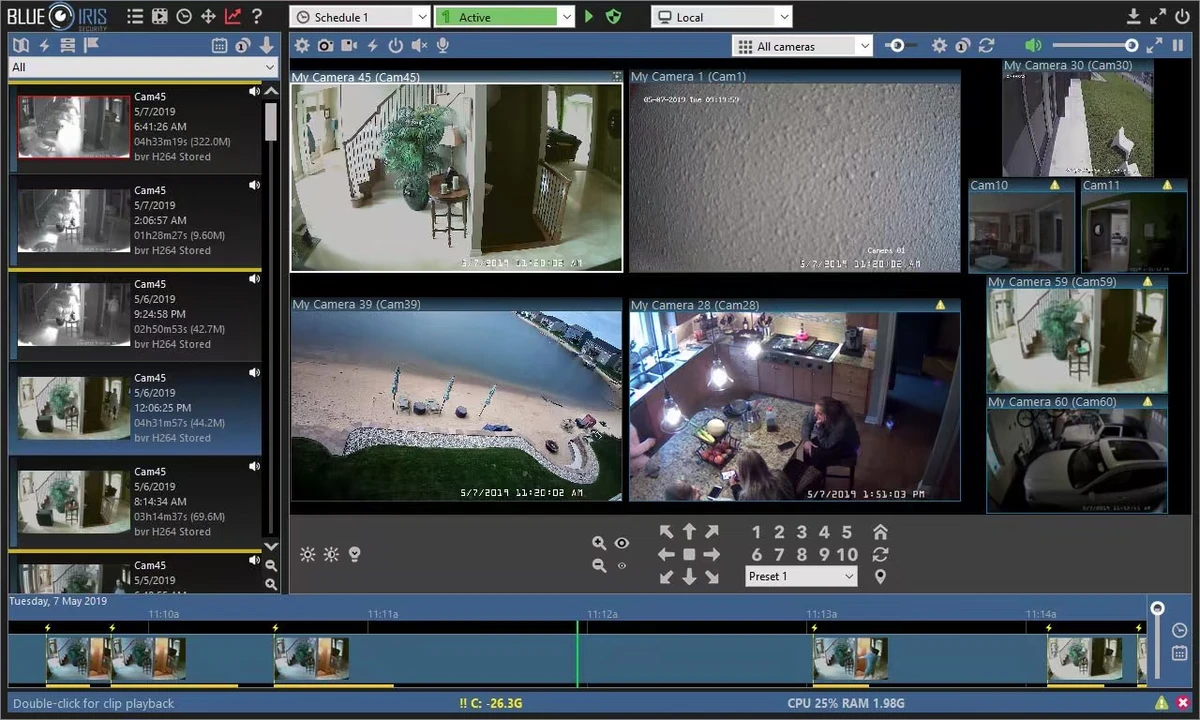

Blue Iris is a professional-grade video surveillance application designed to turn a Windows PC into a fully functional security monitoring system. It supports up to 64 cameras simultaneously, including IP cameras, webcams, DVR, and CCTV systems, making it suitable for both home security setups and small to large-scale monitoring environments.
The software is compatible with a wide range of camera brands such as Amcrest, Hikvision, Axis, Foscam, and many others, giving users flexibility when building or expanding a surveillance system. It uses H.264 video compression to reduce storage usage and bandwidth consumption while maintaining video quality.
Blue Iris includes continuous, scheduled, and motion-based recording modes, along with audio detection capabilities. It also supports alerts via email, instant messaging, phone calls, or external scripts, allowing users to respond quickly to security events.
Key Features of Blue Iris
- Supports up to 64 cameras (IP, webcam, DVR, CCTV)
- Compatible with a wide range of camera brands
- H.264 compression for efficient storage and bandwidth use
- Continuous, scheduled, and motion-triggered recording
- Advanced motion and audio detection alerts
- Email, IM, phone call, and script-based notifications
- Built-in web server for remote access (UI3 interface)
- Live and recorded video viewing from mobile or desktop
- PTZ (Pan-Tilt-Zoom) camera control support
- Runs as a Windows service for background operation
Interface and Usability
Blue Iris provides a feature-rich interface focused on surveillance control and monitoring. While it includes many advanced configuration options, the layout is structured around camera feeds, recording controls, and alert management.
The web-based UI3 interface improves usability for remote access, allowing users to monitor live footage and recordings from mobile devices or browsers. However, due to its professional feature set, initial setup and configuration may require some technical understanding, especially when managing multiple cameras and detection rules.
Who Should Use Blue Iris?
Blue Iris is best suited for users who need a reliable and scalable surveillance system, including homeowners, small business owners, and IT professionals managing multiple camera feeds. It is especially useful for users who want advanced control over motion detection, recording schedules, and remote monitoring.
Conclusion
Blue Iris is a powerful and flexible surveillance solution that transforms a Windows PC into a professional security monitoring system. With support for up to 64 cameras, advanced recording options, and remote access features, it provides strong control over modern security setups.


