Audio Transcoder logo

Audio Transcoder 2.12.24

  • User Rating:
    ★★★★★
    ★★★★★
    0.0 0Votes
  • Requirements:
    Windows
  • Version: 2.12.24
  • Latest updated: 1 week ago
  • License: Free Trial  
  • Publisher: Digital Music Software
  • Size: 12 MB
×

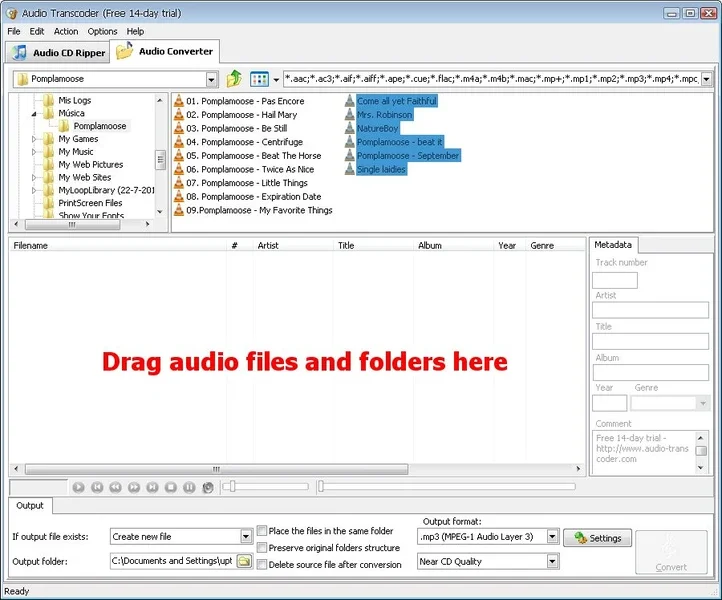
Audio Transcoder is a dedicated audio conversion tool designed for users who need a simple way to convert audio files between a wide range of formats. Beyond basic format conversion, it also includes CD ripping capabilities, audio tag editing, playlist support, and batch processing features.

During my experience with Audio Transcoder, the software focused on doing one job well: converting audio files quickly and efficiently. Instead of overwhelming users with advanced audio production tools, it provides a streamlined workflow for converting, organizing, and managing music files. The software supports many popular audio formats, including MP3, AAC, AC3, WMA, FLAC, WAV, AIFF, APE, M4A, MP2, MP4, OGG, Speex, and several others.

Key Features of Audio Transcoder

Extensive Audio Format Support

  • Convert from more than 20 audio formats.
  • Export to over 15 audio formats.
  • Supports MP3, AAC, FLAC, WAV, WMA, OGG, AIFF, APE, AC3, MP2, MP4, and more.

Audio CD Ripping

  • Rip audio CDs directly to formats such as:
    • MP3
    • FLAC
    • WAV
    • WMA
    • AAC
    • OGG
    • APE
    • MP4
  • Supports CD-Text reading.
  • Retrieves disc information from the FreeDB database.

Batch Conversion

  • Convert multiple files simultaneously.
  • Queue files for automatic processing.
  • Suitable for large music libraries.

Metadata Preservation

  • Retains important audio tags during conversion.
  • Supports:
    • ID3v1
    • ID3v2
    • Ogg/FLAC tags
    • WMA tags
    • APE tags

Built-in Tag Editor

  • Edit music metadata without using separate software.
  • Manage track information before or after conversion.

Built-in Audio Player

  • Preview audio files before conversion.
  • Compare output quality after conversion.

Quality Presets

  • Preconfigured output settings for different quality levels.
  • Simplifies conversion for beginners.

Playlist Support

  • Supports:
    • .m3u
    • .m3u8
    • .pls

Additional Utilities

  • Drag-and-drop file support.
  • Preserve folder structure during conversion.
  • Split a single audio track into separate tracks.
  • Support for multi-channel audio files.
  • Automatic computer shutdown after conversion.
  • Windows context-menu integration for quick conversions.

Conclusion

Audio Transcoder delivers exactly what many users need from an audio conversion utility: broad format compatibility, reliable batch processing, CD ripping, and metadata preservation. Its straightforward interface and focused feature set make it particularly useful for managing and converting large music collections without unnecessary complexity.

Pros & Cons

Pros

    • Supports a large number of audio formats
    • Includes both audio conversion and CD ripping
    • Batch conversion saves time
    • Preserves metadata during conversion
    • Built-in audio player and tag editor
    • Simple drag-and-drop interface
    • Playlist support
    • Windows context-menu integration

Cons

    • User interface may appear dated compared to modern applications
    • Focused primarily on conversion rather than advanced audio editing
    • No advanced audio production or enhancement tools

Frequently Asked Questions

What is Audio Transcoder used for?

Audio Transcoder is used to convert audio files between various formats, rip audio CDs, edit music tags, and manage audio collections through batch processing.

Does Audio Transcoder support MP3 conversion?

Yes. The software can convert audio files to and from MP3 along with many other formats such as FLAC, AAC, WMA, WAV, OGG, and APE.

Can Audio Transcoder convert multiple files at once?

Yes. Batch conversion is supported, allowing users to process multiple files in a single operation.

Does Audio Transcoder preserve metadata?

Yes. The software preserves supported metadata formats including ID3v1, ID3v2, Ogg/FLAC, WMA, and APE tags during conversion.

Can Audio Transcoder rip audio CDs?

Yes. It includes a built-in CD ripper capable of converting audio CDs into several popular digital audio formats.

Does Audio Transcoder include audio editing tools?

The software includes a tag editor and track-splitting functionality, but it is primarily designed for audio conversion rather than advanced audio editing.

Recommended apps [Freeware]:
  • Simple IP Config 2.9.7 Simple IP Config logo a lightweight, portable tool for quickly changing Windows IP, DNS, and network settings
  • IObit Driver Booster 13.4.0.234 IObit Driver Booster logo updates outdated drivers automatically to boost system stability and gaming performance.
  • WinScan2PDF 9.77 WinScan2PDF logo scan documents and save them as PDFs or JPEGs with minimal setup and low CPU usage.
  • Android Studio 2026.1.1.9 Android Studio logo Google’s official IDE for Android, offering intelligent coding, fast emulators, and cloud integration.
  • TreeSize 9.8.1.2302 TreeSize logo Windows disk space analyzer to scan, visualize, and clean storage efficiently with reports.
  • HWMonitor 1.64 HWMonitor logo a free system tool that monitors CPU, GPU, voltages, temperatures, and fan speeds in real time.
Recommended apps [Shareware]: