NewFileTime logo

NewFileTime 8.28

  • User Rating:
    ★★★★★
    ★★★★★
    0.0 0Votes
  • Requirements:
    Windows
  • Version: 8.28
  • Latest updated: 2 days ago
  • License: Freeware  
  • Publisher: Nenad Hrg
  • Size: 0.2 MB
×

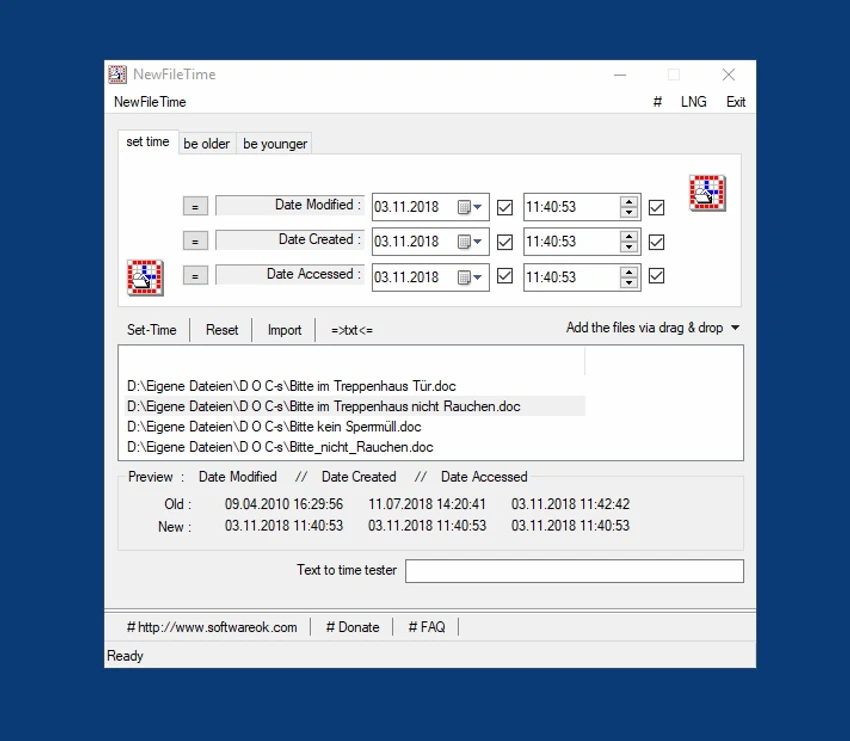
NewFileTime is a small, standalone Windows utility designed to modify file timestamps, including creation, modification, and last access dates. It allows users to adjust the time metadata of individual files, multiple files, or entire folder structures in just a few clicks. The tool is especially useful for organizing files, correcting incorrect timestamps, or adjusting metadata for personal or professional purposes. It provides flexible options to set exact dates or shift timestamps forward or backward by a specified duration.

Features of NewFileTime

  • Modify file creation, modification, and access timestamps
  • Edit timestamps for single files or multiple files at once
  • Support for entire folder structures, including subfolders
  • Drag-and-drop file input for quick workflow
  • Set exact date and time values manually
  • Adjust timestamps relatively (make files older or newer by days/hours)
  • Import entire directories for batch processing
  • Lightweight portable utility (82 KB)
  • Simple reset function to clear loaded files
  • Flexible controls for bulk file time editing

User Experience

Using NewFileTime feels extremely fast and minimalistic. Since it is a lightweight utility, it launches almost instantly and does not require installation, making it convenient for quick tasks. The drag-and-drop functionality simplifies the process of adding files, and users can immediately start adjusting timestamps without navigating complex menus. This makes it especially accessible for users who need a straightforward solution for metadata editing.

One of the most useful aspects is the ability to process multiple files or entire folder structures at once. This is helpful when dealing with large collections of files where timestamps need to be standardized or corrected. The interface is functional rather than modern, but it prioritizes efficiency over design. Most actions are completed within a few clicks, and the tool responds quickly even when handling multiple files.

Who Should Use NewFileTime?

  • Users who need to correct incorrect file timestamps
  • Organizing large file collections with consistent metadata
  • IT professionals managing file systems
  • Photographers or users adjusting media file dates
  • Anyone needing quick file metadata editing on Windows

Conclusion

NewFileTime is a fast, lightweight, and reliable utility for editing file timestamps on Windows. Its ability to handle both individual files and entire folders makes it a valuable tool for users who need precise control over file metadata.

Pros & Cons

Pros

    • Extremely lightweight (200 KB)
    • No installation required
    • Supports batch file and folder processing
    • Easy drag-and-drop functionality
    • Allows precise timestamp customization
    • Supports creation, modification, and access time editing
    • Fast and responsive performance
    • Suitable for entire directory structures

Cons

    • Basic interface with limited visual design
    • Focused only on timestamp editing (single-purpose tool)
    • No advanced file management features
    • Requires caution to avoid unintentional metadata changes

Frequently Asked Questions

What is NewFileTime used for?

NewFileTime is used to modify file timestamps, including creation, modification, and last access dates.

Can NewFileTime edit multiple files at once?

Yes. It supports batch editing for multiple files and entire folder structures.

Does NewFileTime require installation?

No. It is a lightweight standalone utility.

Can I set exact dates and times?

Yes. You can manually set specific timestamps or adjust them relatively.

Is NewFileTime safe to use?

Yes, but users should be careful since modifying file metadata can affect file organization and tracking.

Recommended apps [Freeware]:
  • Simple IP Config 2.9.7 Simple IP Config logo a lightweight, portable tool for quickly changing Windows IP, DNS, and network settings
  • Stretchly 1.21.0 Stretchly logo reminds you to take breaks while working on your computer, promoting better health and productivity.
  • WSCC - Windows System Control Center 10.0.3.8 WSCC - Windows System Control Center logo Windows utility manager that installs, organizes, and runs Sysinternals and system tools from one central interface
  • Visual Studio Code 1.124.2 Visual Studio Code logo Free and powerful code editor from Microsoft with extensions, debugging, Git support, and multi-language development
  • Dr.Web Live Disk 9.0.1 Dr.Web Live Disk logo free bootable antivirus rescue disk that removes malware and helps recover infected systems
  • AnyTXT Searcher 1.3.3173 AnyTXT Searcher logo fast desktop search tool that indexes and searches full-text content across documents, PDFs, emails, and more
Recommended apps [Shareware]:
  • SketchUp Pro 2026 SketchUp Pro logo powerful 3D modeling software for architects, designers, and engineers with intuitive tools.
  • Adobe Illustrator 2026 Adobe Illustrator logo professional vector graphic editor for creating logos, illustrations, and scalable designs.
  • Adobe After Effects 2026 Adobe After Effects logo advanced motion graphics, visual effects, compositing, and animation tools for creators.
  • Topaz Photo 1.6.1 Topaz Photo logo advanced AI to sharpen photos, remove noise, and enhance image quality with ease
  • Bandizip 7.44 Bandizip logo Fast and intuitive file compression software supporting ZIP, RAR, 7Z, and more with high-speed archiving features
  • Secret Disk 2026 v323 Secret Disk logo create hidden, password-protected virtual drives to securely store private files on Windows