HWiNFO Portable logo

HWiNFO Portable 8.50

  • User Rating:
    ★★★★★
    ★★★★★
    0.0 ★ 0Votes
  • Requirements:
    Windows
  • Version: 8.50
  • Latest updated: 2 weeks ago
  • License: Freeware  
  • Publisher: REALiX
  • Size: 20 MB
× app stores

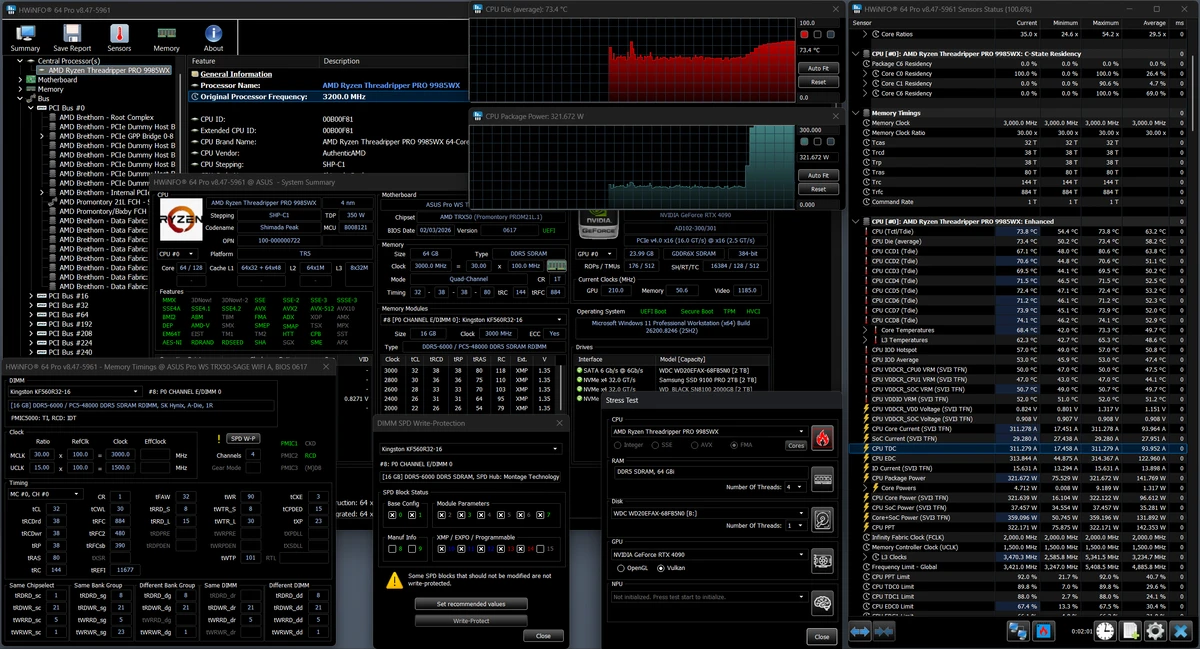
HWiNFO Portable is a professional hardware information and diagnostic utility that provides detailed insights into a computer's hardware components without requiring installation. Designed to support the latest hardware technologies, components, and industry standards, it is an excellent choice for users who need a portable solution for analyzing, monitoring, and troubleshooting Windows systems.

The application gathers extensive information about your computer's hardware and presents it in a well-organized format that is easy to navigate. This makes it valuable for IT professionals, system integrators, computer manufacturers, technicians, and enthusiasts who need accurate hardware data for diagnostics, driver updates, or system evaluation. Since it runs as a portable application, it can be carried on a USB drive and used across multiple computers without modifying the operating system.

In addition to hardware identification, HWiNFO Portable includes comprehensive system monitoring capabilities. It can monitor supported sensors such as temperatures, voltages, fan speeds, and power readings while offering multiple ways to visualize this information through tables, graphs, log files, tray icons, and gadgets. Users can also export detailed reports in several formats, making the software suitable for documentation, troubleshooting, and performance analysis.

Features of HWiNFO Portable

  • Portable application with no installation required
  • Comprehensive hardware detection and analysis
  • Supports the latest hardware components and industry standards
  • Detailed system information
  • Monitor system temperatures, voltages, fan speeds, and power (when supported)
  • Display sensor data through tables, graphs, log files, tray icons, gadgets, and LG LCD reports
  • Export reports in Text, CSV, XML, HTML, and MHTML formats
  • Regular software updates
  • SDK available for custom applications
  • Supports third-party integrations and plug-ins

Interface and Usability

After using HWiNFO Portable, I found the interface information-rich while remaining logically organized. Hardware components are categorized clearly, allowing quick access to detailed specifications for processors, storage devices, memory, and other system hardware.

The monitoring tools provide multiple ways to view sensor information, including graphs, logs, and tray indicators, making it easier to track system health over time. Because the application is portable, it is especially convenient for technicians and advanced users who frequently diagnose multiple computers. Although beginners may find the amount of technical information extensive, the interface remains structured enough to navigate comfortably.

Who Should Use HWiNFO Portable?

  • IT professionals and system administrators
  • Computer technicians diagnosing hardware issues
  • PC enthusiasts monitoring system performance
  • System builders and hardware integrators
  • Users who need a portable hardware diagnostic utility
  • Anyone generating detailed hardware reports without installing software

Conclusion

HWiNFO Portable combines powerful hardware diagnostics, detailed system monitoring, and flexible reporting into a lightweight portable application. Its ability to run without installation makes it especially useful for technicians, IT professionals, and users who frequently work across multiple computers. With support for modern hardware, multiple report formats, and extensive monitoring capabilities, it serves as a reliable tool for system analysis and troubleshooting.

Pros & Cons

✓

Pros

  • Fully portable with no installation required
  • Comprehensive hardware information
  • Detailed hardware sensor monitoring
  • Supports the latest hardware technologies
  • Multiple report export formats
  • Regularly updated
  • SDK available for developers
  • Supports various third-party plug-ins and integrations
✕

Cons

  • Large amount of technical information may be overwhelming for beginners
  • Some monitoring features depend on hardware sensor support

Frequently Asked Questions

What is HWiNFO Portable used for?

HWiNFO Portable is used to analyze computer hardware, display detailed system information, monitor supported hardware sensors, and generate reports without installing the software.

Does HWiNFO Portable require installation?

No. HWiNFO Portable is designed to run directly from its executable files, making it suitable for use from a USB drive or other portable storage devices.

Can HWiNFO Portable monitor hardware temperatures?

Yes. The software can monitor supported hardware sensors, including temperatures, voltages, fan speeds, and power information when these sensors are available on the system.

Can I export hardware reports with HWiNFO Portable?

Yes. HWiNFO Portable supports exporting reports in multiple formats, including Text, CSV, XML, HTML, and MHTML.

Does HWiNFO Portable support third-party integrations?

Yes. The software supports various third-party plug-ins and integrations, including monitoring and display tools compatible with supported applications.

Who should use HWiNFO Portable?

HWiNFO Portable is best suited for technicians, IT professionals, hardware enthusiasts, system builders, and anyone who needs detailed hardware diagnostics and monitoring without installing software.

Recommended apps [Freeware]:
  • Adobe DNG Converter 18.4 Adobe DNG Converter logo Convert camera-specific RAW files to Adobe DNG format for improved compatibility and flexible photo workflows
  • SimpleFixAI 1.7.20 SimpleFixAI logo Diagnose and repair Windows issues with SimpleFixAI, a local AI-powered system troubleshooting tool with one-click rollback
  • Dism++ 10.1.1002.2 Dism++ logo a lightweight Windows optimization tool for cleaning system files, managing startup items, updates, and system images
  • MiniTool Partition Wizard 13.9 MiniTool Partition Wizard logo manages disk partitions with resizing, cloning, recovery, OS migration, and storage tools
  • DXVA Checker 4.8.0 DXVA Checker logo Check DXVA support, decoder compatibility, GPU usage, and hardware video acceleration capabilities for Windows media playback.
  • Eusing MultiClip 2.2 Eusing MultiClip logo Store frequently used text snippets, assign custom hotkeys, and speed up repetitive typing with a lightweight clipboard management utility.
Recommended apps [Shareware]:
  • DiskBoss 17.0.14 DiskBoss logo powerful Windows file management tool for disk analysis, duplicate cleanup, file synchronization, and data migration
  • O&O Defrag Professional 31.3.26064 O&O Defrag Professional logo optimizes HDDs and SSDs with intelligent defragmentation, automatic maintenance, startup management, and disk cleanup tools
  • Catalyst Production Suite 2026.1.1 Catalyst Production Suite logo a professional media tool for browsing, preparing, transcoding, and managing Pro video formats.
  • Auslogics ChillMate 1.1.0.6 Auslogics ChillMate logo Monitor CPU and GPU temperature, optimize battery life, and reduce overheating with Auslogics ChillMate for Windows laptops
  • Fast Video Downloader 4.0.0.82 Fast Video Downloader logo download videos from YouTube, Facebook, Vimeo, and more, with conversion and screen recording tools
  • PerfectXL Risk Finder 1.2.12 PerfectXL Risk Finder logo analyzes Excel files, detects spreadsheet risks, finds errors, and improves model reliability