


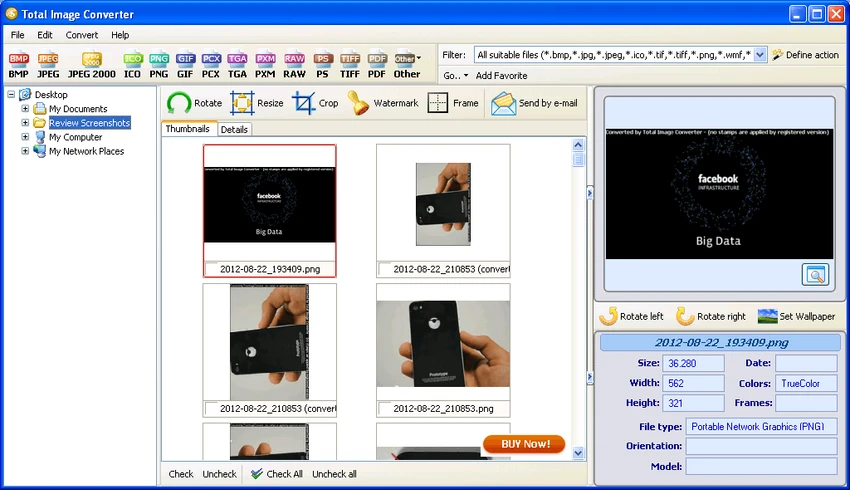

Total Image Converter is a versatile batch image processing tool designed to convert, resize, crop, and enhance images across a wide range of formats. It is especially useful for users who work with large image collections or need to convert professional formats like RAW, TIFF, or PSD into web-friendly formats.
Overview
CoolUtils Total Image Converter is built to simplify image format conversion while offering additional editing tools such as resizing, cropping, rotating, and watermarking. It supports both common and rare image formats, making it suitable for photographers, designers, and users dealing with legacy or specialized image files. The software is designed for speed and efficiency, using multi-threading to handle large batches of images quickly. It also includes a wizard-style interface that makes batch processing accessible even for less technical users.
Beyond basic conversion, it also supports advanced tasks like CMYK to RGB conversion, watermarking, and PDF export, making it a flexible tool for both personal and professional workflows.
Features of Total Image Converter
- Convert images between multiple formats (JPEG, PNG, TIFF, BMP, PSD, RAW, etc.)
- Supports over 30+ common and rare image formats
- Batch image conversion and processing
- Resize and crop images easily
- Rotate images in bulk
- Add text or logo watermarks
- Convert CMYK images to RGB color space
- Multi-threaded processing for faster performance
- Convert images into PDF format
- Add frames to images in batch mode
- Supports RAW camera formats (CR2, NEF, RAF, ORF, and more)
- Built-in preview panel for image inspection
- Command-line support for automation
- SDK version available for server use (no GUI)
- Easy wizard-style interface for beginners
User Experience
Using Total Image Converter feels efficient and straightforward, especially when dealing with large batches of images. The wizard-based interface helps guide users through the conversion process without requiring advanced technical knowledge. Performance is strong thanks to multi-threading, making it suitable for handling large image libraries or high-resolution files. The preview panel is particularly useful for verifying output before conversion. The additional editing tools, such as watermarking and resizing, make it more than just a converter—it functions as a lightweight image processing suite.
Who Should Use Total Image Converter?
- Photographers handling RAW image files
- Designers converting between multiple formats
- Web developers optimizing images for online use
- Users working with legacy or uncommon image formats
- Anyone needing fast batch image conversion
Conclusion
Total Image Converter is a reliable all-in-one solution for converting and processing images in bulk. Its wide format support, fast performance, and additional editing tools make it a strong choice for both casual and professional users.


