Blocker Web logo

Blocker Web 1.1.5.0

  • User Rating:
    ★★★★★
    ★★★★★
    0.0 ★ 0Votes
  • Requirements:
    Windows
  • Version: 1.1.5.0
  • Latest updated: 2 weeks ago
  • License: Freemium  
  • Publisher: ComputerSluggish
  • Size: 3 MB
× app stores

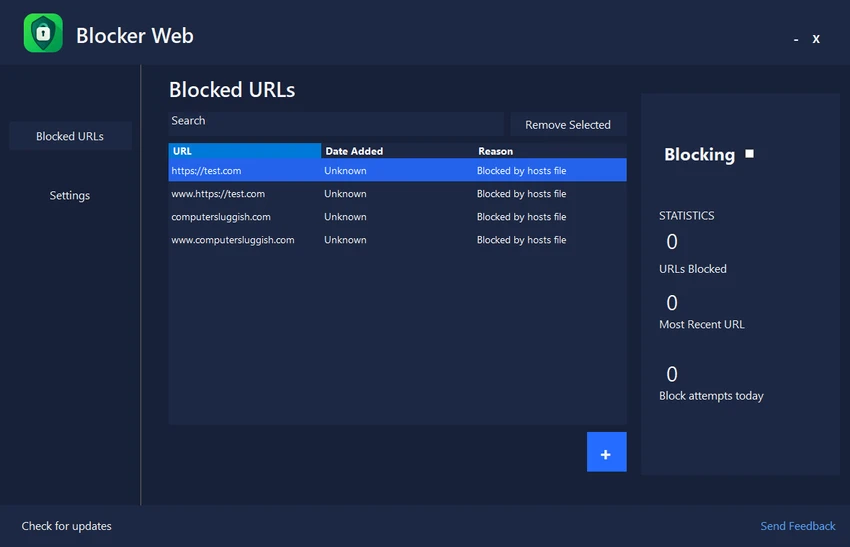
Blocker Web is a lightweight Windows utility designed to help users reduce online distractions by blocking access to selected websites. Whether you're working, studying, or simply trying to stay focused, the application provides a straightforward way to restrict distracting websites and improve productivity. The free version allows users to block up to five websites while providing an easy-to-manage list of blocked URLs. Websites can be added, searched, and removed through a simple interface, making it easy to update your block list whenever your browsing habits change.

One of Blocker Web's key advantages is that website blocking remains active even after the application has been closed. This allows users to maintain their focus without keeping the program running in the foreground. The application also includes basic blocking statistics, giving users an overview of blocked websites and recent blocking activity.

Blocker Web requires no account registration and features a quick installation process, making it accessible for users who want an uncomplicated solution for limiting distractions on Windows. While the free edition is limited to five blocked websites, it provides the core functionality needed to improve concentration during work or study sessions.

Features of Blocker Web

  • Block up to five websites (Free version)
  • Website blocking remains active after closing the application
  • Add, search, and remove blocked URLs
  • View website blocking statistics
  • Lightweight Windows application
  • Simple and user-friendly interface
  • Quick installation
  • No account registration required

Interface and Usability

Blocker Web features a clean, minimal interface that focuses on simplicity. Adding websites to the block list takes only a few clicks, and managing blocked URLs is straightforward thanks to built-in search and editing functions.

The application is lightweight and quick to install, making it suitable for users who want distraction blocking without configuring complex settings. Since website blocking continues to work after the application is closed, users can stay focused without leaving the program running. Overall, the interface prioritizes ease of use, making it suitable for both casual users and those looking for a simple productivity tool.

Who Should Use Blocker Web?

  • Students minimizing online distractions
  • Remote workers
  • Office professionals
  • Anyone trying to improve focus while using a Windows PC
  • Users who need a simple website blocker without creating an account

Conclusion

Blocker Web is a straightforward website-blocking utility that helps Windows users stay focused by restricting access to distracting websites. Its lightweight design, simple interface, and persistent blocking functionality make it an effective tool for improving productivity without unnecessary complexity.

Pros & Cons

✓

Pros

  • Lightweight and easy to use
  • Quick installation
  • No account required
  • Website blocking remains active after the application is closed
  • Simple management of blocked URLs
  • Includes basic blocking statistics
✕

Cons

  • Free version is limited to five blocked websites
  • Available only for Windows
  • Advanced blocking features require the Pro version

Frequently Asked Questions

What is Blocker Web used for?

Blocker Web helps Windows users block distracting websites to improve focus while working, studying, or browsing.

How many websites can I block with the free version?

The free version allows you to block up to five websites.

Does website blocking continue after I close Blocker Web?

Yes. Blocked websites remain inaccessible even after the application has been closed.

Can I edit my list of blocked websites?

Yes. You can add, search for, and remove blocked URLs using the built-in management tools.

Do I need to create an account to use Blocker Web?

No. Blocker Web does not require account registration to use the free version.

Does Blocker Web provide activity information?

Yes. The application includes basic blocking statistics that display information about blocked websites and recent blocking activity.

Recommended apps [Freeware]:
  • MSI Center 2.0.71.0 MSI Center logo a system utility for MSI devices that manages performance, gaming modes, monitoring, RGB, and hardware optimization tools
  • HttpMaster Professional 7.0.0 HttpMaster Professional logo web testing tool for developers to automate HTTP requests, API testing, and response validation
  • Monkey's Audio 13.18 Monkey's Audio logo a free lossless audio compressor that reduces file size while preserving original sound quality
  • Cloudflare WARP 2026.6.850.0 Cloudflare WARP logo Browse faster and more securely with Cloudflare WARP, featuring encrypted connections, WireGuard technology, and Zero Trust support
  • ESET Online Scanner 3.7.11.0 ESET Online Scanner logo Scan and remove malware, viruses, spyware, and other online threats with a lightweight browser-based security scanner.
  • DNSCrypt-Proxy 2.1.17 DNSCrypt-Proxy logo Encrypt DNS traffic, monitor queries, filter unwanted domains, and improve online privacy with this powerful command-line security utility.
Recommended apps [Shareware]:
  • Adobe Premiere Pro 2026 Adobe Premiere Pro logo professional 4K video editor with advanced audio, color, and motion graphics tools.
  • Teorex FolderIco 9.3.1 Teorex FolderIco logo Change folder colors or icons in one click and organize your files visually, so you can find everything instantly
  • FastKeys 6.07 FastKeys logo Windows automation tool for shortcuts, text expansion, mouse gestures, macros, and workflow automation
  • ComboTIFF Pro 2.97 ComboTIFF Pro logo Manage multipage TIFF files with image merging, extraction, conversion, resizing, compression, and advanced editing options.
  • Batch It Ultra 6.77 Batch It Ultra logo Process thousands of images with batch resizing, conversion, effects, watermarking, captions, and advanced automation tools.
  • SmartGit 26.1.045 SmartGit logo Manage Git repositories easily with visual history, merging tools, platform integrations, and customizable workflows.