Textadept logo

Textadept 13.0

  • User Rating:
    ★★★★★
    ★★★★★
    0.0 ★ 0Votes
  • Requirements:
    Windows
  • Version: 13.0
  • Latest updated: 3 weeks ago
  • License: Open Source  
  • Publisher: orbitalquark
  • Size: 21.2 MB
× app stores

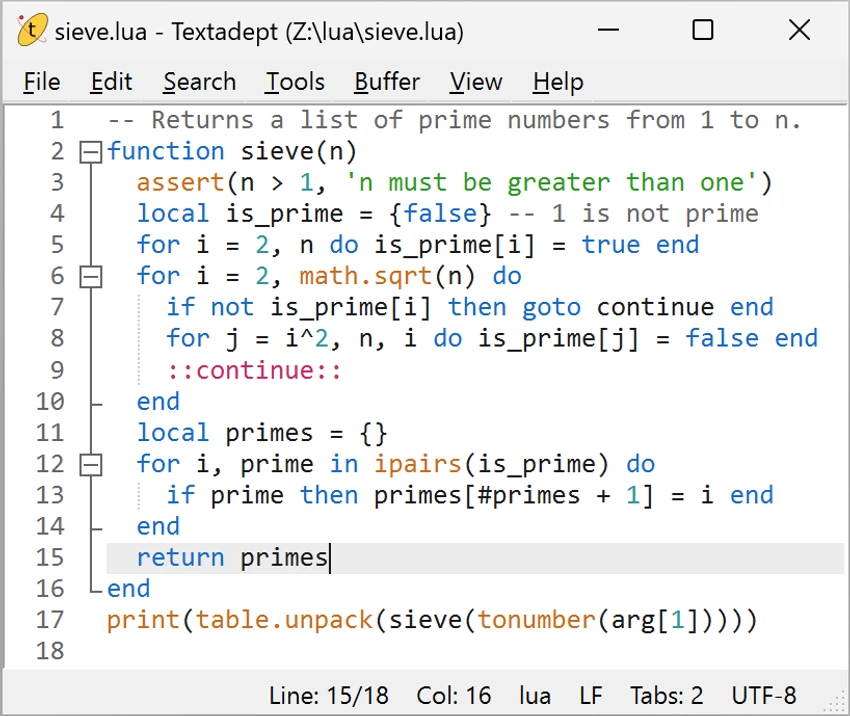
Textadept is a free, portable, and cross-platform text editor built for programmers who value speed, flexibility, and simplicity. After spending time with it, I found that it strikes an impressive balance between minimalism and powerful customization. Rather than overwhelming users with built-in features, Textadept focuses on delivering a fast editing experience while allowing nearly every aspect of the editor to be customized through Lua scripting.

Designed primarily for software developers, Textadept supports over 100 programming languages and recognizes hundreds of file types. It also includes useful coding features such as syntax highlighting, code autocompletion, API documentation, and the ability to compile and run simple source files. Despite these capabilities, the application remains remarkably lightweight and portable.

Features of Textadept

  • Free, open-source, and cross-platform text editor.
  • Portable version that runs without installation.
  • Extensive customization using the Lua programming language.
  • Syntax highlighting for more than 100 programming languages.
  • Supports hundreds of source code file types.
  • Code autocompletion for words and programming symbols.
  • Displays API documentation while coding.
  • Can compile and run simple source files.
  • Unlimited vertical and horizontal split views.
  • Built-in light, dark, and terminal themes.

Interface and Usability

Textadept embraces a minimalist design that keeps distractions to a minimum. The interface feels clean and responsive, making it easy to focus on writing and editing code. Although it lacks the polished appearance of larger development environments, navigation is straightforward and performance remains consistently fast. One feature I particularly appreciated was the unlimited split-view support, which makes comparing files or working with different sections of the same file much easier. The built-in themes also provide enough flexibility for different working environments, whether you prefer light, dark, or terminal-style interfaces.

For experienced developers, the Lua-based customization system is a major advantage. Nearly every aspect of the editor can be modified, allowing users to tailor the application to their own workflow.

Who Should Use Textadept?

  • Software developers who prefer lightweight tools.
  • Programmers seeking extensive customization through Lua.
  • Developers working across multiple operating systems.
  • Users who need a portable code editor.
  • Anyone looking for a fast alternative to heavier development environments.

Conclusion

Textadept proves that a code editor doesn't need to be large to be powerful. Its combination of speed, portability, extensive language support, and Lua-based customization makes it an excellent choice for developers who want complete control over their editing environment.

Pros & Cons

✓

Pros

  • Free and open source.
  • Lightweight and highly responsive.
  • Portable with no installation required.
  • Supports over 100 programming languages.
  • Powerful Lua scripting for customization.
  • Unlimited split-view editing.
  • Built-in themes for different preferences.
✕

Cons

  • Minimalist interface may feel basic for some users.
  • Advanced customization may require familiarity with Lua.

Frequently Asked Questions

What is Textadept used for?

Textadept is a lightweight text editor designed primarily for programming. It supports source code editing, syntax highlighting, code autocompletion, and basic compilation for simple source files.

Is Textadept free?

Yes. Textadept is completely free and open source, making it available for both personal and professional use.

Which programming languages does Textadept support?

Textadept supports syntax highlighting for more than 100 programming languages and recognizes hundreds of different source code file types.

Can Textadept run without installation?

Yes. Textadept offers a portable version that can be used directly from a USB drive or any folder without installing it on the operating system.

Does Textadept support code autocompletion?

Yes. Textadept can autocomplete words from open files as well as programming language symbols. It also displays API documentation to assist while coding.

Is Textadept a full IDE?

Textadept is primarily a lightweight code editor rather than a full integrated development environment (IDE). While it can compile and run simple source files and offers powerful customization, it focuses on fast editing instead of providing the extensive built-in tooling found in larger IDEs.

Recommended apps [Freeware]:
  • QuadSpinner Gaea 2.3.0.1 QuadSpinner Gaea logo a procedural terrain design tool for creating realistic landscapes with advanced erosion tools.
  • PC Timer 19.7 PC Timer logo a lightweight Windows tool to schedule shutdown, restart, logout, or lock actions with a simple timer or calendar-based scheduler
  • Intel Wireless Bluetooth Driver 24.50.0 Intel Wireless Bluetooth Driver logo Intel Wireless Bluetooth Driver for Windows 10/11 delivers stable Bluetooth connectivity for supported Intel adapters
  • 360 Total Security 11.0.0.1314 360 Total Security logo 360 Total Security provides antivirus protection, malware detection, system cleanup, and online security tools
  • ImTranslator 20.1 ImTranslator logo Translate text, web pages, and phrases in over 90 languages with multiple translation providers, dictionary support, and text-to-speech.
  • Notepad++ 8.9.7 Notepad++ logo Edit code and plain text with a fast, lightweight editor featuring syntax highlighting, multiple tabs, plugins, and support for many programming languages.
Recommended apps [Shareware]:
  • Teorex FolderIco 9.3.1 Teorex FolderIco logo Change folder colors or icons in one click and organize your files visually, so you can find everything instantly
  • VueScan 9.8.56 VueScan logo Enhance scanner functionality with advanced tools for scanning documents, photos, videos, and slides.
  • Remo Recover Windows 6.0.0.260 Remo Recover Windows logo Recover deleted, formatted, and lost files with Remo Recover Windows, a comprehensive data recovery solution
  • PDF Eraser 1.9.9.1 PDF Eraser logo a Windows tool for removing text, images, and pages from PDFs with editing and rotation features
  • Wondershare MobileTrans 5.1.13 Wondershare MobileTrans logo Transfer contacts, photos, apps, and more between Android and iPhone safely
  • WinCatalog 2026.2.0.629 WinCatalog logo a disk and file cataloging tool for Windows that indexes files for fast search and organization