Wireshark logo

Wireshark 4.6.7

  • User Rating:
    ★★★★★
    ★★★★★
    0.0 ★ 0Votes
  • Requirements:
    Windows
  • Version: 4.6.7
  • Latest updated: 2 weeks ago
  • License: Freeware  
  • Publisher: Gerald Combs
  • Size: 93 MB
× app stores

Wireshark is a powerful network protocol analyzer that allows users to capture and inspect data traveling across a live network or stored in previously captured files. Originally known as Ethereal, the software has become one of the most widely used tools for examining network communications, troubleshooting connectivity issues, and analyzing packet-level data.

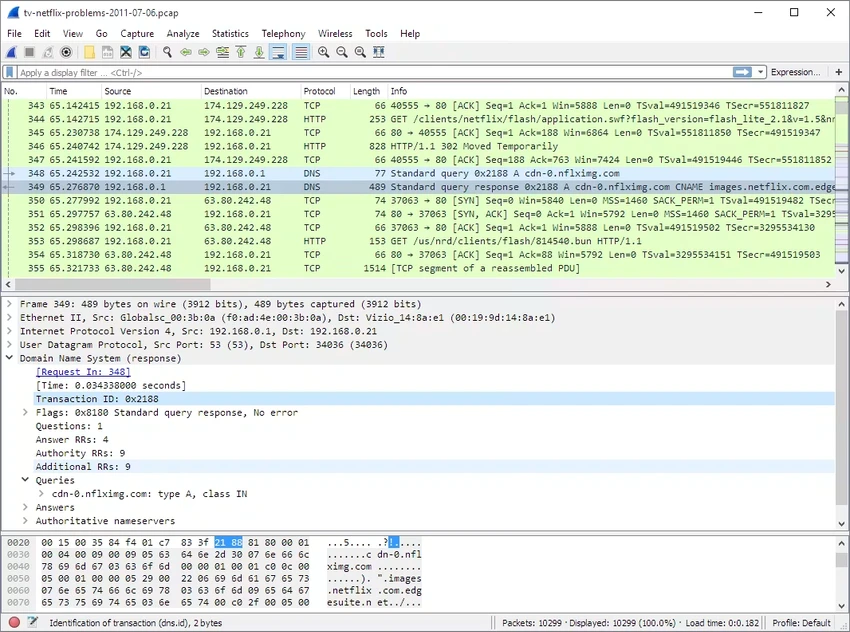
The application provides an interactive environment where users can browse captured network traffic and view both summary information and detailed packet data. Wireshark supports advanced filtering capabilities, allowing users to focus on specific types of traffic, protocols, or communication patterns. It also includes features for viewing reconstructed TCP streams, helping users understand the flow of network sessions.

Wireshark can open capture files from many different sources and formats, including tcpdump (libpcap), NAI Sniffer, Sniffer Pro, NetXray, snoop, Microsoft Network Monitor, Novell LANalyzer, RADCOM WAN/LAN Analyzer, and other network capture tools. It can also work with compressed capture files, including those compressed with gzip.

Designed for detailed network analysis, Wireshark is commonly used by network administrators, security professionals, developers, and technical users who need visibility into network activity. Its extensive protocol support and detailed packet inspection capabilities make it suitable for diagnosing network problems, studying communication behavior, and analyzing captured traffic.

Features of Wireshark

  • Capture and inspect data from live networks
  • Analyze previously saved packet capture files
  • View detailed information for individual packets
  • Provides summary and detailed packet views
  • Includes advanced display filtering capabilities
  • Supports TCP session stream reconstruction
  • Reads capture files from various network analysis tools
  • Supports compressed capture files using gzip
  • Designed for detailed network protocol analysis

Interface and Usability

Wireshark provides a detailed interface built around packet capture and analysis workflows. The application displays captured traffic in an interactive format, allowing users to browse packets and examine information at different levels of detail. The filtering system is one of the most important usability features, helping users narrow large amounts of network data into specific results. For experienced users, this makes it easier to investigate particular protocols, connections, or communication events.

Because Wireshark exposes low-level network information, the software has a learning curve for beginners. Users who are familiar with networking concepts will find its detailed packet views and analysis tools especially valuable.

Overall, Wireshark is designed as a professional-grade analysis tool rather than a simple network monitoring application.

Who Should Use Wireshark?

  • Network administrators troubleshooting connections
  • Security professionals analyzing network traffic
  • Developers debugging network-based applications
  • IT professionals investigating communication issues
  • Students and researchers learning network protocols

Conclusion

Wireshark is a comprehensive network protocol analyzer that provides deep insight into network traffic and packet communication. Its ability to capture live data, analyze saved files, and display detailed protocol information makes it an essential tool for many networking and security professionals.

Although the software requires some technical knowledge, its powerful analysis features make it valuable for troubleshooting, learning, and investigating network behavior. If you need a professional packet analysis solution for examining network traffic, Wireshark is a tool worth exploring.

Pros & Cons

✓

Pros

  • Powerful packet capture and analysis capabilities
  • Supports many capture file formats
  • Includes advanced filtering tools
  • Provides detailed protocol information
  • Can analyze both live traffic and saved captures
✕

Cons

  • Requires networking knowledge to use effectively
  • The large amount of technical information may be overwhelming for beginners

Frequently Asked Questions

What is Wireshark used for?

Wireshark is used to capture and analyze network traffic. It allows users to inspect packets from live networks or review previously saved capture files.

Can Wireshark analyze saved packet capture files?

Yes. Wireshark can read packet capture files from various tools and formats, including tcpdump (libpcap) and other network analysis applications.

Does Wireshark work with live network traffic?

Yes. Wireshark can capture and inspect data from a live network, allowing users to analyze active communications and network activity.

What information can Wireshark show?

Wireshark can display summary and detailed information for captured packets, including protocol details and communication data.

Does Wireshark support filtering?

Yes. Wireshark includes a powerful display filter system that helps users focus on specific packets, protocols, or network activity.

Who typically uses Wireshark?

Wireshark is commonly used by network administrators, security professionals, developers, and technical users who need detailed network traffic analysis.

Recommended apps [Freeware]:
  • Valentina Studio 17.5.2 Valentina Studio logo manage SQL and NoSQL databases with schema design, queries, reports, and cross-platform support.
  • ConfigureDefender 4.1.1 ConfigureDefender logo a Windows utility that helps users fine-tune Microsoft Defender settings with presets and advanced security controls
  • Vektorrazor 2.2 Vektorrazor logo converts logos and image sources into clean, CAD-friendly vector contours for technical workflows
  • Monkey's Audio 13.18 Monkey's Audio logo a free lossless audio compressor that reduces file size while preserving original sound quality
  • MACAddressView 1.55 MACAddressView logo Find company details from MAC addresses with a lightweight Windows utility that works offline using an internal database.
  • Revo Uninstaller Free 2.7.0 Revo Uninstaller Free logo Remove unwanted programs, clean leftover files, and manage Windows apps with a free uninstall utility designed for easier system maintenance.
Recommended apps [Shareware]:
  • SysTools MBOX Converter 9.0 SysTools MBOX Converter logo batch email migration tool that converts MBOX, MBS, and MBX files into multiple formats with attachment support
  • NOD32 Antivirus 19.2.7.0 NOD32 Antivirus logo Protect your PC with ESET NOD32 Antivirus, offering real-time malware defense, fast scans, and low system impact
  • Actual Window Guard 8.15.4 Actual Window Guard logo organizes windows, manages positioning, sizing, and rules to improve productivity on Windows desktops
  • NoteCase Pro 4.9.0 NoteCase Pro logo organize notes, tasks, attachments, and audio across multiple platforms with powerful import and export support
  • AnyViewer 5.8.0 AnyViewer logo Access and control computers remotely with smooth connections, file transfers, chat, and security tools for flexible work.
  • Lossless Extract 3.0.1 Lossless Extract logo Extract high-resolution audio from Blu-ray, SACD, MKV, and DVD-Audio while preserving lossless quality and immersive audio formats.