


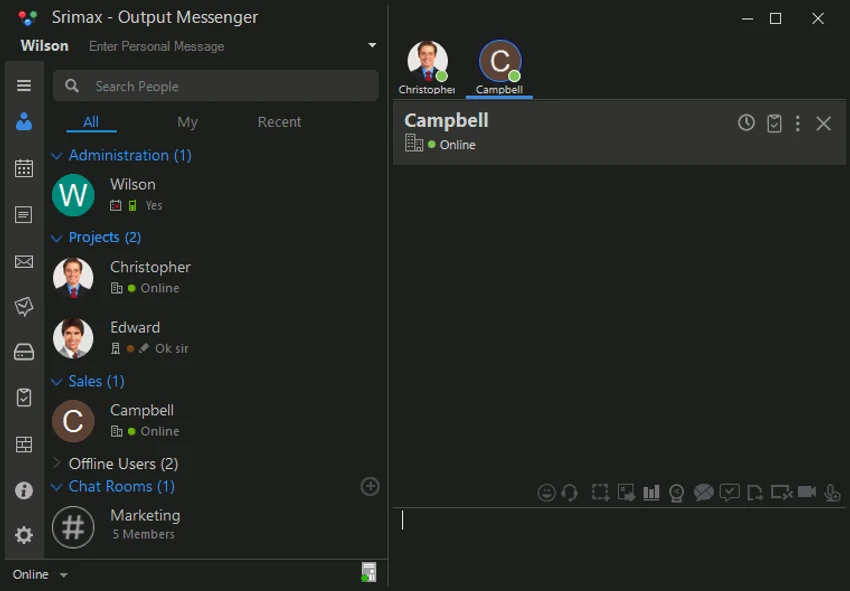

Output Messenger is a team communication and collaboration platform designed for organizations that need a centralized space for messaging, file sharing, video calls, task management, and remote support. It brings together multiple workplace tools into a single application, allowing teams to communicate and collaborate more efficiently. The software supports one-on-one messaging, group chat rooms, and integrated productivity tools such as task lists and shared drives, making it suitable for both small teams and larger organizations.
Features of Output Messenger
- One-on-one and group chat communication.
- Organized chat rooms for team discussions and brainstorming.
- File sharing via drag-and-drop (documents, images, videos, audio).
- Video calls for individuals and group conferencing.
- Voice calls and instant voice messaging.
- Secure remote desktop sharing with control access.
- Task management system (Output Task) with:
- Private tasks
- One-on-one tasks
- Team tasks
- Project/chatroom tasks
- Reminders and task-based chat integration
- Output Drive for file storage and sharing.
- Private and chatroom-based file storage options.
- Folder organization with version history support.
User Experience
Output Messenger provides a structured and practical communication environment for teams that need more than basic chat functionality. The interface focuses on combining messaging with productivity tools, reducing the need to switch between multiple applications.
Chat rooms are particularly useful for organizing team discussions, making it easier to separate projects or departments. File sharing is simple and intuitive, with drag-and-drop support for quickly sending documents, media, and other resources during conversations. Video and voice communication features work alongside text chat, enabling teams to switch between communication modes depending on urgency. The ability to schedule or conduct group video conferences helps maintain remote collaboration.
One of the more powerful features is remote desktop sharing. This allows users to view or control another user's desktop in real time, which is especially useful for technical support or collaborative troubleshooting. The integrated task management system adds structure to communication by allowing users to assign and track tasks directly within chats or projects. Combined with Output Drive, which offers centralized file storage and version control, the platform becomes a complete collaboration hub.
Overall, Output Messenger is designed for teams that want communication, file sharing, and task management unified in one workspace.
System Requirements
- Windows OS supporting .NET Framework 4.8:
- Windows Vista SP2
- Windows 7 SP1
- Windows 8 / 10
- Windows Server 2008 SP2 / 2008 R2 SP1
- Windows Server 2012 / 2012 R2 / 2016 / 2019 / 2022
- Processor: 1 GHz
- RAM: 1 GB
- Disk Space: 2 GB
Who Should Use Output Messenger?
Output Messenger is ideal for businesses, remote teams, IT support departments, and organizations that need an integrated communication and productivity platform. It is particularly useful for teams that require chat, task management, file sharing, and remote assistance within a single application.
Conclusion
Output Messenger is a versatile team collaboration tool that goes beyond traditional chat applications by integrating productivity and support features. With structured chat rooms, task management, secure file sharing, and remote desktop capabilities, it provides a complete workspace for modern teams.


