pdfMachine logo

pdfMachine 20.60

  • User Rating:
    ★★★★★
    ★★★★★
    0.0 0Votes
  • Requirements:
    Windows
  • Version: 20.60
  • Latest updated: 3 weeks ago
  • License: Free Trial  
  • Publisher: Broadgun Software Pty Ltd
  • Size: 22 MB
× app stores

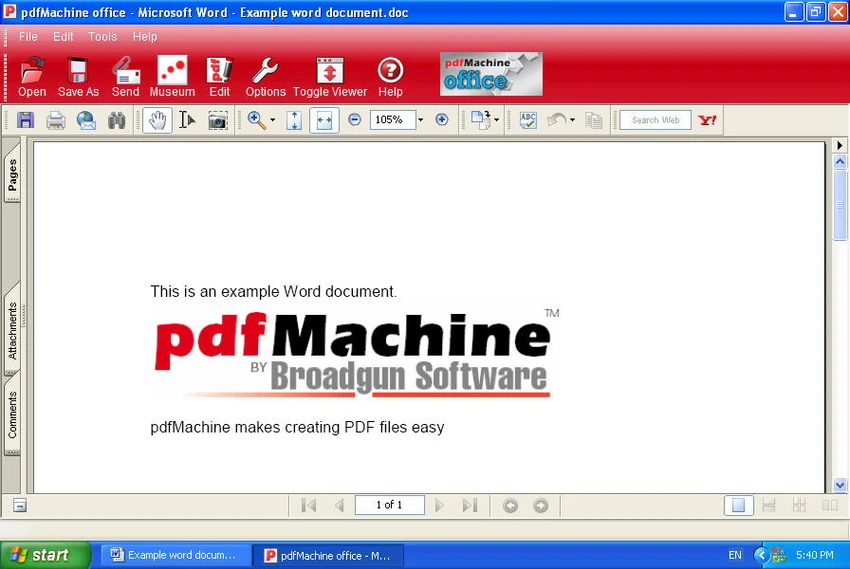
pdfMachine is a Windows-based PDF creation tool that works through a virtual printer system. Instead of exporting files manually, users simply print documents from any application and select the “Broadgun pdfMachine printer” to instantly generate a PDF file.

The software focuses on preserving document integrity, ensuring that fonts, layouts, and formatting remain consistent across different devices and platforms. This makes it a practical solution for users who need reliable and predictable PDF output without complex configuration. It is particularly useful for office workflows, document archiving, and situations where quick PDF conversion is required directly from print commands.

Features of pdfMachine

  • Converts print output directly into PDF format
  • Virtual printer integration (“Broadgun pdfMachine printer”)
  • Preserves original document formatting and layout
  • Maintains document integrity across platforms
  • Produces PDFs compatible with all standard PDF readers
  • Supports long-term document archiving
  • Creates searchable PDF files
  • Compatible with web browsers for viewing PDFs
  • High-quality color and size rendering
  • Supports zooming up to 800% without quality loss
  • Optimized PDF file sizes for storage efficiency
  • Suitable for intranet and web-based document sharing

Interface and Usability

pdfMachine operates in a simple and familiar way by integrating directly into the Windows printing system. Users do not need to learn a new interface or workflow—conversion happens automatically through the print dialog. Once installed, it appears as a printer option, making it accessible from virtually any application that supports printing. This makes the software highly convenient for users who frequently convert documents into PDF format without needing editing tools. Because it relies on a print-based workflow, pdfMachine remains lightweight and easy to use, with minimal setup required.

Who Should Use pdfMachine?

  • Office users needing fast PDF conversion
  • Businesses archiving documents in PDF format
  • Administrative staff handling reports and forms
  • Users who prefer print-based workflows
  • Organizations requiring consistent document formatting
  • Anyone needing quick PDF generation without editing tools

Conclusion

pdfMachine is a practical and reliable PDF creation tool that excels at converting printable documents into high-quality PDF files. Its virtual printer approach makes it easy to use across different applications without requiring complex setup or additional software.

Pros & Cons

Pros

  • Extremely easy to use via print function
  • Preserves original formatting accurately
  • Works with any printable Windows application
  • Produces searchable PDFs
  • Lightweight and fast workflow
  • Good for document archiving and sharing

Cons

  • Limited advanced features compared to full PDF suites
  • Requires printing step for conversion
  • Windows-focused solution only

Frequently Asked Questions

What is pdfMachine used for?

pdfMachine is used to convert documents into PDF format by printing through a virtual PDF printer.

How does pdfMachine work?

It works by adding a virtual printer to Windows. When you print a document, selecting pdfMachine generates a PDF file instead of a paper printout.

Does pdfMachine preserve formatting?

Yes. It is designed to maintain the original layout, fonts, and formatting of the source document.

Can pdfMachine create searchable PDFs?

Yes. The software supports creating PDFs that include searchable text content.

Is pdfMachine suitable for business use?

Yes. It is commonly used in business environments for document conversion and archiving.

Does pdfMachine support editing PDFs?

No. pdfMachine is focused on PDF creation, not editing existing PDF files.

Recommended apps [Freeware]:
  • ManicTime 2026.2.0.3 ManicTime logo Automatically track work hours, monitor productivity, and generate accurate reports with ManicTime
  • O&O ShutUp10++ 3.2.1111 O&O ShutUp10++ logo control Windows privacy, telemetry, updates, and system settings with a simple portable interface
  • Bulk Crap Uninstaller 6.2 Bulk Crap Uninstaller logo a free Windows tool that quickly removes multiple applications and cleans leftover files
  • Jux 4.900 Jux logo fractal explorer for Mandelbrot and Julia sets with advanced coloring, lighting effects, and high-resolution rendering tools
  • Driver Magician Lite 5.82 Driver Magician Lite logo Backup, restore, update, and manage Windows device drivers with a utility designed for hardware maintenance and system recovery.
  • CapCut 8.9.1.3802 CapCut logo Create professional videos easily with a versatile editor featuring AI tools, effects, templates, and advanced editing options.
Recommended apps [Shareware]:
  • Amazing Laptop Cooling Wizard 1.1.5.8 Amazing Laptop Cooling Wizard logo Reduce laptop overheating by optimizing CPU and fan cooling performance on Windows.
  • FoneTool 3.8.0 FoneTool logo back up, transfer, and manage iPhone data with convenient device management tools
  • Beyond Compare 5.2.3.32296 Beyond Compare logo compare, merge, and sync files easily with Beyond Compare, a powerful cross-platform tool
  • WinCatalog 2026.2.0.629 WinCatalog logo a disk and file cataloging tool for Windows that indexes files for fast search and organization
  • ProfiCAD 13.5.8 ProfiCAD logo easy-to-use CAD tool for creating electrical, electronic, control, pneumatic, and hydraulic diagrams
  • TrainController Gold 11.0 C1 TrainController Gold logo Control model railroads digitally with advanced automation, route management, and safety features for realistic train operations.