Rocrail logo

Rocrail Build 7065

  • User Rating:
    ★★★★★
    ★★★★★
    0.0 0Votes
  • Requirements:
    Windows
  • Version: Build 7065
  • Latest updated: 3 days ago
  • License: Freeware  
  • Publisher: Robert Jan Versluis
  • Size: 27 MB
× app stores

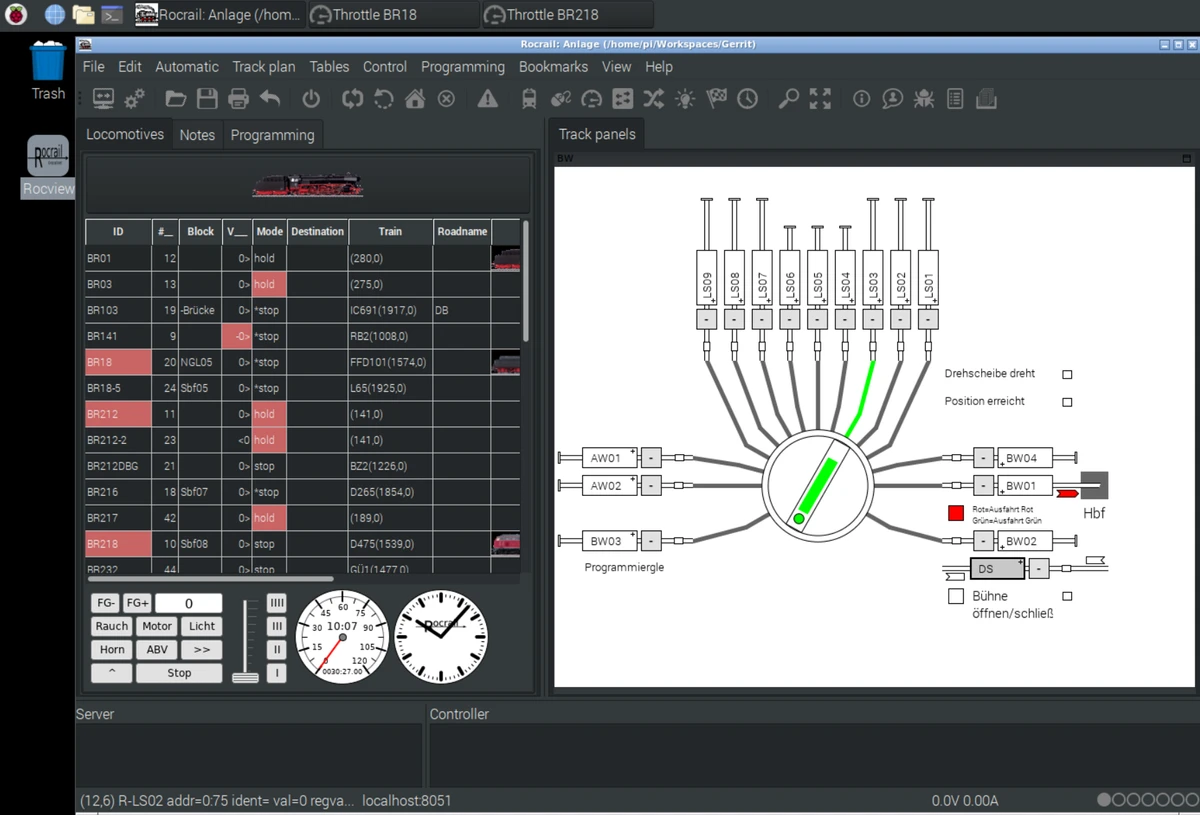
Rocrail is a free, cross-platform application designed to control model railroad layouts. Compatible with Windows, Linux, and Android, it allows hobbyists to manage trains, switches, lighting, and other accessories from a single interface. Whether you prefer manually driving your trains or fully automating your entire layout, Rocrail provides flexible control options to accommodate both beginners and experienced model railway enthusiasts.

Features of Rocrail

  • Manual and fully automatic train control.
  • Mixed operation mode for combining manual and automated trains.
  • Dispatcher Panel for controlling analog and digital trains.
  • Supports continuous digital operation.
  • Schedule-based train automation.
  • Automatic routing and train management.
  • Control of accessories and layout components.
  • Ambient lighting control with weather and time-of-day simulation.
  • Multiple user interfaces:
    • Rocview desktop application
    • Rocweb browser-based client
    • andRoc for Android devices
  • Cross-platform compatibility:
    • Windows
    • Linux
    • Android
  • Free and open-source software.

User Experience

Rocrail offers a comprehensive environment for managing model railway layouts. The desktop application, Rocview, provides access to the software's extensive control features, while Rocweb enables remote access from virtually any web browser. Android users can also manage layouts through the dedicated andRoc application. One of Rocrail's greatest strengths is its flexibility. Users can manually operate trains, automate specific routes, or configure entire layouts to run according to schedules. Mixed operation makes it possible to enjoy hands-on control while allowing other trains to operate automatically. Due to its extensive feature set, new users may need some time to become familiar with the software. However, experienced model railroad enthusiasts will appreciate the high level of customization and automation available.

Who Should Use Rocrail?

  • Model railroad hobbyists.
  • Digital railway enthusiasts.
  • Club layouts requiring automated operation.
  • Users managing complex train schedules.
  • Hobbyists looking for free cross-platform railroad control software.

Conclusion

Rocrail delivers an impressive collection of tools for controlling and automating model railroad layouts. From manual train operation to fully automated scheduling and accessory management, it offers enough flexibility for projects of almost any size.

Pros & Cons

Pros

  • Completely free to use.
  • Supports manual, semi-automatic, and fully automatic operation.
  • Cross-platform compatibility.
  • Multiple control interfaces.
  • Supports train accessories and lighting systems.
  • Flexible scheduling and automation features.

Cons

  • Learning curve for beginners.
  • Interface emphasizes functionality over modern design.
  • Advanced configuration may require time to master.

Frequently Asked Questions

What is Rocrail used for?

Rocrail is used to control and automate model railroad layouts, including trains, accessories, and scheduling.

Is Rocrail free?

Yes. Rocrail is available as free software.

Which operating systems does Rocrail support?

It supports Windows, Linux, and Android.

Can Rocrail automatically control trains?

Yes. It supports fully automatic, semi-automatic, scheduled, and manual train operation.

What are Rocview, Rocweb, and andRoc?

Rocview is the desktop application. Rocweb is the web-based client for desktop and mobile browsers. andRoc is the Android application for controlling layouts.

Recommended apps [Freeware]:
  • QuadSpinner Gaea 2.3.0.1 QuadSpinner Gaea logo a procedural terrain design tool for creating realistic landscapes with advanced erosion tools.
  • O&O ShutUp10++ 3.1.1104 O&O ShutUp10++ logo control Windows privacy, telemetry, updates, and system settings with a simple portable interface
  • WD Drive Utilities 2.1.6.511 WD Drive Utilities logo Manage, diagnose, and optimize Western Digital external hard drives with WD Drive Utilities for Windows
  • Claude Desktop 1.15962.1 Claude Desktop logo Anthropic's AI assistant to Windows and macOS for writing, coding, research, and file analysis
  • XnConvert 1.112.0.0 XnConvert logo batch image converter supporting 500 formats with 80+ editing actions and cross-platform compatibility
  • Brave Browser 1.91.178 Brave Browser logo Browse faster and more privately, block ads, earn BAT rewards, and enjoy Chromium compatibility.
Recommended apps [Shareware]:
  • Adobe Illustrator 2026 Adobe Illustrator logo professional vector graphic editor for creating logos, illustrations, and scalable designs.
  • Send Anywhere 24.6.0 Send Anywhere logo free cross-platform file-sharing tool that transfers files of any size without registration.
  • Coolutils Total Doc Converter 5.1.0.394/167 Coolutils Total Doc Converter logo Convert DOC, DOCX, RTF, and TXT files into PDF, HTML, images, and more with fast batch processing
  • Adobe Media Encoder 2026 Adobe Media Encoder logo a powerful video encoding and media management tool for exporting and transcoding
  • DaVinci Resolve 21.0.1 DaVinci Resolve logo a professional video editor with advanced color grading, AI tools, and high-end post-production features.
  • ReclaiMe Build 6447 ReclaiMe logo easy-to-use Windows data recovery tool for hard drives, USB drives, RAID arrays, and memory cards