ButterScroll logo

ButterScroll 1.5.5

  • User Rating:
    ★★★★★
    ★★★★★
    0.0 ★ 0Votes
  • Requirements:
    Windows
  • Version: 1.5.5
  • Latest updated: 3 weeks ago
  • License: Free Trial  
  • Publisher: ButterScroll
  • Size: 7 MB
× app stores

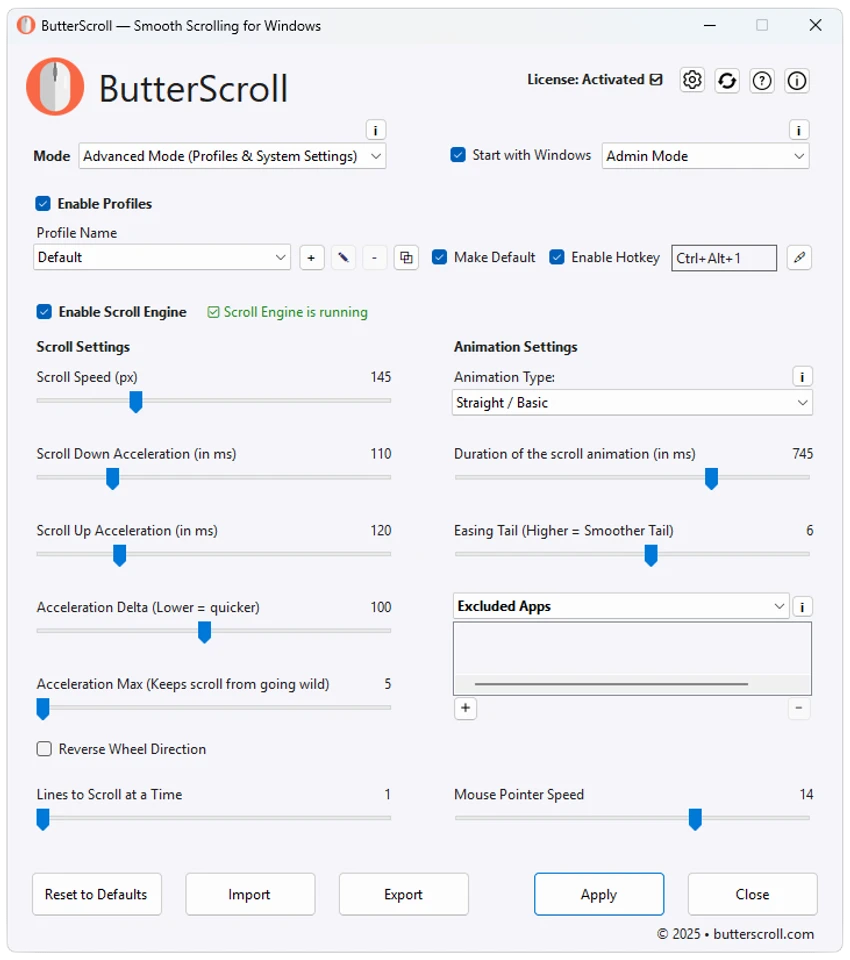
ButterScroll is a lightweight Windows utility designed to improve the default mouse scrolling experience with smooth animations and customizable scrolling behavior. Instead of relying on standard Windows scrolling, it adds fluid motion that feels more responsive across everyday applications, including web browsers, spreadsheets, and productivity software. The software is easy to configure and works with virtually any mouse without requiring additional hardware. With adjustable speed, acceleration, and easing settings, ButterScroll lets users fine-tune scrolling to match their personal preferences while remaining lightweight and privacy-focused.

Features of ButterScroll

  • Smooth scrolling animations across Windows applications
  • Compatible with virtually any mouse
  • Adjustable scrolling speed
  • Customizable acceleration settings
  • Configurable easing effects
  • Lightweight and optimized for performance
  • Easy setup and simple configuration
  • Works across browsers, spreadsheets, and other desktop applications
  • No tracking
  • No advertisements
  • Privacy-focused design
  • Supports Windows 10 and Windows 11

Interface and Usability

ButterScroll focuses on simplicity. Installation is straightforward, and the software is designed to start improving scrolling with minimal configuration. I found the available customization options easy to understand, allowing quick adjustments to scrolling speed, acceleration, and easing until the movement felt natural.

The application stays lightweight in the background and integrates well with everyday Windows applications. Rather than changing how individual programs work, it enhances the overall scrolling experience consistently across supported software, making navigation feel smoother without adding unnecessary complexity.

Who Should Use ButterScroll?

  • Windows users who want smoother mouse scrolling
  • Professionals working with long documents or spreadsheets
  • Users who spend significant time browsing the web
  • Anyone seeking more control over scrolling behavior
  • Users looking for a lightweight utility without ads or tracking

Conclusion

If the default Windows scrolling feels abrupt or inconsistent, ButterScroll offers a simple way to make everyday navigation more fluid. Its customizable scrolling controls, lightweight performance, and privacy-friendly approach make it a worthwhile utility for users who want a smoother desktop experience. If smooth mouse scrolling is a priority, ButterScroll is definitely worth trying.

Pros & Cons

✓

Pros

  • Noticeably smoother scrolling experience
  • Works with existing mice
  • Easy to install and configure
  • Adjustable speed, acceleration, and easing
  • Lightweight with minimal system impact
  • Works across many Windows applications
  • No ads or user tracking
  • Privacy-focused
✕

Cons

  • Official release notes are not available for the current version
  • Limited purpose compared to broader Windows utility suites

Frequently Asked Questions

What is ButterScroll?

ButterScroll is a Windows utility that enhances mouse scrolling by adding smooth scrolling animations and allowing users to customize scrolling speed, acceleration, and easing.

Does ButterScroll work with any mouse?

Yes. ButterScroll is designed to work with existing mice and does not require any additional hardware.

Can I customize the scrolling behavior?

Yes. The software allows you to adjust scrolling speed, acceleration, and easing to create a scrolling experience that matches your preferences.

Does ButterScroll affect all Windows applications?

ButterScroll is designed to provide smooth scrolling across many Windows applications, including web browsers, spreadsheets, and other desktop software.

Does ButterScroll collect user data?

According to the provided information, ButterScroll includes no tracking, no advertisements, and emphasizes user privacy.

Which operating systems are supported?

ButterScroll supports Windows 10 and Windows 11.

Recommended apps [Freeware]:
  • NanaZip 6.5.1767.0 NanaZip logo a modern file compression and extraction tool based on 7-Zip, offering strong encryption and wide format support
  • WonderPen 3.2.0.8457 WonderPen logo writing app with Markdown support, tree structure organization, and export tools for Windows users
  • Wagnardsoft Tools 1.0.8.2 Wagnardsoft Tools logo Clean temporary files, repair Windows system files, and maintain your PC with Wagnardsoft Tools (WTools)
  • Alternate Archiver 4.780 Alternate Archiver logo Organize, rename, archive, and manage multiple files easily with a lightweight Windows utility built for efficient file handling.
  • v2rayN 7.23.3 v2rayN logo Manage secure proxy connections with advanced routing, encryption, and protocol support for flexible private browsing.
  • Telegram 7.0.2 Telegram logo Securely chat, share files, join large communities, and stay connected across devices with a feature-rich cloud messaging platform.
Recommended apps [Shareware]:
  • DBConvert Studio 4.3.1 DBConvert Studio logo simplifies database migration and synchronization across multiple database platforms.
  • Tomabo MP4 Downloader 6.4.9 Tomabo MP4 Downloader logo downloads videos, playlists, subtitles, and audio while offering format conversion tools.
  • Advanced Installer 23.8 Advanced Installer logo Windows MSI packaging tool for developers to build, customize, and deploy reliable installers
  • reaConverter Pro 8.0.231 reaConverter Pro logo batch image converter and editor supporting 700+ formats with automation and advanced processing tools
  • Atlantis Word Processor 5.0.5.3 Atlantis Word Processor logo Create documents with Atlantis Word Processor, a fast and lightweight word processor featuring spell check, formatting, and eBook export
  • PingPlotter 5.27.10 PingPlotter logo network monitoring tool for tracking latency, packet loss, and remote host performance in real time