Start11 logo

Start11 2.72

  • User Rating:
    ★★★★★
    ★★★★★
    0.0 0Votes
  • Requirements:
    Windows
  • Version: 2.72
  • Latest updated: 3 days ago
  • License: Free Trial  
  • Publisher: Stardock
  • Size: 55 MB
× app stores

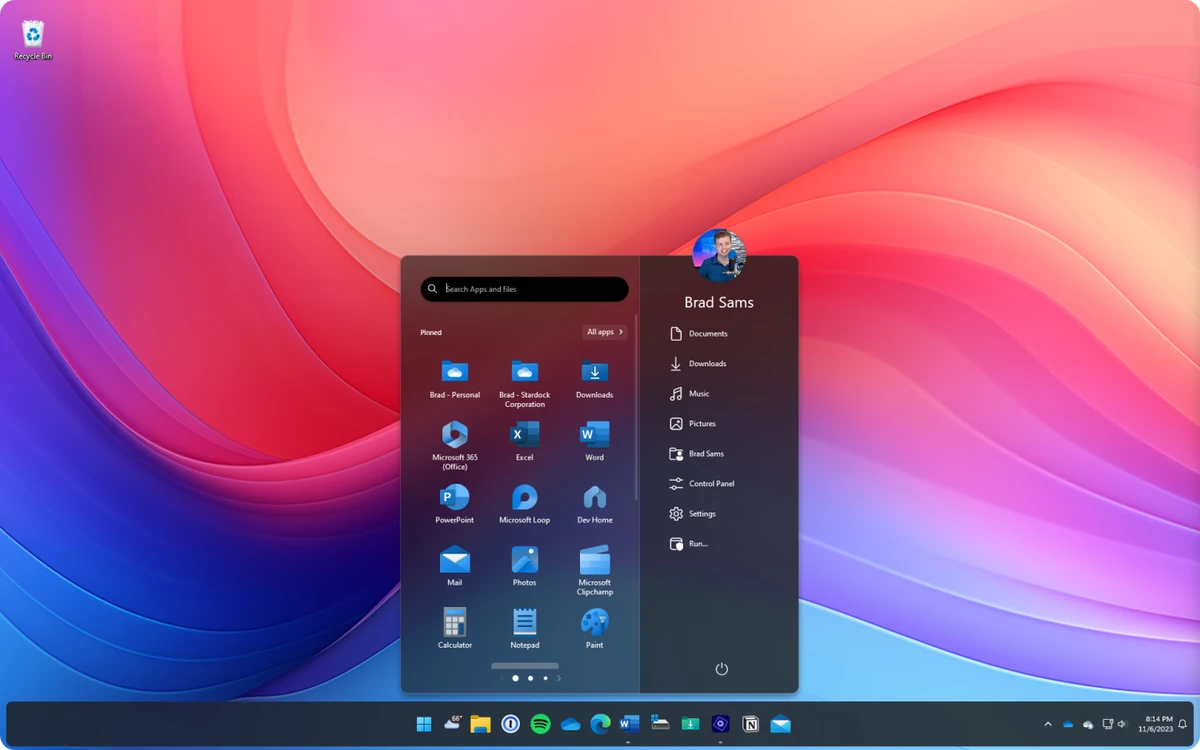
Start11 is a Windows customization utility developed by Stardock that allows users to modify the Start Menu and taskbar experience in Windows 10 and Windows 11. It is designed for users who prefer classic Windows layouts or want more control over the modern Windows interface. The software focuses on restoring familiar Start Menu styles while also introducing new customization options for productivity and workflow improvements.

Features of Start11

  • Customize or replace the Windows Start Menu.
  • Multiple Start Menu styles:
    • Apps style
    • Professional style
    • Launcher style
  • Restore classic Start Menu layouts (Windows 7 / Windows 10-inspired designs).
  • Deep customization of Start Menu appearance:
    • Colors
    • Transparency
    • Layout style
    • Icon spacing and design
  • Taskbar enhancements:
    • Pin files or folders directly to the taskbar
    • Turn folders into popup menus
    • Adjust taskbar size, position, and appearance
  • Advanced search integration with Everything Search Engine support.
  • Backup and restore Start Menu configurations.
  • Enterprise features:
    • Kiosk mode support
    • Centralized Start Menu deployment
  • Improved animations and UI transitions.
  • Option to remove folders from the “All Apps” list.
  • Enhanced taskbar context menu options (restores missing Windows 10 behavior).

User Experience

Start11 provides a familiar and intuitive experience for users who want more control over their Windows interface. Installation is straightforward, and users can quickly switch between different Start Menu styles without advanced configuration. The ability to restore classic Start Menu layouts is particularly useful for users transitioning from older versions of Windows. At the same time, modern customization options allow users to fine-tune appearance and functionality to match personal workflows.

Taskbar enhancements such as pinning files or converting folders into quick-access menus improve productivity by reducing the number of steps needed to access frequently used items. Overall, Start11 integrates smoothly into Windows without significantly affecting system performance.

Who Should Use Start11?

  • Users who prefer classic Windows Start Menu layouts.
  • Windows 11 users wanting more taskbar control.
  • Productivity-focused users.
  • IT administrators managing standardized desktop environments.
  • Anyone wanting deeper Windows UI customization.

Conclusion

Start11 is one of the most effective tools for customizing the Windows Start Menu and taskbar experience. It offers a balanced combination of classic design restoration and modern usability enhancements.

Pros & Cons

Pros

  • Restores classic Start Menu styles.
  • Highly customizable interface.
  • Improves taskbar functionality.
  • Lightweight and stable system integration.
  • Supports productivity-focused features like folder shortcuts.
  • Backup and restore configuration support.

Cons

  • Paid software (no full free version).
  • Advanced customization may overwhelm casual users.
  • Some features depend on Windows version compatibility.

Frequently Asked Questions

What is Start11 used for?

Start11 is used to customize and replace the Windows Start Menu and enhance taskbar functionality.

Does Start11 work on Windows 11?

Yes, it is fully compatible with Windows 11 and Windows 10.

Can Start11 restore the Windows 7 Start Menu?

Yes, it includes classic Start Menu styles inspired by Windows 7 and Windows 10.

Does Start11 improve performance?

It is lightweight and does not significantly impact system performance.

Is Start11 free?

No, Start11 is a paid customization tool developed by Stardock.

Recommended apps [Freeware]:
  • OCCT 16.1.11.99 OCCT logo hardware monitoring and stress testing tool for CPU, GPU, memory, and power supply performance analysis.
  • PortKiller 3.3.3 PortKiller logo a network utility for monitoring TCP ports, managing processes, and handling tunnels on Windows.
  • FluentCleaner 26.06.04 FluentCleaner logo a lightweight Windows cleaning tool designed to remove unnecessary files using a modern, minimal WinUI 3 interface
  • ConfigureDefender 4.1.1 ConfigureDefender logo a Windows utility that helps users fine-tune Microsoft Defender settings with presets and advanced security controls
  • ExplorerPatcher 26100.8457.70.3 ExplorerPatcher logo restores Windows 10-style taskbar, menus, and Explorer behavior on Windows 11.
  • Google Chrome 149.0.7827.201 Google Chrome logo fast, secure, and stable web browser with sandboxing, tab isolation, and a minimal interface for modern web applications
Recommended apps [Shareware]:
  • Secret Disk 2026 v323 Secret Disk logo create hidden, password-protected virtual drives to securely store private files on Windows
  • Coolutils Total Doc Converter 5.1.0.394/167 Coolutils Total Doc Converter logo Convert DOC, DOCX, RTF, and TXT files into PDF, HTML, images, and more with fast batch processing
  • Lansweeper 12.8.1.3 Lansweeper logo network discovery and IT asset management tool for software inventory, compliance reporting, and device tracking
  • Duplicate Finder 2026 v418 Duplicate Finder logo remove duplicate photos and videos by scanning files using MD5 hashing for accurate results.
  • Coolutils PDF Splitter 5.2.0.43 Coolutils PDF Splitter logo split PDF files into individual pages, custom page ranges, or chapters defined by bookmarks
  • XnView MP 1.11.5 XnView MP logo a powerful image viewer, editor, and batch converter supporting 500+ image formats on Windows