


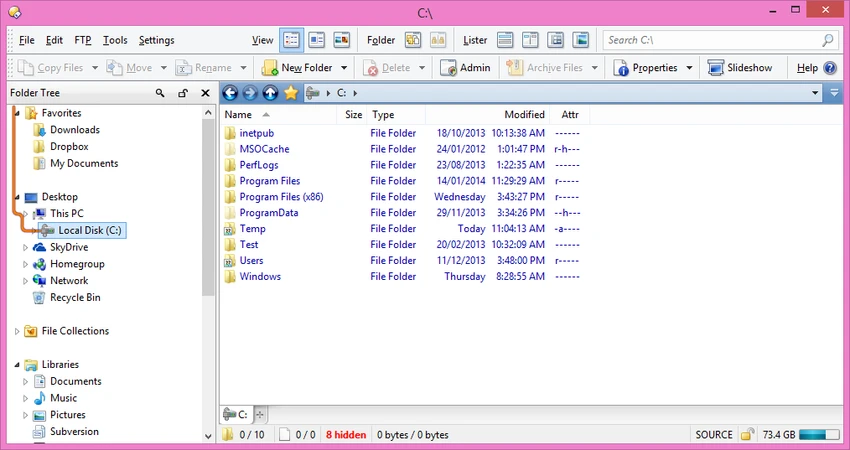

Directory Opus is an advanced file management solution designed to replace Windows Explorer with a faster, more customizable, and feature-rich experience. Built for power users and professionals, it combines file browsing, organization, searching, metadata management, FTP access, and automation tools into a single application. Unlike the default Windows file manager, Directory Opus offers extensive customization options, dual-pane navigation, tabbed browsing, and integrated file management utilities that help streamline everyday workflows.
Key Features of Directory Opus
- Single-pane or dual-pane file display
- Tabbed interface for managing multiple folders simultaneously
- Full Windows Explorer replacement mode
- Advanced file filtering, sorting, grouping, and searching
- File color-coding, status icons, ratings, tags, and descriptions
- Integrated viewer for images, documents, and other file types
- Image marking tools for photo organization
- Batch file renaming with keyboard macros
- Metadata viewing and editing
- FTP support
- Support for ZIP, 7Zip, and RAR archive formats
- Folder synchronization tools
- Duplicate file finder
- Folder size calculation
- Print and export folder listings
- Queued file copy operations for improved performance
- Fully customizable interface including toolbars, fonts, colors, and hotkeys
- Scripting support for advanced automation
- Multi-threaded architecture optimized for modern 64-bit systems
- Support for high-resolution 4K displays
- Integration with indexed search engines such as Windows Search and Everything
User Experience
After using Directory Opus, the most noticeable difference compared to Windows Explorer is the amount of control it gives over file management. The dual-pane layout makes transferring files between folders significantly more efficient, while tabbed navigation helps reduce desktop clutter when working with multiple locations. Searching and organizing files feels particularly powerful thanks to filtering, grouping, tagging, and labeling tools. Users managing large collections of documents, media files, or project assets will likely appreciate how quickly files can be categorized and located.
The integrated viewer and metadata editor reduce the need to switch between multiple applications. For photographers and users with extensive image libraries, the image-marking capabilities provide a convenient way to sort and review files. Customization is another major strength. Nearly every aspect of the interface can be adjusted, from toolbars and menus to fonts, colors, and keyboard shortcuts. Advanced users can further extend functionality through the built-in scripting interface.
Performance is generally strong thanks to its native C++ multi-threaded design, helping file operations remain responsive even when handling large directories and multiple tasks simultaneously.
Who Should Use Directory Opus?
- Power users who manage large numbers of files daily
- IT professionals and system administrators
- Content creators handling media libraries
- Photographers organizing image collections
- Developers working across multiple project directories
- Users seeking a full Windows Explorer replacement
- Professionals who require advanced file organization and automation tools
Conclusion
Directory Opus is a feature-rich file manager that successfully goes beyond the capabilities of Windows Explorer. Its dual-pane interface, advanced search tools, metadata management, FTP integration, and extensive customization options make it a compelling solution for professional and advanced users.


