CreateInstall logo

CreateInstall 8.11.2

  • User Rating:
    ★★★★★
    ★★★★★
    0.0 0Votes
  • Requirements:
    Windows
  • Version: 8.11.2
  • Latest updated: 3 weeks ago
  • License: Freeware  
  • Publisher: Novostrim
  • Size: 5 MB
× app stores

CreateInstall is a Windows installer creation tool designed for developers who need complete control over the installation process. Rather than relying on predefined installation templates, it allows every step of the installer to be customized through commands and scripting, making it suitable for projects with unique deployment requirements.

After reviewing its capabilities, CreateInstall stands out for its flexibility. It supports both simple installer creation through the included CreateInstall Assistant and advanced installer development using the Gentee programming language. This approach allows beginners to build basic installation packages quickly while giving experienced developers the freedom to customize nearly every aspect of installation and uninstallation.

Whether you need to automate complex deployment tasks, customize installer dialogs, or optimize package compression, CreateInstall provides the tools to build installers that behave exactly as intended.

Features of CreateInstall

  • Complete control over the installation and uninstallation process.
  • Command-based installer architecture for highly customizable workflows.
  • Includes CreateInstall Assistant for quickly creating installation packages.
  • Supports scripting with the Gentee programming language.
  • Allows developers to add custom installation operations.
  • Customizable installer dialogs and interface elements.
  • Supports adding custom resources and graphical components.
  • Provides access to the installer source code used in installation packages.
  • Offers two compression algorithms:
    • High compression ratio
    • Faster decompression performance
  • Allows different compression methods within the same installation package.
  • Includes additional compression settings for balancing package size and extraction speed.
  • Scales well for both simple and complex installation projects.

Interface and Usability

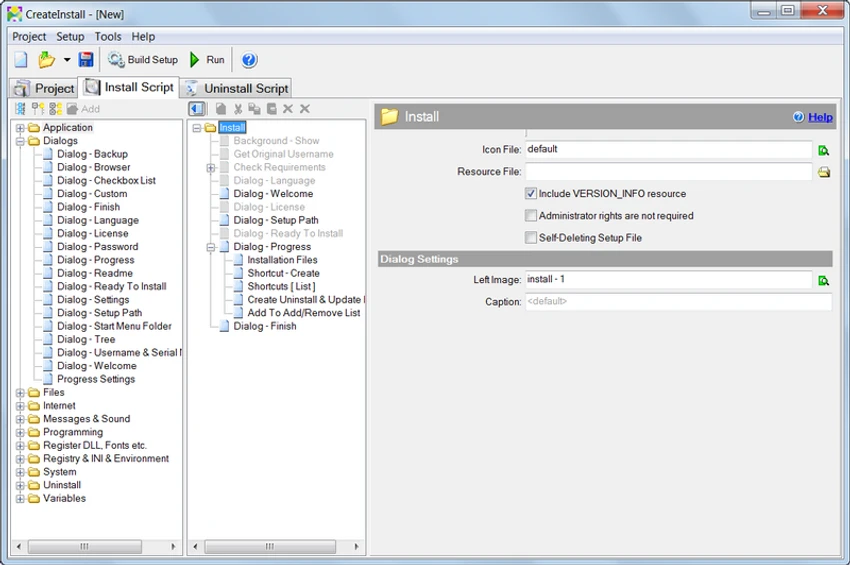
CreateInstall offers two different approaches depending on the user's experience level. During my review, I found that CreateInstall Assistant provides a simplified interface that helps users generate installers without spending much time learning the full application.

The main CreateInstall environment is more developer-oriented. Instead of hiding installation logic behind a wizard, it exposes the installation process as a sequence of commands that can be modified or extended. This design gives developers significantly more flexibility but also requires a greater understanding of installation workflows and scripting concepts. Overall, the software favors customization over simplicity, making it particularly appealing to technical users.

Who Should Use CreateInstall?

  • Software developers creating Windows installers.
  • Development teams with custom deployment requirements.
  • ISVs distributing desktop applications.
  • Advanced users who need full control over installation behavior.
  • Developers who want scriptable installer logic.
  • Users creating both simple and highly customized installation packages.

System Requirements

  • Windows XP
  • Windows Vista
  • Windows 7
  • Windows 8
  • Windows 10

Conclusion

CreateInstall is designed for developers who need more than a basic setup wizard. Its command-based architecture, scripting support, customizable interface, and flexible compression options allow installation packages to be tailored to a wide variety of deployment scenarios.

Pros & Cons

Pros

  • Highly customizable installation process
  • Supports scripting with the Gentee programming language
  • Includes a beginner-friendly installer assistant
  • Flexible installer interface customization
  • Multiple compression options
  • Supports complex installation workflows
  • Complete control over install and uninstall operations

Cons

  • Advanced features require scripting knowledge
  • Less beginner-friendly than wizard-only installer creators
  • No official information provided about changes in the latest version

Frequently Asked Questions

Is CreateInstall suitable for beginners?

Yes. CreateInstall includes CreateInstall Assistant, which offers a simplified interface for creating basic installation packages. More advanced customization is available through the main application.

Does CreateInstall support scripting?

Yes. CreateInstall uses the Gentee programming language for installer scripting, allowing developers to customize installation and uninstallation behavior extensively.

Can I customize the installer interface?

Yes. The software allows you to modify dialog boxes, add graphical elements, include custom resources, and personalize various parts of the installer interface.

Does CreateInstall support different compression methods?

Yes. It offers two compression algorithms—one optimized for maximum compression and another for faster decompression. Different algorithms can also be applied to separate groups of files within the same installation package.

Can CreateInstall create custom installation workflows?

Yes. The installation process is built from commands that can be arranged and extended, allowing developers to implement custom operations and complex deployment logic.

Which Windows versions does CreateInstall support?

According to the provided information, CreateInstall supports Windows XP, Windows Vista, Windows 7, Windows 8, and Windows 10.

Recommended apps [Freeware]:
  • iTop Easy Desktop 4.4.0.348 iTop Easy Desktop logo declutter, organize, and manage Windows desktop items efficiently and quickly
  • Zortam Mp3 Media Studio 33.97 Zortam Mp3 Media Studio logo Manage, tag, rip, organize, convert, and play MP3 files with the all-in-one Zortam Mp3 Media Studio
  • Red Burner 19.7 Red Burner logo a portable disc burning tool for CD, DVD, and Blu-ray with fast ISO handling and a simple interface
  • PDF Shaper 15.6 PDF Shaper logo Windows PDF utility for splitting, merging, converting, encrypting, and editing PDF documents with powerful tools
  • Universal Media Server 15.6.0 Universal Media Server logo Stream videos, music, and images across devices with a flexible DLNA server supporting multiple platforms and formats.
  • Fire Toolbox 45.1 Fire Toolbox logo Customize Amazon Fire tablets with tools for app management, interface changes, backups, troubleshooting, and Android feature support.
Recommended apps [Shareware]:
  • EF CheckSum Manager 26.07 EF CheckSum Manager logo creates and verifies MD5, SHA, and SFV checksums to ensure file integrity and detect corruption.
  • Sketchbook Pro 9.4.7.0 Sketchbook Pro logo a professional drawing app with customizable brushes, layers, symmetry tools, and natural pen support.
  • ON1 Resize AI 2026.4 ON1 Resize AI logo advanced AI upscaling technology to enlarge photos up to 10x while preserving detail, sharpness, and print quality
  • Beyond Compare 5.2.3.32296 Beyond Compare logo compare, merge, and sync files easily with Beyond Compare, a powerful cross-platform tool
  • Catalyst Production Suite 2026.1.1 Catalyst Production Suite logo a professional media tool for browsing, preparing, transcoding, and managing Pro video formats.
  • SynthFont2 2.9.2.1 SynthFont2 logo a MIDI editor and player that renders MIDI files into audio using SoundFonts, VST instruments, and SFZ