FileLegit Windows Utilities System Tools NirLauncher Package
NirLauncher Package logo

NirLauncher Package 1.30.24

  • User Rating:
    ★★★★★
    ★★★★★
    0.0 0Votes
  • Requirements:
    Windows
  • Version: 1.30.24
  • Latest updated: 20 hours ago
  • License: Freeware  
  • Publisher: NirSoft
  • Size: 35 MB
×

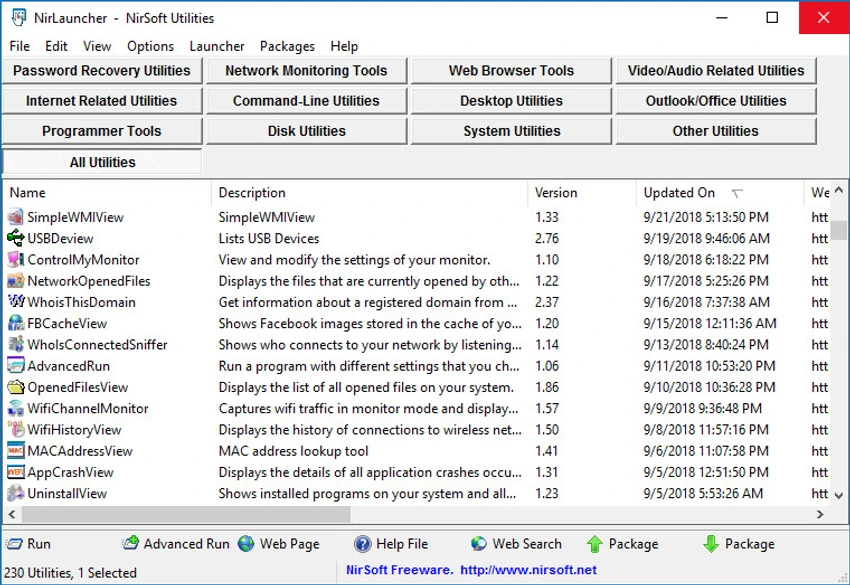
NirLauncher is a portable software package for Windows that bundles more than 180 free utilities developed by NirSoft. It is designed for users who need a wide range of system tools in one lightweight, portable toolkit without installation. The package can be run directly from a USB flash drive, making it especially useful for IT technicians, system administrators, and advanced users who work across multiple computers.

NirLauncher acts as a centralized launcher for a large collection of small utilities, each focused on a specific task such as password recovery, network monitoring, browser data inspection, file searching, and system analysis. All included tools are freeware and designed to be lightweight. The package does not include third-party software, adware, or browser modifications, and it is intended to remain clean and minimal. One of its key strengths is portability—everything runs without installation, and settings are stored locally on the USB drive when used in portable mode.

The password for extracting the files is nirsoft9876$

Features of NirLauncher Package

  • Over 180 portable Windows utilities included
  • No installation required (fully portable)
  • Can run directly from USB flash drives
  • Tools for password recovery and system analysis
  • Network monitoring utilities
  • Browser data inspection (cookies, cache, stored data)
  • File search and system information tools
  • Individual help and web links for each utility
  • Configuration saved to USB in portable mode
  • Automatic support for x64 versions where available
  • Ability to add additional software packages
  • Support for generating BartPE plugin files
  • Completely freeware with no adware or bundled software

Using NirLauncher feels like working with a compact control panel for system utilities. Instead of installing multiple separate tools, everything is accessible from a single launcher interface. The structure is practical rather than modern—its focus is on functionality rather than design. Each utility opens independently, which keeps performance light and responsive even on older systems. For IT troubleshooting or system diagnostics, the ability to quickly switch between tools is a major advantage, especially when working from a USB drive in different environments.

Who Should Use NirLauncher Package?

  • IT support professionals and system administrators
  • Users performing system diagnostics and troubleshooting
  • Technicians working on multiple Windows machines
  • Advanced users who prefer portable utilities
  • Security and recovery-focused use cases

Conclusion

NirLauncher is a powerful portable toolkit that brings together more than 180 lightweight Windows utilities in one package. Its portability and breadth of tools make it especially valuable for technical users who need quick access to system, network, and recovery utilities without installation overhead.


Pros & Cons

Pros

    • Huge collection of 180+ utilities in one package
    • Fully portable with USB support
    • No installation or system changes required
    • Wide range of system, network, and recovery tools
    • Clean, freeware-only distribution

Cons

    • Interface feels utilitarian and outdated
    • No official update details provided
    • Tools may be overwhelming for casual users

Frequently Asked Questions

What is NirLauncher used for?

NirLauncher is used to access a large collection of Windows utilities for system monitoring, recovery, networking, and diagnostics.

Does NirLauncher require installation?

No, it is fully portable and can run directly from a USB drive.

Is NirLauncher safe to use?

Yes, it is freeware and does not include adware or third-party bundled software according to the provided data.

Can NirLauncher recover passwords?

Yes, it includes utilities designed for password recovery among its toolset.

Does it support 64-bit Windows?

Yes, it automatically runs x64 versions of compatible utilities when available.

Recommended apps [Freeware]:
  • Garmin Express 7.29.0.0 Garmin Express logo manage Garmin GPS devices with map updates, backups, software updates, and device registration
  • CS Easy Unlocker 1.1.5.0 CS Easy Unlocker logo unlock restricted folders and fix “Access Denied” errors with a simple one-click tool.
  • Universal USB Installer 2.0.3.7 Universal USB Installer logo create bootable Linux USB drives easily with ISO support and persistence options on Windows.
  • Automatic Email Processor 4.0.24 Automatic Email Processor logo Automatically save, archive, print, and process Outlook emails and attachments with customizable rules.
  • DriversCloud 12.1.6 DriversCloud logo scan system hardware, update drivers, monitor performance, and analyze blue screen errors (BSODs) on Windows.
  • Far Manager 3.0 Build 6699 Far Manager logo Manage files efficiently with Far Manager's fast text-based interface, plugins, and archive support
Recommended apps [Shareware]:
  • Audio Transcoder 2.12.24 Audio Transcoder logo all-in-one audio converter and CD ripper supporting MP3, FLAC, AAC, WMA, and more
  • Sidify Spotify Music Converter 2026 Sidify Spotify Music Converter logo convert Spotify songs, playlists, and podcasts to MP3, AAC, FLAC, and WAV formats.
  • Adobe Illustrator 2026 Adobe Illustrator logo professional vector graphic editor for creating logos, illustrations, and scalable designs.
  • Foxit PDF Editor 2026.1.1.36485 Foxit PDF Editor logo complete PDF solution for businesses, offering advanced editing, collaboration, and document security features.
  • Remote Desktop Manager 2026.2.9.0 Remote Desktop Manager logo manage RDP, SSH, VNC, and virtual machines from one secure centralized platform
  • Any video Converter 9.2.3 Any video Converter logo video conversion tool that supports multiple formats, editing features, and device-ready output profiles