


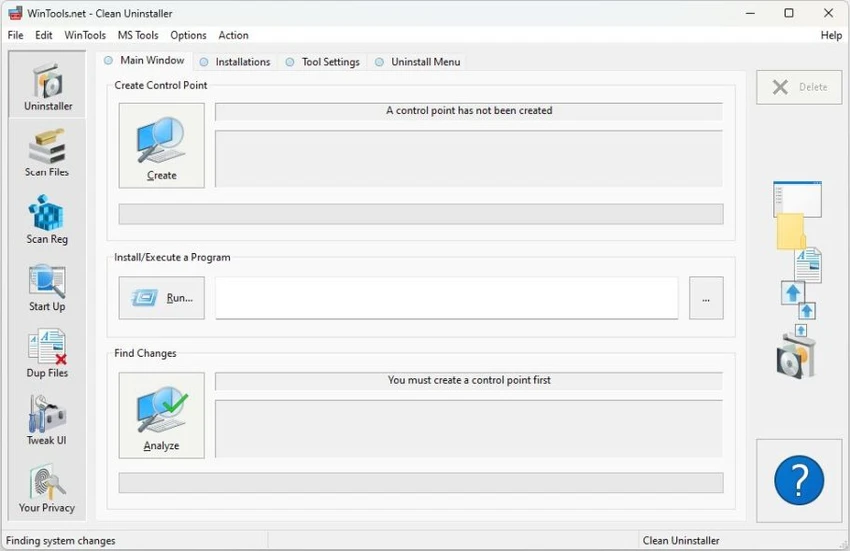

WinTools.net Professional is a comprehensive Windows utility suite designed to help users maintain, optimize, and customize their Microsoft Windows systems. The software combines multiple tools for cleaning unnecessary files, managing system settings, improving startup performance, and protecting user privacy in one package.
The application includes utilities for removing leftover files, invalid registry references, and unused shortcuts that can accumulate over time. Its cleaning tools are designed to help users identify and remove unnecessary data from hard drives and the Windows registry, while the Clean Uninstaller helps monitor changes made during software installation and properly remove programs.
Beyond system cleanup, WinTools.net Professional provides tools for controlling startup applications, adjusting Windows behavior, managing network settings, and protecting sensitive information. The Startup Manager allows users to monitor and modify programs launched during system startup, while Tweak UI provides additional system adjustments related to preferences, safety, and Windows configuration.
The Professional edition also includes advanced tools such as Net Tweaker for modifying hidden network settings, Your Privacy for protecting sensitive information, and File Shredder for permanently deleting files. With its wide range of utilities, WinTools.net Professional is designed for users who want more control over Windows maintenance, performance, and customization.
Tools included in WinTools.net Professional
- WinTools.net: Clean Uninstaller Used for correctly removing software and monitoring changes made to the hard drive, MS Windows registry, and system files during program installations.
- WinTools.net: Scan Files Used for periodic cleaning of your hard drive from dead references, junk, and obsolete files produced by different software. These files and references remain on the hard disk, increasing drive access time.
- WinTools.net: Scan Shortcuts Used for periodically cleaning your Desktop, Start menu, Application data, and hard drives from dead shortcuts. These shortcuts remain on the hard disk and increase drive access time.
- WinTools.net: Scan Registry Used for periodic cleaning of the MS Windows registry from unused applications remaining after uninstallation and invalid references, decreasing system speed and system loading time.
- WinTools.net: Startup Manager This tool allows you to monitor, add, remove, enable, and/or disable individual startup items. You can also adjust applications initialized during the loading process of the operating system.
- WinTools.net: Tweak UI This is a set of additional adjustments related to safety, system capacity, and user preferences and which are not included in the basic components of MS Windows.
- WinTools.net: Net Tweaker The tool increases data transfer and improves connection by changing hidden network settings. Available only in the "Professional" edition.
- WinTools.net: Your Privacy This is a kit of tools that ensures your privacy and keeps sensitive information secure. Available only in the "Professional" edition.
- WinTools.net: Invisible Man This tool is used for saving private information and its later restoration. This is useful if you don't want any information saved by the system.
- WinTools.net: File Shredder This tool is used to fully secure deleting documents, programs, and any other files without the possibility of restoring them.
- WinTools.net: IE Favorites Little tools for quick delete, backup, and restoring Internet Explorer Favorites. Remove unused or damaged links.
- WinTools.net: RAM Memory Booster This tool serves for monitoring, cleaning, and optimization of RAM. It is used to increase operating system performance and release RAM for usage by other processes. If you have a possibility, we recommend using RAM Saver Pro instead of RAM Memory Booster.
Features of WinTools.net Professional
- Cleans unnecessary files and obsolete references from hard drives.
- Removes invalid registry entries and unused application references.
- Includes Clean Uninstaller for monitoring software installation changes.
- Scans and removes broken shortcuts from Windows locations.
- Provides a Startup Manager for controlling programs loaded with Windows.
- Includes Windows customization tools through Tweak UI.
- Offers network optimization features through Net Tweaker.
- Provides privacy protection tools for sensitive information.
- Includes Invisible Man for saving and restoring private information.
- Permanently deletes files with File Shredder.
- Includes Internet Explorer Favorites management tools.
- Provides RAM monitoring and cleaning features.
Interface and Usability
WinTools.net Professional brings together many Windows maintenance utilities in one application, allowing users to access different system tools from a central location. The collection of features is extensive, covering everything from disk cleanup and startup management to privacy and customization options.
Each tool focuses on a specific maintenance task, such as scanning files, cleaning registry entries, or adjusting startup programs. This organization makes it easier to locate the function needed, although users may need some familiarity with Windows settings to make the most of the advanced options. The Startup Manager and cleaning utilities are particularly practical for users who want more control over system performance. Advanced tools such as Net Tweaker and privacy features provide additional customization possibilities for experienced users who want to adjust Windows beyond its default settings.
Who Should Use WinTools.net Professional?
- Windows users who want a complete system maintenance toolkit.
- Users looking to clean unnecessary files and registry entries.
- People who want more control over startup applications.
- Advanced users interested in Windows customization and privacy tools.
- Users who need utilities for file deletion, system adjustments, and network configuration.
Conclusion
WinTools.net Professional provides a broad collection of utilities for users who want greater control over Windows maintenance and customization. Its combination of disk cleanup, registry management, startup control, privacy features, and system adjustments makes it a versatile toolkit for managing a Windows environment.


