F-Rename logo

F-Rename 3.001

  • User Rating:
    ★★★★★
    ★★★★★
    0.0 ★ 0Votes
  • Requirements:
    Windows
  • Version: 3.001
  • Latest updated: 3 weeks ago
  • License: Free Trial  
  • Publisher: ASCOMP Software GmbH
  • Size: 13 MB
× app stores

F-Rename is a batch file renaming utility designed to simplify the task of organizing large collections of files. Whether you're managing photos from a digital camera, videos from a smartphone, downloaded documents, or an extensive music library, the software provides multiple renaming methods to help create meaningful and consistent filenames.

Its clean interface makes it approachable for beginners while still offering advanced pattern-based renaming for experienced users. With support for numbering, dates, metadata-based naming, and customizable filename patterns, F-Rename helps automate what would otherwise be a repetitive and time-consuming task. A built-in preview and logging system also allows you to review changes before applying them, reducing the risk of accidental renaming.

Features of F-Rename

  • Batch rename multiple files at once.
  • Beginner-friendly and intuitive interface.
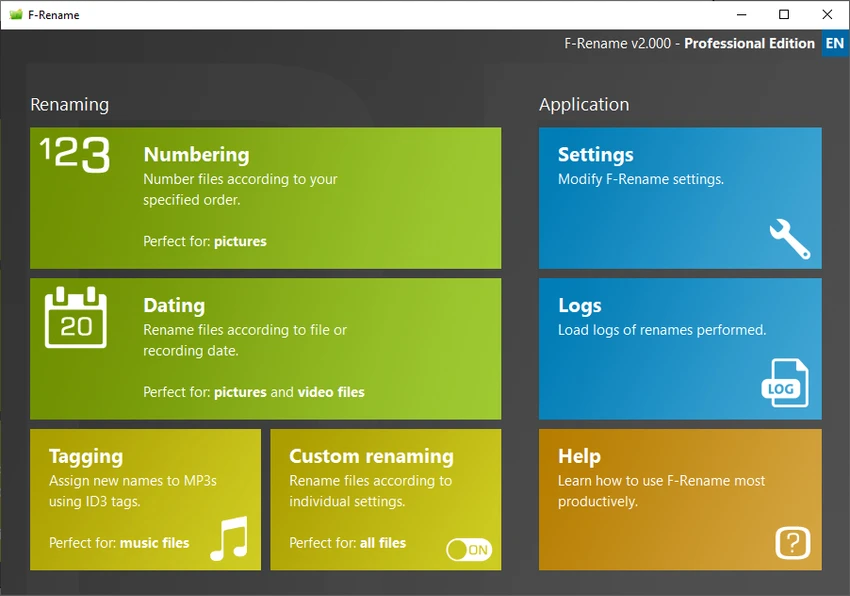
  • Multiple renaming modes for different file types.
  • Rename image files using automatic numbering.
  • Customize:
    • Starting number
    • Number of digits
    • Separators
    • Brackets
  • Rename video files using:
    • Creation date
    • Modification date
    • Recording date
  • Option to append or insert dates while preserving the original filename.
  • Rename audio files using ID3 metadata, including:
    • Artist
    • Album
    • Song title
    • Track number
  • Create fully customizable filename patterns.
  • Convert, shorten, replace, or partially modify existing filenames.
  • Preview renamed filenames before applying changes.
  • Generate logs of renaming operations.
  • Supports pre-made renaming templates.
  • Compatible with Windows 11, Windows 10, Windows 8.1, Windows 8, Windows 7, and Windows Server editions from 2012 through 2025.

Interface and Usability

F-Rename offers a modern, well-organized interface that keeps its renaming options easy to find without overwhelming the user. The available renaming methods are clearly grouped, making it simple to select the most appropriate option for photos, videos, music files, or general documents.

During testing, the preview feature stood out as one of the most useful aspects of the workflow. Being able to verify filenames before committing changes adds confidence, especially when processing large collections of files. The predefined templates also help speed up common renaming tasks, while custom patterns provide additional flexibility for users with more specific naming conventions.

Who Should Use F-Rename?

  • Photographers organizing image collections.
  • Users managing large video libraries.
  • Music collectors who want filenames based on ID3 tags.
  • Office users organizing documents.
  • Anyone who frequently needs to rename multiple files efficiently.
  • Power users looking for customizable batch renaming patterns.

Conclusion

F-Rename is a practical solution for anyone who regularly works with large numbers of files. It combines ease of use with flexible batch renaming options, allowing users to organize photos, videos, music, and general documents quickly and consistently.

Pros & Cons

✓

Pros

  • Easy-to-use interface suitable for beginners.
  • Batch rename large numbers of files.
  • Multiple renaming methods for different file types.
  • Supports numbering, dates, and metadata-based filenames.
  • Highly customizable filename patterns.
  • Preview changes before renaming.
  • Includes operation logs.
  • Supports modern Windows versions and Windows Server.
✕

Cons

  • Advanced pattern creation may require some learning.
  • Specialized features such as ID3 tag renaming are primarily useful for audio collections.

Frequently Asked Questions

What is F-Rename used for?

F-Rename is a batch file renaming application that allows users to rename multiple files simultaneously using numbering, dates, metadata, or custom filename patterns.

Can F-Rename rename photos automatically?

Yes. F-Rename can rename image files by adding sequential numbers. You can customize the starting number, digit length, separators, and brackets to match your preferred naming convention.

Does F-Rename support renaming MP3 files using ID3 tags?

Yes. The software can use ID3 metadata to generate filenames based on information such as the artist, album, song title, and track number.

Can I preview filenames before renaming?

Yes. F-Rename includes a preview feature that lets you review the new filenames before applying changes, helping reduce mistakes during batch operations.

Can I create my own renaming rules?

Yes. In addition to predefined templates, F-Rename allows you to build custom filename patterns and modify existing filenames by converting, shortening, replacing, or appending text.

Which versions of Windows are supported?

According to the provided information, F-Rename supports Windows 11, Windows 10, Windows 8.1, Windows 8, Windows 7, and Windows Server 2012, 2016, 2019, 2022, and 2025.

Recommended apps [Freeware]:
  • LAV Filters 0.82 LAV Filters logo a free DirectShow codec package that enables broad audio and video format support on Windows
  • Q-Dir 12.71 Q-Dir logo a lightweight quad-pane file manager for Windows, offering fast navigation, drag-and-drop, and portable access
  • 360 Total Security 11.0.0.1314 360 Total Security logo 360 Total Security provides antivirus protection, malware detection, system cleanup, and online security tools
  • HP Easy Start 17.5.11 HP Easy Start logo Install and configure HP printer drivers easily with automatic device detection, network support, and streamlined setup tools.
  • StereoPhoto Maker 6.41 StereoPhoto Maker logo Create and edit 3D stereo images with alignment tools, batch processing, multiple viewing modes, and broad image format support.
  • VidMasta 30.7 VidMasta logo Search, preview, and manage movie downloads with advanced filtering, subtitles, trailers, and detailed title information.
Recommended apps [Shareware]:
  • Total Excel Converter 7.1.0.138 Total Excel Converter logo convert Excel, ODS, CSV, DBF, and more into PDF, DOC, HTML, SQL, and other formats on Windows.
  • DiskGenius 6.2.0.1829 DiskGenius logo a Windows tool for partition management, data recovery, disk cloning, and backup with advanced features.
  • DocuFreezer 7.0.2606.20080 DocuFreezer logo a Windows batch converter for documents and images, converting files to PDF, JPG, TIFF, PNG, and TXT formats
  • Becky! Internet Mail 2.83.03 Becky! Internet Mail logo a fast, feature-rich Windows email client with POP3/IMAP support and advanced mailbox management
  • SysTools EDB Converter 7.0 SysTools EDB Converter logo Convert Exchange database files into multiple formats, recover mailbox data, preview items, and preserve folder structure with ease.
  • StartAllBack 3.9.23.5370 StartAllBack logo Customize Windows 11 with a familiar interface, improved taskbar controls, classic menus, and enhanced desktop usability options.