


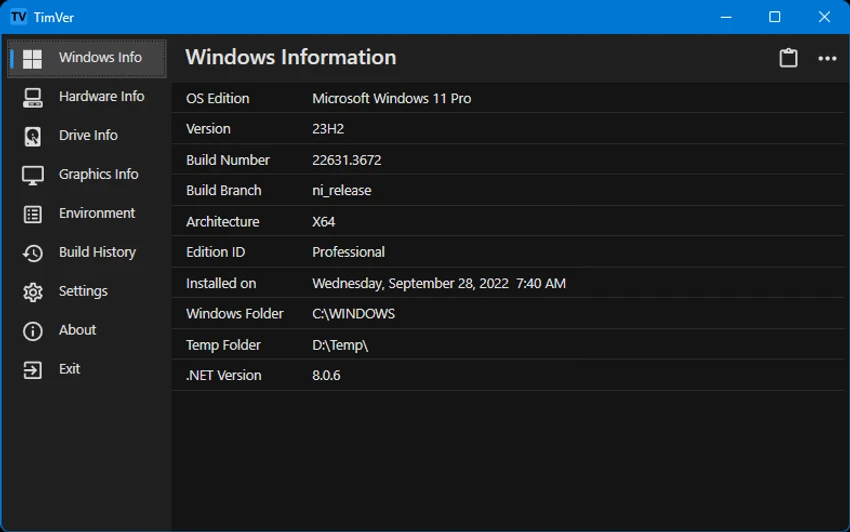

TimVer is a lightweight open-source utility designed to provide detailed information about the Windows operating system installed on your computer. Serving as an enhanced alternative to the standard Winver command, TimVer goes beyond basic version reporting by presenting build information, release details, system specifications, and historical tracking data in a well-organized interface.
Whether you're troubleshooting software issues, verifying hardware compatibility, or simply curious about your system configuration, TimVer offers a convenient way to access comprehensive Windows information from a single application.
Features of TimVer
- Displays detailed Windows version information
- Shows Windows build numbers
- Provides Windows release date details
- Offers system information beyond the standard Winver utility
- Uses Windows Management Information (WMI) data
- Retrieves information from Windows environment settings
- Accesses Windows registry version details
- Organized multi-section interface
- Displays computer specifications
- Provides performance-related system information
- Includes activity and change history tracking
- Supports interface customization options
- Theme and appearance customization
- Open-source software
- Useful for software and hardware compatibility verification
User Experience
During use, TimVer proves to be a practical utility for users who need more detailed Windows information than what Microsoft's built-in Winver command provides. The interface is straightforward and organized into clearly defined sections, making it easy to navigate through system details.
The application gathers information from multiple Windows sources, including WMI, environment variables, and the Windows registry, presenting the data in a centralized and accessible format. This approach eliminates the need to manually search through various system settings or registry entries. One of TimVer's strongest advantages is its usefulness for compatibility checks. Users planning software installations, hardware upgrades, or troubleshooting tasks can quickly verify important system details without relying on multiple tools.
The inclusion of a history log adds additional value by helping users track changes and activities over time. Meanwhile, customization options allow users to adjust the interface appearance according to personal preferences. Because the tool focuses on presenting information rather than modifying system settings, it remains approachable even for less technical users while still offering useful insights for advanced users and IT professionals.
Who Should Use TimVer?
- Windows power users
- IT administrators
- Technical support professionals
- System builders
- Software testers
- Users troubleshooting compatibility issues
- Anyone needing detailed Windows version information
Conclusion
TimVer offers a simple yet effective way to gather detailed information about your Windows installation and system environment. By extending far beyond the capabilities of the built-in Winver command, it provides valuable insights for troubleshooting, compatibility verification, and system auditing.


