Tagman logo

Tagman 2025.11.03

  • User Rating:
    ★★★★★
    ★★★★★
    0.0 0Votes
  • Requirements:
    Windows
  • Version: 2025.11.03
  • Latest updated: 3 days ago
  • License: Freeware  
  • Publisher: Abelssoft
  • Size: 31.3 MB
× app stores

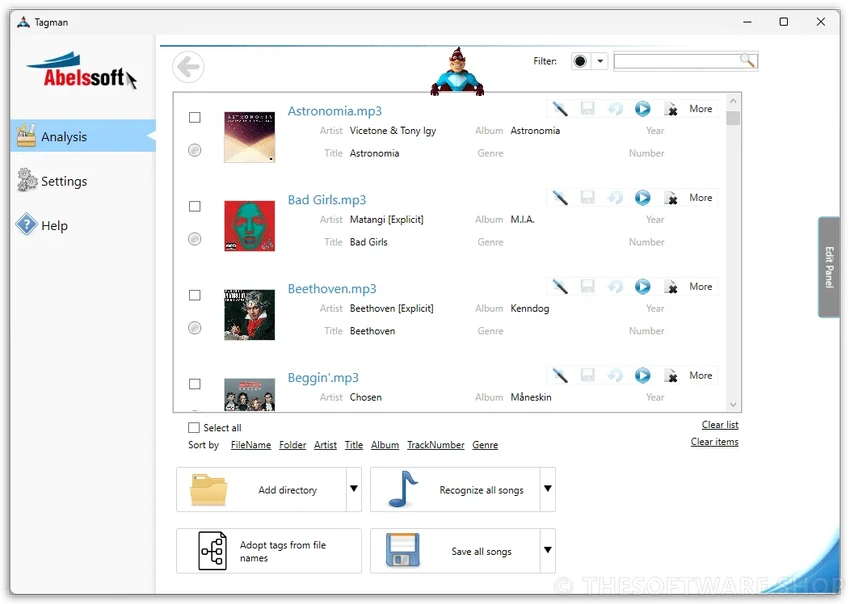
Tagman is a music organization and MP3 tagging tool designed to help users quickly clean up and structure their music libraries. With a focus on simplicity, it allows users to update ID3 tags such as titles, artists, albums, and cover art with just a single click. The software also uses fingerprint-based recognition technology to identify tracks and automatically fill in missing metadata by matching songs against an online database. This makes it particularly useful for large or poorly organized music collections.

Features of Tagman

  • One-click editing of MP3 ID3 tags.
  • Add or update song title, artist, album, and cover art.
  • Fingerprint technology to identify unknown tracks.
  • Matches audio fingerprints against an online music database.
  • Batch editing of multiple music files at the same time.
  • Automatic organization of large music libraries.
  • Generates folder structures based on artist and album.
  • Supports bulk metadata updates for efficiency.
  • Improves music library consistency and structure.

User Experience

Using Tagman feels straightforward and efficient, especially when working with large MP3 collections. Instead of manually editing metadata for each file, I could apply changes across multiple tracks at once, which significantly reduced the time required to organize my library. The fingerprint technology is the standout feature. By analyzing each song and comparing it to an online database, Tagman can automatically detect missing information and fill in details like artist names, album titles, and cover artwork. This is particularly helpful for poorly labeled or unknown audio files.

Batch processing also plays a major role in usability. Rather than handling tracks individually, I could apply updates to entire folders, making it practical for cleaning up large music libraries in one session. The automatic folder structure feature adds another layer of organization by sorting music based on artist and album information, helping maintain a cleaner and more structured collection over time.

Overall, Tagman prioritizes speed and automation over advanced editing control, making it ideal for users who want quick and effective music organization.

System Requirements

  • Windows 7
  • Windows 8
  • Windows 8.1
  • Windows 10
  • Windows 11

Who Should Use Tagman?

Tagman is ideal for music enthusiasts, DJs, and users with large MP3 collections who need a fast and automated way to organize their libraries. It is especially useful for users who have poorly tagged or unorganized music files and want to clean them up with minimal effort.

Conclusion

Tagman is a lightweight and efficient MP3 tagging tool that simplifies the process of organizing music libraries. With its one-click tagging system, fingerprint identification, and batch editing features, it is well suited for users who want quick and automated music management.

Pros & Cons

Pros

  • Simple one-click tag editing.
  • Fingerprint-based song identification.
  • Automatic metadata retrieval from online database.
  • Batch editing support for large libraries.
  • Helps organize and structure music folders automatically.
  • Saves time when managing large MP3 collections.

Cons

  • Limited information on advanced customization options.
  • Relies on online database matching for full functionality.
  • Primarily focused on MP3 files.

Frequently Asked Questions

What is Tagman?

Tagman is a music organization tool that edits MP3 ID3 tags such as title, artist, album, and cover art with one click.

Does Tagman support automatic music recognition?

Yes. It uses fingerprint technology to identify songs and match them with an online database to retrieve missing metadata.

Can Tagman edit multiple files at once?

Yes. Tagman supports batch editing, allowing users to update multiple music files simultaneously.

Does Tagman organize music folders automatically?

Yes. It can create folder structures based on artist and album information.

What file types does Tagman support?

Tagman primarily works with MP3 files and their ID3 metadata.

Recommended apps [Freeware]:
  • CrossFTP 2.00.1 CrossFTP logo a multi-protocol FTP client for Windows supporting SFTP, WebDAV, S3, Azure, and secure file transfers
  • Video Repair Tool 5.0.2.3 Video Repair Tool logo repair corrupted, broken, or unplayable video files on Windows and Mac with simple recovery workflows.
  • Burp Suite 2026.4.3 Burp Suite logo Test, analyze, and secure web applications with Burp Suite’s advanced proxy, scanning, and penetration testing tools
  • Digital Clock 5.2.2 Digital Clock logo customizable desktop clock app with skins, alarms, opacity control, and system tray support
  • Disk Drill 6.3.1398.0 Disk Drill logo advanced data recovery software for Windows to restore deleted files from drives, USB, and partitions
  • Claude Desktop 1.15962.1 Claude Desktop logo Anthropic's AI assistant to Windows and macOS for writing, coding, research, and file analysis
Recommended apps [Shareware]:
  • Adobe After Effects 2026 Adobe After Effects logo advanced motion graphics, visual effects, compositing, and animation tools for creators.
  • Bandizip 7.44 Bandizip logo Fast and intuitive file compression software supporting ZIP, RAR, 7Z, and more with high-speed archiving features
  • DiskGenius 6.2.0.1829 DiskGenius logo a Windows tool for partition management, data recovery, disk cloning, and backup with advanced features.
  • Araxis Merge 2026.0 Araxis Merge logo a powerful file comparison and merging tool for developers, legal teams, and professionals handling version control
  • Softros LAN Messenger 12.6.3.0 Softros LAN Messenger logo secure encrypted LAN messaging, group chat, and file sharing for office communication
  • LanSend 26.06 LanSend logo LAN messaging tool for system administrators to send instant messages to multiple Windows users without installing client software