FileLegit Windows Multimedia Video Editors VideoPad Video Editor
VideoPad Video Editor logo

VideoPad Video Editor 18.38

  • User Rating:
    ★★★★★
    ★★★★★
    0.0 0Votes
  • Requirements:
    Windows
  • Version: 18.38
  • Latest updated: 2 days ago
  • License: Free Trial  
  • Publisher: NCH Software
  • Size: 8.4 MB
× app stores

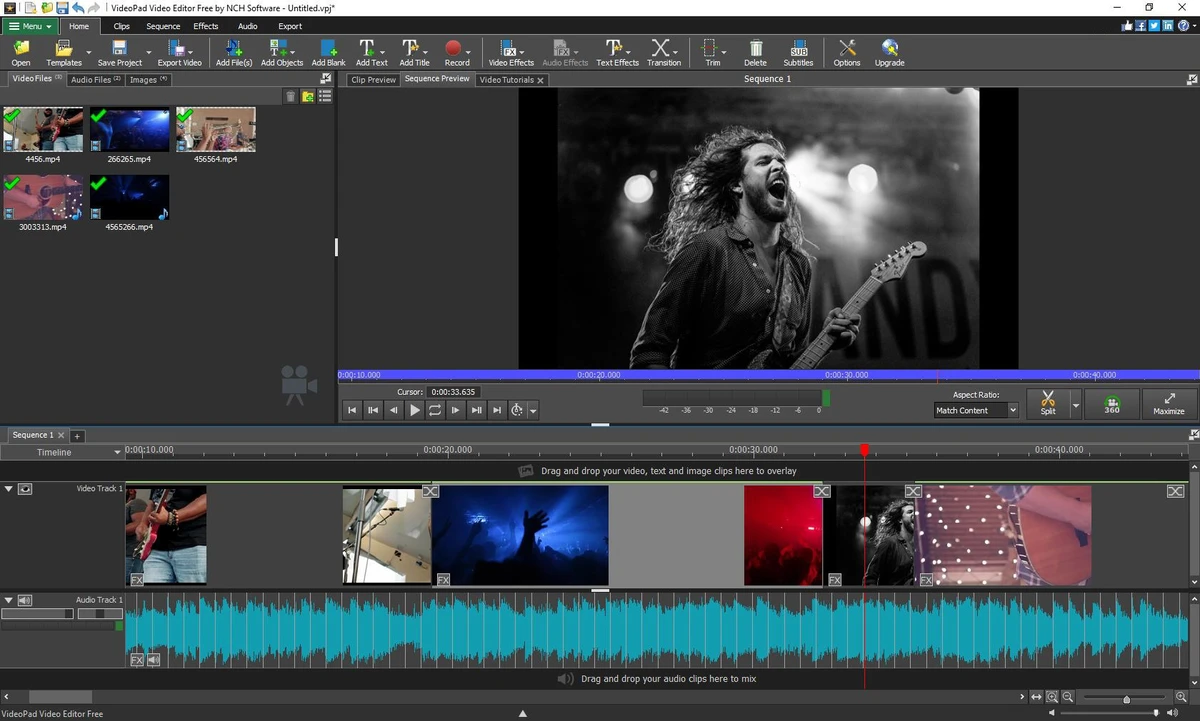
VideoPad Video Editor is a user-friendly video editing application for Windows that allows users to create, edit, and export videos with a range of effects, transitions, and audio tools. It supports drag-and-drop editing, making it accessible for beginners while still offering enough features for more creative projects.

Overview

VideoPad Video Editor is designed as a straightforward yet capable movie-making tool. It supports a wide variety of video and audio formats and provides a timeline-based editing environment where users can combine clips, images, soundtracks, and effects. The software also includes tools for audio mixing, voice recording, and basic visual enhancements such as transitions, overlays, and chroma key effects. Once editing is complete, users can export their projects in multiple formats or upload directly to online platforms. Some advanced features are offered as trial functionalities, which may require purchase after a limited usage period.

Features of VideoPad Video Editor

  • Drag-and-drop video editing interface
  • Supports multiple video formats (AVI, MP4, MOV, WMV, MPEG, and more)
  • Wide selection of transitions with customizable duration
  • Speed control (slow motion, fast motion, reverse playback)
  • Add text, images, and overlays to video timeline
  • 3D video editing capabilities
  • 2D to 3D stereoscopic conversion
  • Chroma key (green screen) support
  • Audio import and mixing tools
  • Supports multiple audio formats (MP3, WAV, AAC, FLAC, and more)
  • Audio recording for narration
  • Audio effects such as chorus, compression, and distortion
  • Text-to-speech functionality
  • Stock sound library integration
  • Export to multiple formats (ASF, AVI, WMV, and more)
  • Support for HD, Full HD, 2K, and 4K exports
  • Direct upload to platforms like YouTube and Facebook
  • DVD burning capability
  • Mobile device export options

User Experience

VideoPad Video Editor provides a familiar timeline-based editing environment that is easy to understand, especially for users who are new to video production. The drag-and-drop functionality simplifies the process of adding media files, making it easy to start editing quickly. Basic editing tasks such as trimming clips, adding transitions, and layering audio work smoothly and feel intuitive. The ability to preview edits in real time helps users refine their projects without needing to render repeatedly.

The inclusion of audio tools and effects adds extra creative flexibility, allowing users to enhance both video and sound within a single application. Features like chroma key and 3D editing extend its capabilities beyond basic editing, though they may require some learning for beginners. Export options are versatile, supporting multiple resolutions and formats, along with direct sharing to social platforms or DVD creation for offline viewing. Some advanced features are time-limited trial functions, which may require upgrading to continue using them.

Who Should Use VideoPad Video Editor?

  • Beginners learning video editing
  • Content creators for YouTube and social media
  • Users creating personal or family videos
  • Students working on video projects
  • Users who need basic to intermediate editing tools
  • Anyone wanting an all-in-one editing and exporting solution

Conclusion

VideoPad Video Editor is a practical and accessible video editing solution for users who want to create and share videos without dealing with complex professional tools. Its combination of drag-and-drop editing, effects, audio tools, and flexible export options makes it a solid choice for beginners and casual creators.

Pros & Cons

Pros

  • Easy drag-and-drop editing interface
  • Supports many video and audio formats
  • Wide range of transitions and effects
  • Built-in audio recording and mixing tools
  • Chroma key (green screen) support
  • Direct export to social media platforms
  • DVD burning capability
  • Multiple resolution export options up to 4K

Cons

  • Some advanced features are limited to trial or paid versions
  • Not as advanced as professional editing software
  • Interface may feel basic for high-end production workflows

Frequently Asked Questions

What is VideoPad Video Editor used for?

VideoPad is used for editing videos, adding effects, mixing audio, and exporting finished projects in multiple formats.

Does VideoPad support 4K video editing?

Yes. VideoPad supports exporting videos in resolutions up to 4K, depending on system capabilities.

Can I add music and voice recordings in VideoPad?

Yes. The software supports audio import, mixing, and voice recording for narration.

Does VideoPad support green screen editing?

Yes. It includes chroma key functionality for green screen video production.

Can I upload videos directly to YouTube?

Yes. VideoPad allows direct sharing to platforms such as YouTube and Facebook.

Is VideoPad suitable for beginners?

Yes. Its drag-and-drop interface and simple timeline make it beginner-friendly.

Which operating systems are supported?

VideoPad supports Windows systems (exact versions not specified in the provided data).

Recommended apps [Freeware]:
  • EarthView 7.16.6 EarthView logo dynamic wallpapers and screensavers with day, night, and weather effects
  • QuadSpinner Gaea 2.3.0.1 QuadSpinner Gaea logo a procedural terrain design tool for creating realistic landscapes with advanced erosion tools.
  • ManicTime 2026.2.0.3 ManicTime logo Automatically track work hours, monitor productivity, and generate accurate reports with ManicTime
  • Wondershare Recoverit 14.0.29.10 Wondershare Recoverit logo Recover deleted, lost, formatted, or corrupted files from PCs, USB drives, SD cards, and more with Wondershare Recoverit
  • 1Click Uninstaller 4.0 1Click Uninstaller logo simple Windows uninstaller tool with context menu removal, leftover cleanup, and process termination features
  • Viber for Windows 28.2.0 Viber for Windows logo make free calls, send messages, and sync chats across devices via WiFi or 3G
Recommended apps [Shareware]:
  • Internet Download Manager (IDM) 6.43 Build 2 Internet Download Manager (IDM) logo boosts download speeds up to 5x, schedules downloads, and supports all major browsers and protocols
  • Send Anywhere 24.6.0 Send Anywhere logo free cross-platform file-sharing tool that transfers files of any size without registration.
  • Total Audio Converter 6.1.0.299 Total Audio Converter logo convert MP3, WAV, FLAC, AAC and more with batch processing, CD ripping, and Windows integration.
  • WYSIWYG Web Builder 21.1.0 WYSIWYG Web Builder logo create responsive websites visually with drag-and-drop tools and automatic HTML generation
  • VovSoft PDF to Text Converter 1.5 VovSoft PDF to Text Converter logo convert PDF files to editable TXT documents offline with batch processing
  • FoneTool 3.8.0 FoneTool logo back up, transfer, and manage iPhone data with convenient device management tools