


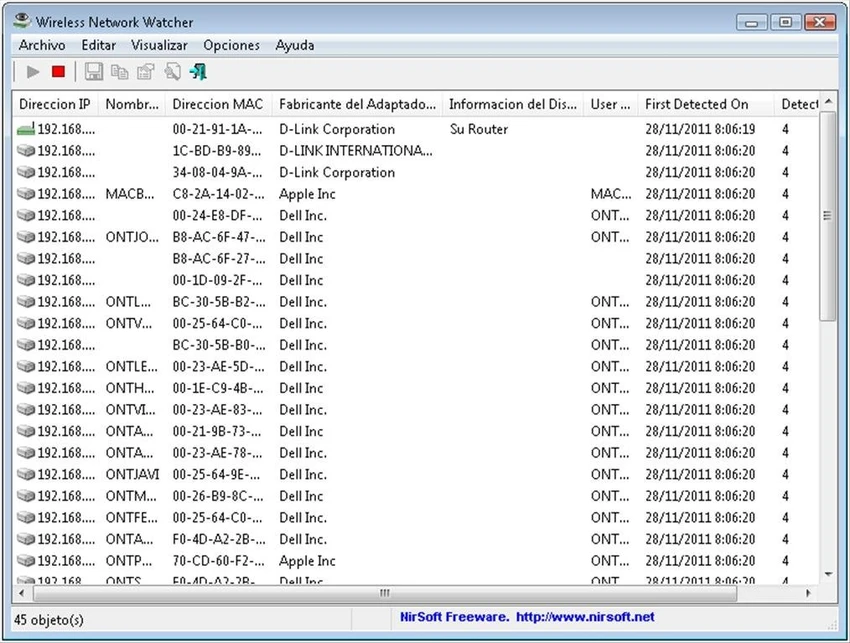

Knowing which devices are connected to your wireless network is an important part of managing network security and troubleshooting connectivity issues. Wireless Network Watcher is a lightweight utility that simplifies this task by scanning your Wi-Fi network and displaying all currently connected computers and devices. Rather than offering complex network analysis tools, it focuses on quickly identifying connected devices and presenting useful information such as IP addresses, MAC addresses, device manufacturers, and computer names in a clean, easy-to-read interface.
Overview
Wireless Network Watcher is a Windows utility that scans a wireless network and displays the devices currently connected to it. Once the scan is complete, the application lists each detected device along with its IP address, MAC address, network adapter manufacturer, and, when available, the computer name. The software is portable and can be run without installation, although an installer version is also available for users who prefer traditional installation. Scan results can be exported in multiple formats or copied directly into spreadsheet applications for further analysis.
Features of Wireless Network Watcher
- Scan your wireless network for connected devices
- Display connected computers and network devices
- View each device's:
- IP address
- MAC address
- Network adapter manufacturer
- Computer name (when available)
- Detect randomized MAC addresses
- Updated internal MAC address database
- Export scan results to:
- HTML
- XML
- CSV
- Text
- Copy results directly to the clipboard
- Compatible with Microsoft Excel and other spreadsheet applications
- Portable version requires no installation
- Optional installer with Start Menu shortcut
- Manual network adapter selection through Advanced Options
User Experience
Wireless Network Watcher is designed to do one job efficiently: identify the devices connected to your wireless network. After launching the application, it automatically detects the wireless adapter and scans the network within seconds, requiring little or no configuration in most cases. The results are presented in a clear table, making it easy to review connected devices and identify useful information such as IP addresses, MAC addresses, and network adapter manufacturers. When available, computer names provide additional context, helping distinguish between known and unfamiliar devices.
If the application cannot automatically detect the correct network adapter, the Advanced Options menu allows users to manually select the appropriate adapter, ensuring compatibility with a wider range of system configurations. Exporting results is equally straightforward. Whether you need an HTML report, a CSV file for analysis, or simply want to copy the data into Excel, the available export options make sharing or documenting scan results quick and convenient.
Who Should Use Wireless Network Watcher?
- Home users monitoring their Wi-Fi network
- Network administrators
- IT support technicians
- Users troubleshooting network connectivity
- Anyone wanting to identify devices connected to their wireless network
Conclusion
Wireless Network Watcher offers a fast and uncomplicated way to monitor devices connected to your Wi-Fi network. Its automatic scanning, portable design, and detailed device information make it a practical utility for both everyday users and IT professionals.


