Photo Supreme logo

Photo Supreme 2026.3.0.9285

  • User Rating:
    ★★★★★
    ★★★★★
    0.0 0Votes
  • Requirements:
    Windows
  • Version: 2026.3.0.9285
  • Latest updated: 1 day ago
  • License: Free Trial  
  • Publisher: IDimager Systems
  • Size: 162 MB
×

Photo Supreme is a powerful digital asset management (DAM) solution designed to help photographers and image collectors organize, catalog, and locate photos quickly. Whether you're managing a few thousand images or a massive archive containing hundreds of thousands of files, the software provides efficient tools for searching, tagging, organizing, and sharing your collection.

Overview

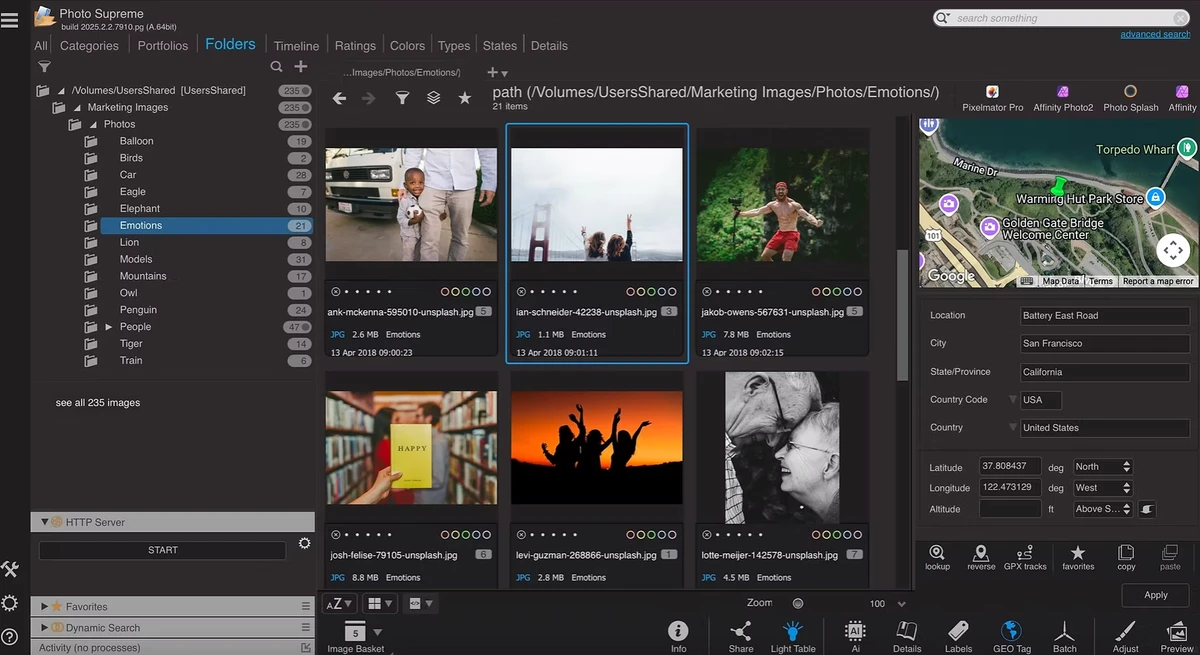
Managing a growing photo library can quickly become overwhelming. Photo Supreme addresses this challenge by offering a comprehensive image cataloging system that keeps digital archives organized and easily accessible. Built with usability in mind, the software combines a clean interface with advanced management capabilities. It allows users to import images, assign keywords and catalog labels, manage metadata, detect duplicates, and perform highly detailed searches. The platform is optimized for speed, ensuring quick access to photos even within extremely large collections.

Photo Supreme also integrates with popular image editing applications, making it easy to incorporate into existing photography workflows. Available for both Windows and macOS, it serves as a practical solution for photographers, content creators, and professionals who need reliable photo organization tools.

Features of Photo Supreme

  • Advanced search capabilities for locating images quickly
  • Photo cataloging and image management tools
  • Import and ingest photos from various sources
  • Keyword tagging and metadata management
  • Advanced GEO tagging functionality
  • Duplicate image detection
  • Side-by-side image comparison for up to six photos
  • Portfolio-based image organization
  • Face detection and area tagging
  • Custom metadata fields
  • Multi-tab browsing support
  • Dual-monitor support
  • Lossless image editing
  • Color management support
  • Fully scriptable architecture
  • Portable image previews stored within the database
  • Sharing support for Flickr, SmugMug, Zenfolio, PicasaWeb, FTP, and email
  • Creative Commons support
  • Open catalog architecture using industry-standard metadata formats
  • Import tools for existing photo collections and metadata

User Experience

After using Photo Supreme, one of the first things that stands out is its focus on organization and efficiency. Despite offering a large number of advanced features, the interface remains relatively clean and easy to navigate. Importing images is straightforward, and assigning keywords, labels, and metadata helps create a structured library from the start. Once photos are cataloged, the search functionality becomes particularly valuable. Finding specific images within large collections takes only seconds, making the software suitable for users with extensive archives.

Conclusion

Photo Supreme is a highly capable photo management solution designed for users who need more than simple folder organization. Its advanced cataloging tools, fast search engine, metadata management capabilities, and integration with external editors make it a valuable addition to any photography workflow.

Pros & Cons

Pros

    • Powerful photo cataloging and asset management tools
    • Fast search performance across large image libraries
    • Advanced metadata, keyword, and GEO tagging features
    • Duplicate detection capabilities
    • Integrates with popular photo editing applications
    • Supports image sharing and export options
    • Open architecture with industry-standard metadata support
    • Available for Windows and macOS

Cons

    • Primarily focused on organization rather than advanced photo editing
    • Feature-rich interface may require time to fully master for new users

Frequently Asked Questions

What is Photo Supreme used for?

Photo Supreme is a digital asset management and photo cataloging application used to organize, search, tag, and manage large collections of digital images.

Does Photo Supreme support metadata management?

Yes. The software includes extensive metadata management features, including keyword tagging, custom fields, GEO tagging, and support for industry-standard metadata formats.

Can Photo Supreme work with existing photo collections?

Yes. Photo Supreme provides import tools for existing photo libraries and supports importing metadata from compatible applications and XMP-enabled software.

Is Photo Supreme available for Windows and macOS?

Yes. Photo Supreme is available for both Windows and macOS platforms.

Does Photo Supreme include duplicate photo detection?

Yes. The software includes duplicate detection tools to help identify and manage duplicate images within your collection.

What are the system requirements for Photo Supreme?

Photo Supreme supports Windows 7, Windows 8, Windows 8.1, Windows 10, and Windows 11. Windows 10 or later is recommended.

Recommended apps [Freeware]:
  • IObit Driver Booster 13.4.0.234 IObit Driver Booster logo updates outdated drivers automatically to boost system stability and gaming performance.
  • WinScan2PDF 9.77 WinScan2PDF logo scan documents and save them as PDFs or JPEGs with minimal setup and low CPU usage.
  • DirPrintOK 7.61 DirPrintOK logo fast and portable tool to print or export directory contents in XLS, HTML, CSV, or TXT formats.
  • Winhance 26.06.12 Winhance logo Windows optimization tool to debloat apps, tweak settings, and customize Windows 10/11
  • FastCopy 5.11.3 FastCopy logo a lightweight Windows tool for ultra-fast file copying, syncing, and error-resilient data transfer
  • Universal USB Installer 2.0.3.7 Universal USB Installer logo create bootable Linux USB drives easily with ISO support and persistence options on Windows.
Recommended apps [Shareware]:
  • Audio Transcoder 2.12.24 Audio Transcoder logo all-in-one audio converter and CD ripper supporting MP3, FLAC, AAC, WMA, and more
  • Wondershare Filmora 15.3.20.18660 Wondershare Filmora logo a powerful, user-friendly video editor with effects, transitions, and 4K support.
  • COAA PlanePlotter 6.7.5.9 COAA PlanePlotter logo a Windows tool that decodes live aircraft data like ADS-B and ACARS and displays real-time radar-style tracking
  • HyperSnap 10.0.3 HyperSnap logo captures screenshots, scrolling windows, OCR text and video with advanced editing tools on Windows.
  • GiliSoft Exe Lock 12.0.0 GiliSoft Exe Lock logo Protect Windows applications with passwords and prevent unauthorized access using GiliSoft Exe Lock
  • ExamDiff Pro 17.0.1.2 ExamDiff Pro logo a Windows file comparison tool for code review, folder sync, and document diffing with merge support.