DipTrace logo

DipTrace 5.3.0.1

  • User Rating:
    ★★★★★
    ★★★★★
    0.0 0Votes
  • Requirements:
    Windows
  • Version: 5.3.0.1
  • Latest updated: 2 weeks ago
  • License: Freeware  
  • Publisher: DipTrace
  • Size: 242 MB
× app stores

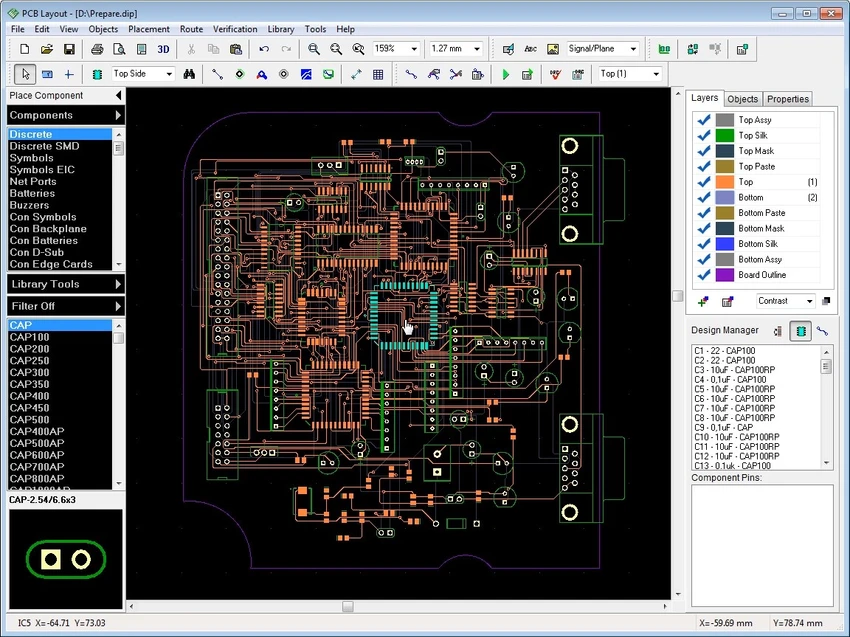
DipTrace is a professional electronic design automation (EDA) software suite that enables engineers, students, and hardware developers to design printed circuit boards (PCBs) from initial schematics through manufacturing output. The application combines schematic capture, PCB layout, component library management, and 3D PCB visualization into an integrated workflow suitable for both simple and complex multilayer circuit board projects.

The software is designed with an intuitive interface that allows new users to become productive quickly while still providing advanced capabilities for experienced PCB designers. DipTrace supports multi-sheet and hierarchical schematics, intelligent routing tools, real-time design rule checking (DRC), high-speed signal design, and extensive import and export compatibility with various EDA, CAD, and manufacturing formats.

Its modular architecture includes dedicated tools for schematic capture, PCB layout, library creation, and 3D modeling. Real-time verification helps identify design issues during development, while built-in manufacturing output options simplify the transition from design to production. The software also includes thousands of ready-to-use 3D component models and supports exporting PCB models to mechanical CAD applications using STEP and VRML formats.

Features of DipTrace

  • Schematic capture with multi-sheet and hierarchical design
  • Visual pin connections using net ports and buses
  • Electrical Rule Check (ERC)
  • Hierarchy verification
  • Smart PCB placement and routing tools
  • Shape-based autorouter
  • Smart manual routing
  • High-speed signal design support
  • Real-time Design Rule Checking (DRC)
  • PCB layout verification tools
  • Component and pattern library editors
  • Cross-module library management
  • Bulk pin naming and pad numbering
  • Wide import and export compatibility
  • Manufacturing file generation
  • Real-time 3D PCB preview
  • Export PCB models to STEP and VRML
  • Import 3DS, VRML, STEP, and IGES 3D models
  • Includes over 11,000 free 3D component models

Interface and Usability

DipTrace features a consistent interface across all of its modules, making it easier to transition between schematic design, PCB layout, library management, and 3D visualization. The interface is designed to accommodate beginners while providing advanced functionality for complex hardware projects.

Real-time design verification helps identify routing and rule violations during the design process rather than after completion. The integrated tutorial included with the software also helps users learn each stage of PCB development, making it suitable for those new to PCB design as well as experienced engineers. The ability to preview boards in 3D and export them for mechanical CAD integration further streamlines hardware development workflows.

Who Should Use DipTrace?

  • Electronics engineers
  • PCB designers
  • Hardware developers
  • Embedded systems developers
  • Engineering students
  • Makers and electronics hobbyists
  • Organizations designing multilayer circuit boards

Conclusion

DipTrace provides a complete PCB design environment that covers schematic capture, PCB layout, library management, verification, and 3D visualization within a unified interface. Its combination of intuitive usability and advanced engineering tools makes it suitable for projects ranging from educational circuits to complex multilayer PCB designs.

Pros & Cons

Pros

  • Integrated schematic capture and PCB layout tools
  • Supports hierarchical and multi-sheet designs
  • Real-time DRC and verification features
  • Built-in 3D PCB visualization
  • Extensive import and export support
  • Includes over 11,000 free 3D models
  • Suitable for both beginners and advanced users

Cons

  • Primarily intended for PCB and electronic design workflows
  • Advanced capabilities may require time to master

Frequently Asked Questions

What is DipTrace used for?

DipTrace is electronic design automation (EDA) software used to create schematics, design printed circuit boards (PCBs), manage component libraries, and generate manufacturing files.

Does DipTrace support multilayer PCB design?

Yes. DipTrace is designed to handle both simple circuit boards and complex multilayer PCB projects.

Can DipTrace generate manufacturing files?

Yes. The software includes manufacturing output capabilities for preparing PCB designs for production.

Does DipTrace include 3D PCB visualization?

Yes. DipTrace provides real-time 3D PCB previews and allows PCB models to be exported in STEP and VRML formats for use with mechanical CAD software.

Can DipTrace import and export other CAD or EDA formats?

Yes. DipTrace supports importing and exporting various EDA, CAD, netlist, and manufacturing formats. It also imports 3D models in formats including 3DS, VRML, STEP, and IGES.

Which operating systems support DipTrace?

According to the provided system requirements, DipTrace supports Windows XP, Windows Vista, Windows 7, Windows 8, Windows 8.1, Windows 10, and Windows 11.

Recommended apps [Freeware]:
  • IObit Driver Booster 13.5.1.400 IObit Driver Booster logo updates outdated drivers automatically to boost system stability and gaming performance.
  • Audacity 3.7.8 Audacity logo Free open-source audio editor and recorder with multi-track editing, effects, audio analysis, and format conversion
  • CS Easy Unlocker 1.1.6.0 CS Easy Unlocker logo unlock restricted folders and fix “Access Denied” errors with a simple one-click tool.
  • Mozilla Firefox 152.0.6 Mozilla Firefox logo Browse the web securely and quickly with Mozilla Firefox, a customizable browser with strong privacy and add-on support
  • Volumouse 2.21 Volumouse logo Adjust Windows sound volume quickly using mouse wheel shortcuts with customizable rules and simple background controls.
  • cPicture LE 4.14 cPicture LE logo Manage, browse, crop, search, and process digital photos with a lightweight image workflow application supporting plugins and JPEG tools.
Recommended apps [Shareware]:
  • GetFLV 32.2606.25 GetFLV logo combines video downloading, conversion, audio extraction, and basic editing tools in one Windows application
  • XnView MP 1.11.5 XnView MP logo a powerful image viewer, editor, and batch converter supporting 500+ image formats on Windows
  • Advanced ETL Processor Professional 6.5.1.5 Advanced ETL Processor Professional logo a powerful ETL tool for database automation and data integration
  • Actual Window Guard 8.15.4 Actual Window Guard logo organizes windows, manages positioning, sizing, and rules to improve productivity on Windows desktops
  • pdfFactory Pro 9.31 pdfFactory Pro logo creates, combines, previews, and prints PDFs easily with advanced tools like bookmarks, email export, and job control
  • pdfMachine 20.60 pdfMachine logo converts any printable document into PDF using a virtual printer while preserving formatting and file integrity.