Sandboxie logo

Sandboxie 5.73.0

  • User Rating:
    ★★★★★
    ★★★★★
    0.0 ★ 0Votes
  • Requirements:
    Windows
  • Version: 5.73.0
  • Latest updated: 2 weeks ago
  • License: Open Source  
  • Publisher: David Xanatos
  • Size: 3 MB
× app stores

Sandboxie (Classic) is a Windows security utility designed to run programs inside an isolated environment called a sandbox. By separating applications from the rest of the operating system, Sandboxie helps prevent programs from making permanent changes to files, settings, and other system data.

When users browse the web, install software, or open files, various changes can occur in the background. These changes may include browser history updates, temporary files, downloaded content, or modifications caused by unwanted software. Sandboxie provides an additional layer of protection by containing these changes within a controlled space.

Unlike approaches that block browser features or limit website functionality, Sandboxie works by isolating the results of those actions. This allows browsers and other applications to continue operating normally while reducing the impact of potentially harmful changes. If unwanted software is downloaded or installed inside the sandbox, the affected environment can be discarded without permanently affecting the main system.

Sandboxie can be configured according to user needs, making it suitable for different security scenarios. It can be used for safer web browsing, testing applications, opening potentially risky files, and keeping temporary activity separated from the main Windows environment. With its focus on application isolation, Sandboxie provides a practical security solution for users who want additional control over how programs interact with their computer.

Features of Sandboxie

  • Run applications inside isolated sandbox environments
  • Prevent programs from making permanent system changes
  • Protect against unwanted software, spyware, viruses, worms, and malware
  • Enable safer web browsing without disabling browser functionality
  • Keep browser history, cookies, and temporary files inside the sandbox
  • Isolate email attachments to reduce security risks
  • Support custom sandbox configurations
  • Help test software in a controlled environment
  • Reduce unnecessary system changes caused by software installations

Interface and Usability

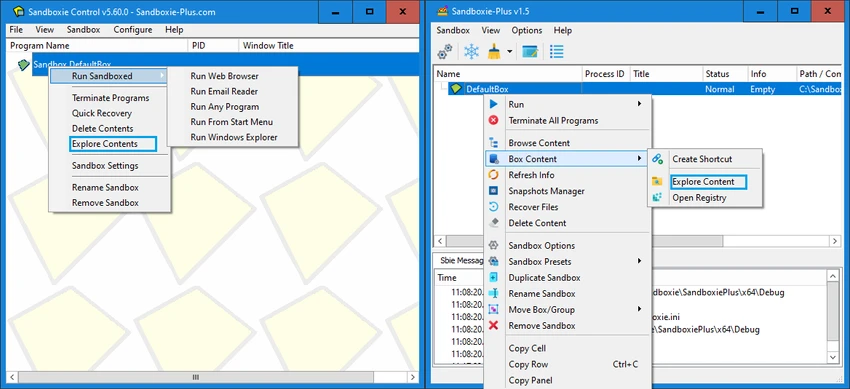
Sandboxie provides a practical approach to application isolation by allowing users to run programs inside separate sandbox environments. The concept is straightforward: applications operate normally, but their changes are contained instead of being written directly to the main system.

The software is designed for users who want more control over application behavior. Users can create and configure sandbox environments based on their needs, whether for browsing, testing software, or handling potentially unsafe files.

For everyday use, the main benefit is the ability to discard unwanted changes after closing a sandboxed application. This makes it easier to experiment with programs or browse unfamiliar websites while keeping the primary Windows environment cleaner. Because sandbox configuration provides advanced control, some features may require users to understand basic security concepts and application behavior.

Who Should Use Sandboxie?

  • Users who want safer web browsing
  • People testing unfamiliar applications
  • Users who open files from unknown sources
  • Security-conscious home users
  • Organizations looking for application isolation tools
  • Anyone who wants to prevent temporary changes from affecting Windows

Conclusion

Sandboxie offers an effective way to improve Windows security through application isolation. By running programs in a controlled sandbox environment, it helps prevent unwanted changes from becoming permanent while allowing applications to maintain normal functionality.

Pros & Cons

✓

Pros

  • Provides application isolation for improved security
  • Allows normal browser functionality while containing changes
  • Helps protect against unwanted software activity
  • Useful for testing programs safely
  • Supports customizable sandbox environments
  • Lightweight application size
✕

Cons

  • Advanced configuration may require technical knowledge
  • Does not replace a complete antivirus solution

Frequently Asked Questions

What is Sandboxie used for?

Sandboxie is used to run applications in an isolated environment, preventing them from making permanent changes to the main Windows system.

How does Sandboxie protect my computer?

Sandboxie contains program activity inside a sandbox. Any changes made by the application, such as file modifications or temporary data creation, remain isolated and can be removed without affecting the main system.

Can Sandboxie be used for safe web browsing?

Yes. Sandboxie can run web browsers in a sandboxed environment, helping prevent downloaded malware or unwanted changes from affecting the computer.

Does Sandboxie block websites or browser features?

No. Sandboxie does not disable browser functions or block website features. Instead, it isolates the results of those activities within the sandbox.

Can I test software with Sandboxie?

Yes. Sandboxie can be used to run and test programs in an isolated environment, making it easier to evaluate applications without directly affecting the main Windows installation.

Is Sandboxie a replacement for antivirus software?

No. Sandboxie provides application isolation and an additional security layer, but it is not intended to replace antivirus software or other security solutions.

Recommended apps [Freeware]:
  • ManicTime 2026.2.0.3 ManicTime logo Automatically track work hours, monitor productivity, and generate accurate reports with ManicTime
  • XMedia Recode 3.6.3.1 XMedia Recode logo Free video and audio converter with GPU acceleration, batch conversion, editing tools, and subtitle support
  • MuPDF 1.28.0 MuPDF logo a lightweight, no-frills PDF and XPS viewer designed for fast document viewing with minimal system usage
  • Display Driver Uninstaller (DDU) 18.1.5.6 Display Driver Uninstaller (DDU) logo Completely remove AMD, NVIDIA, and Intel GPU drivers with DDU for clean installs and troubleshooting Windows issues
  • MultiPack Visual C++ Installer 4.2 MultiPack Visual C++ Installer logo Install required Microsoft Visual C++ runtimes quickly to fix application and game compatibility issues on Windows systems.
  • DNSCrypt-Proxy 2.1.17 DNSCrypt-Proxy logo Encrypt DNS traffic, monitor queries, filter unwanted domains, and improve online privacy with this powerful command-line security utility.
Recommended apps [Shareware]:
  • Typing Instructor Platinum 21.1 Typing Instructor Platinum logo improve typing speed and accuracy through interactive lessons, games, and 10-finger typing practice.
  • Pepakura Designer 6.2.6 Pepakura Designer logo converts 3D models into printable papercraft patterns with layout editing and export tools
  • Ideal Remote 26.8 Ideal Remote logo Manage Windows, macOS, and Linux systems remotely with IDEAL REMOTE, featuring secure remote access and built-in administration tools
  • Actual Window Rollup 8.15.4 Actual Window Rollup logo adds a roll-up button to Windows, letting you collapse windows into title bars for faster workspace management
  • Ashampoo Driver Updater 2.6.2 Ashampoo Driver Updater logo Automatically scan, update, and manage outdated drivers to improve Windows system stability, hardware compatibility, and performance.
  • NTFS Permissions Reporter 5.5.701 NTFS Permissions Reporter logo Audit Windows file permissions with detailed reports, scheduling, filtering, exports, and security analysis tools for administrators.