


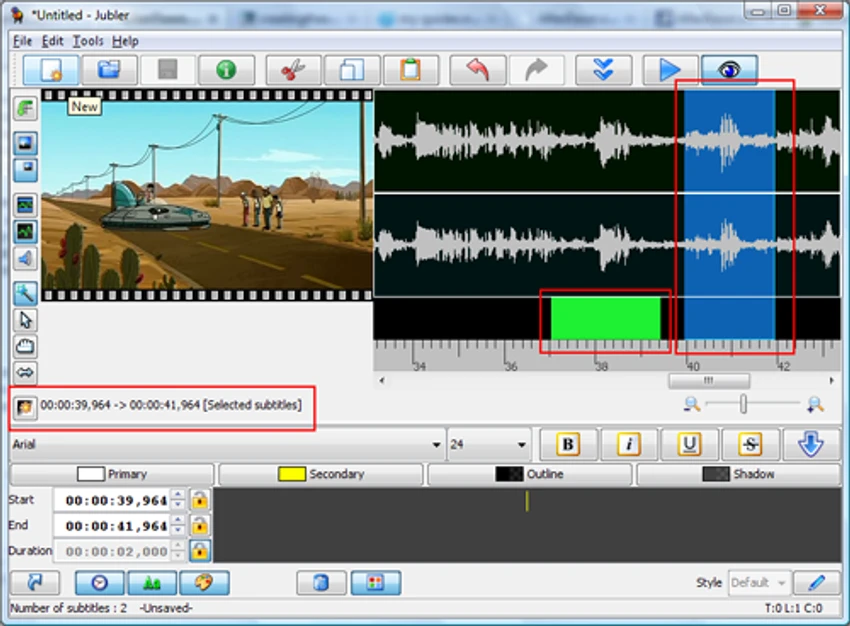

Jubler Subtitle Editor is a dedicated subtitle editing tool designed for creating, converting, correcting, and refining text-based subtitles. It supports multiple popular subtitle formats and provides real-time preview capabilities, making it suitable for both beginners and experienced subtitle editors.
Overview
Jubler Subtitle Editor is built for users who work with subtitles in different video projects. It allows you to create new subtitle files from scratch or modify existing ones with precision. The software supports widely used formats such as Advanced SubStation, SubStation Alpha, SubRip, MicroDVD, MPL2, and others.
One of its core strengths is its real-time subtitle preview, which helps users visually synchronize subtitles with video playback. It also includes spell checking, translation mode, and style editing features for more professional subtitle production. The tool runs on Java, making it compatible with multiple operating systems, and it offers installation support for Windows, macOS, and Linux.
Features of Jubler Subtitle Editor
Subtitle Formats
- 20+ formats supported including SubRip (SRT), Advanced SubStation Alpha (ASS/SSA), WebVTT, MicroDVD, SubViewer, MPL2, Spruce DVD Maestro, TTML, ITT, DFXP, and YouTube subtitles
- Universal encoding support (UTF-8, UTF-16, and all Java platform encodings)
- Character and paragraph-level styling for formats that support it (ASS/SSA, SRT)
- Format conversion between all supported types
Video Integration
- VLC-based frame preview, audio waveform and video playback
- Real-time subtitle editing while watching video
- Interactive timeline with draggable subtitle blocks
- Two-point synchronization for timing alignment
- Enhanced preview controls with shift/alt key support and snapping
Editing Tools
- Time manipulation - shift, frame rate conversion, round timing
- Content operations - split/join entries, split/join files
- Text processing - spell checker, find & replace with regex support
- Smart time fixer with overlap detection and resolution
- Translation mode for side-by-side subtitle translation
- Undo/redo with full history
- Auto-save and recovery
Quality Control
- Subtitle validation with configurable quality rules
- CPS (characters-per-second) metrics displayed in subtitle table
- TED guidelines compliance checking
- Color-coded validation to highlight issues
- Statistics and analysis tools
User Interface
- HiDPI support with adjustable scaling
- Dark theme available
- Customizable keyboard shortcuts
- Multi-language interface with i18n support
- Color marking for organizing subtitle groups
Automation
- Command-line tools for batch processing
- Plugin system for extensibility
- External tool integration
- Azure Translator support for automated translation
User Experience
In practical use, Jubler Subtitle Editor feels like a technical but capable environment for subtitle work. The interface is functional rather than modern, but it provides direct access to essential tools needed for precise subtitle timing and editing. The real-time preview is particularly useful when syncing subtitles with video playback, allowing users to immediately see how changes affect timing and display. Editing operations such as splitting or shifting subtitle timing are straightforward once the workflow is understood. Advanced features like translation mode and waveform preview add depth for users working on multilingual subtitles or detailed synchronization tasks.
Who Should Use Jubler Subtitle Editor?
- Subtitle creators and video editors working with multiple formats
- Translators handling multilingual subtitle projects
- Users who need precise subtitle timing control
- Developers or technical users comfortable with Java-based tools
Conclusion
Jubler Subtitle Editor is a capable and feature-rich subtitle editing tool for users who need detailed control over subtitle timing, formatting, and translation. While its interface may not be the most modern, its functional depth makes it a solid choice for serious subtitle work.


