


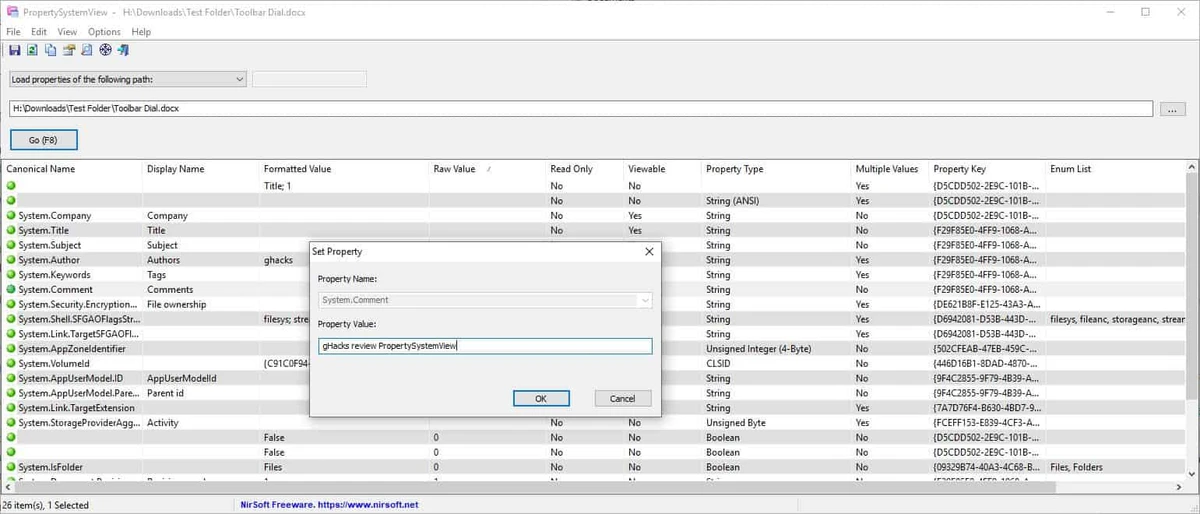

PropertySystemView is a portable Windows utility designed to help users view and modify file properties through the Windows Property System. The tool provides access to detailed metadata stored inside different file types, including media files and office documents, allowing users to inspect and edit available property values directly. The software focuses on advanced file information management rather than traditional file browsing. Users can load files by dragging them from Windows Explorer into the application window or by selecting files manually through the built-in browse option. Once loaded, PropertySystemView displays the available properties associated with the selected item.
One of the tool’s notable uses is modifying metadata fields in media files, such as the “Media Created” timestamp stored in MP4 files. It can also manage other available information, including titles, comments, authors, tags, acquisition dates, saved dates, content creation dates, imported dates, and image-related information such as EXIF date fields in JPG files.
Beyond file metadata, PropertySystemView can also display properties related to Windows windows and system objects. Users can load window properties by selecting a target window or entering a window handle. The application also includes an option to list all properties available on the current system, making it useful for users who need deeper access to Windows property information.
As a portable tool, PropertySystemView does not require a traditional installation process, making it convenient for users who need a small utility for occasional metadata management or system property inspection.
Features of PropertySystemView
- View detailed Windows property information for files and system objects
- Modify metadata stored in media files and office documents
- Change media timestamps, including the System.Media.DateEncoded property in MP4 files
- Edit file information such as titles, comments, authors, tags, and dates
- Access image metadata, including Date Taken information from JPG EXIF data
- Load files easily by dragging them from Windows Explorer
- Browse and select files directly from the application interface
- View available properties on the current Windows system
- Inspect and modify selected Windows window properties
Interface and Usability
PropertySystemView uses a straightforward utility-style interface focused on functionality rather than visual design. The layout makes it easy to access file properties and begin working without complicated configuration steps. The drag-and-drop workflow is one of the most convenient parts of the application. Users can simply drag a file from Windows Explorer into the main window to view its available properties. The browse option provides an alternative method for selecting files when drag-and-drop is not preferred.
The software is designed mainly for users who need direct access to Windows property data. While the interface is simple, the available information can be extensive, meaning users unfamiliar with Windows metadata may need some technical knowledge to understand certain properties.
Who Should Use PropertySystemView?
- Advanced Windows users managing file information
- Developers or technical users inspecting Windows properties
- Media users who need to adjust metadata stored in files
- Users working with document or image metadata
- Anyone looking for a portable tool to examine Windows property data
Conclusion
PropertySystemView is a practical system utility for users who need direct access to Windows file properties and metadata. Its portable design, simple loading methods, and ability to modify various property fields make it a useful tool for technical workflows involving media files, documents, and Windows system information.


