WavePad logo

WavePad 24.38

  • User Rating:
    ★★★★★
    ★★★★★
    0.0 0Votes
  • Requirements:
    Windows
  • Version: 24.38
  • Latest updated: 5 days ago
  • License: Freemium  
  • Publisher: NCH Software
  • Size: 3 MB
× app stores

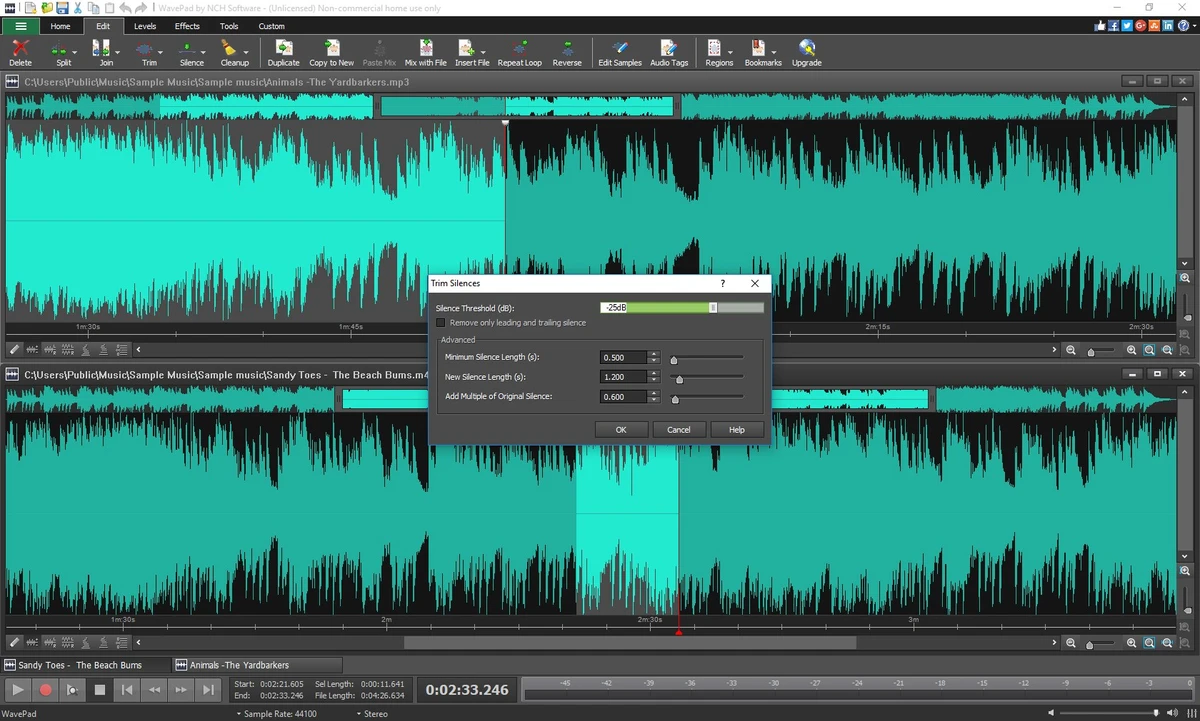
WavePad is a full-featured audio editing software developed by NCH Software. It is designed for users who need to edit, enhance, or restore audio recordings, whether for music production, podcasting, voice recording, or general sound editing tasks. The software combines professional-grade audio tools with a user-friendly interface, making it suitable for both beginners and experienced audio editors.

Features of WavePad

  • Cut, copy, paste, delete, and insert audio segments
  • Trim silence and auto-clean recordings
  • Apply audio effects such as reverb, echo, amplification, and normalization
  • Pitch shifting and audio transformation tools
  • Equalizer, envelope, and compression controls
  • Noise reduction, click/pop removal, and hum elimination
  • Spectral analysis (FFT) for advanced audio inspection
  • Voice changer and speech synthesis tools
  • Batch processing for multiple audio files
  • Support for VST plugins for extended effects
  • Audio format support including MP3, WAV, FLAC, OGG, AAC, AMR, and WMA
  • Extract and edit audio from video files
  • Built-in library of royalty-free sound effects and music clips
  • Cross-platform support (Windows, macOS, iOS, Android, Kindle)

User Experience

During my experience with WavePad, the software proved to be a flexible and capable audio editing tool that balances ease of use with professional functionality. Basic editing tasks such as trimming, cutting, and adjusting audio levels are straightforward and can be completed quickly even by beginners. For more advanced users, WavePad offers a wide range of sound processing tools. Effects such as noise reduction, echo, and equalization are easy to apply and provide immediate improvements to audio quality. The inclusion of spectral analysis tools gives deeper insight into sound frequencies, which is especially useful for audio restoration or precise editing work.

Batch processing is another strong advantage, allowing users to apply the same edits or effects to multiple files at once. This is particularly useful for podcasters, content creators, and anyone working with large audio libraries. The software also performs well in audio cleanup tasks, with tools designed to remove background noise, clicks, and hums from recordings. This makes it a practical choice for improving voice recordings or restoring older audio files.

Who Should Use WavePad?

  • Podcasters and voice recording creators
  • Music producers and sound designers
  • Students learning audio editing
  • Users restoring or cleaning audio recordings
  • Content creators working with audio and video projects
  • Anyone needing a flexible multi-platform audio editor

Conclusion

WavePad delivers a comprehensive set of audio editing tools that cover everything from basic trimming to advanced sound restoration and spectral analysis. Its combination of usability and depth makes it a strong choice for a wide range of users.

Pros & Cons

Pros

  • Wide range of professional audio editing tools
  • Supports many audio file formats
  • Strong audio restoration features
  • Batch processing for multiple files
  • VST plugin support for advanced customization
  • Cross-platform availability
  • Suitable for both beginners and professionals

Cons

  • Some advanced features require paid version
  • Interface design feels slightly outdated
  • Free version has limited functionality

Frequently Asked Questions

What is WavePad used for?

WavePad is used for editing, enhancing, and restoring audio files for music, podcasts, and recordings.

Does WavePad support multiple audio formats?

Yes. It supports formats such as MP3, WAV, FLAC, OGG, AAC, AMR, and WMA.

Can WavePad remove background noise?

Yes. It includes noise reduction and audio cleanup tools such as click/pop and hum removal.

Does WavePad support batch processing?

Yes. Users can apply edits and effects to multiple audio files at once.

Can I use WavePad for professional audio work?

Yes. It includes advanced tools such as spectral analysis, VST plugin support, and audio restoration features.

Is WavePad available on multiple platforms?

Yes. It is available on Windows, macOS, iOS, Android, and Kindle devices.

Is WavePad suitable for beginners?

Yes. It offers a simple interface while still providing access to advanced editing tools when needed.

Recommended apps [Freeware]:
  • Glow 26.9 Glow logo advanced Windows system analysis tool offering deep hardware insights, diagnostics, benchmarks, and system optimization utilities
  • HomeBank 5.10.2 HomeBank logo Track expenses, manage budgets, and analyze personal finances with HomeBank's powerful reporting tools
  • CrossFTP 2.00.1 CrossFTP logo a multi-protocol FTP client for Windows supporting SFTP, WebDAV, S3, Azure, and secure file transfers
  • Adobe DNG Converter 18.4 Adobe DNG Converter logo Convert camera-specific RAW files to Adobe DNG format for improved compatibility and flexible photo workflows
  • K-Lite Codec Pack Full 19.8.2 K-Lite Codec Pack Full logo Play all audio and video formats on Windows with K-Lite Codec Pack Full, a lightweight and reliable codec package
  • PhotoPad Photo Editor 15.16 PhotoPad Photo Editor logo photo retouching, effects, collages, panoramas, and non-destructive editing for Windows
Recommended apps [Shareware]:
  • HyperSnap 10.1.2 HyperSnap logo captures screenshots, scrolling windows, OCR text and video with advanced editing tools on Windows.
  • VueScan 9.8.56 VueScan logo Enhance scanner functionality with advanced tools for scanning documents, photos, videos, and slides.
  • Paradox Converter 4.86 Paradox Converter logo transforms Paradox DB files into SQL, Excel, CSV, XML, DBF, HTML, and other formats
  • EF Duplicate MP3 Finder 26.05 EF Duplicate MP3 Finder logo Find and remove duplicate MP3, FLAC, WMA, and OGG audio files using tag-based and similarity analysis
  • O&O SafeErase 21.3.26142 O&O SafeErase logo securely deletes files, drives, and internet traces using certified methods to prevent data recovery on Windows
  • MobiKin Assistant for Android 5.1.47 MobiKin Assistant for Android logo back up, restore, and manage Android data, contacts, apps, and files from a PC